- 6 -
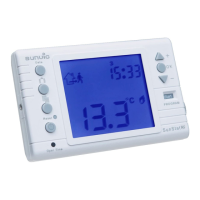
Press 'P' on the 'stat. You will see a number flashing on top of the
display. This is the 'DAY' number. At this point you select which system
you want to use. Either 24 Hr. (each day the same), or 5/2 day. If using the 24 Hr set up, then
using either of the keys showing a triangle on it keep pressing it until all of the numbers 1,2,3,4,5,6
& 7 are displayed, then follow setting up procedure as below. If you are using the 5/2 day set up,
press P for the flashing number at the top of the screen, then using either of the keys showing a
triangle on it keep pressing it until all of the numbers 1,2,3,4, & 5 are showing, then follow the
setting up procedure as below. press P for the flashing number at the top of the screen, then using
either of the keys showing a triangle on it keep pressing it until all of the numbers 6 & 7 are
showing, then follow the setting up procedure as below.
Please note if using the 5/2 day set up, then you need to select one program for the 5 days
and a different one for the remaining 2 days.
You are now going to select your programme. There are 9 programmes in the thermostat.
Programmes 1 - 6 are pre-set in the factory and cannot be altered, except for temperatures.
Please refer to your instruction manual where it shows PROGRAM NUMBER & PROGRAM
PROFILE.
The numbers along the bottom of the program profile, represent the 24 hours in the day.
The blacked out portion above the numbers indicates when the thermostat is in 'Comfort' mode
and the clear spaces indicate 'Economy’ mode.
Having set the day number/numbers, press 'P' , and a ‘P’ number will flash at the bottom of the
display. Again using the buttons with the triangles, step through to the pre-set programmes to
select one of these if they are suitable for your requirements.
If you want to put in your own programme, keep pressing the triangle button until you reach
programme 7, 8, or 9. Press 'P' again.
The display should now show, the day/days number the number '0' and your
programme number, plus a sun or moon sign and a flashing cursor in the bottom left hand corner
of the display. The 0 equals the time between midnight and one o'clock, 1 equals the time between
one and two o'clock etc.
When setting up your own programme for the first time, there will be a black square above each of
the hours along the timeline at the bottom of the screen. Using the button with the SUN/MOON
icon (top middle button), scroll along removing Black squares till you get to the point where you
want your first heating time ON. Then using the upward pointing triangle, continue to scroll along till
you get to the point where you want the heating to switch off. Using the SUN/MOON icon button,
again scroll along till you get to the point where you want the heating to come back on, and then
use the upward pointing triangle to scroll to the switch off point. Repeat this process for Switch on
Switch off times. Each Black square gives an hour of Comfort heating
Pressing the ‘SUN/MOON’ button will place a black box down if there isn’t one there, or will
remove one if there is.
Easy set guide



 To Next Page
 Loading...