Notes: 1) Since the color of the operation indicator changes according to the ON / OFF state of ‘OSSD’, the
operation indicator is marked as OSSD on the sensor.
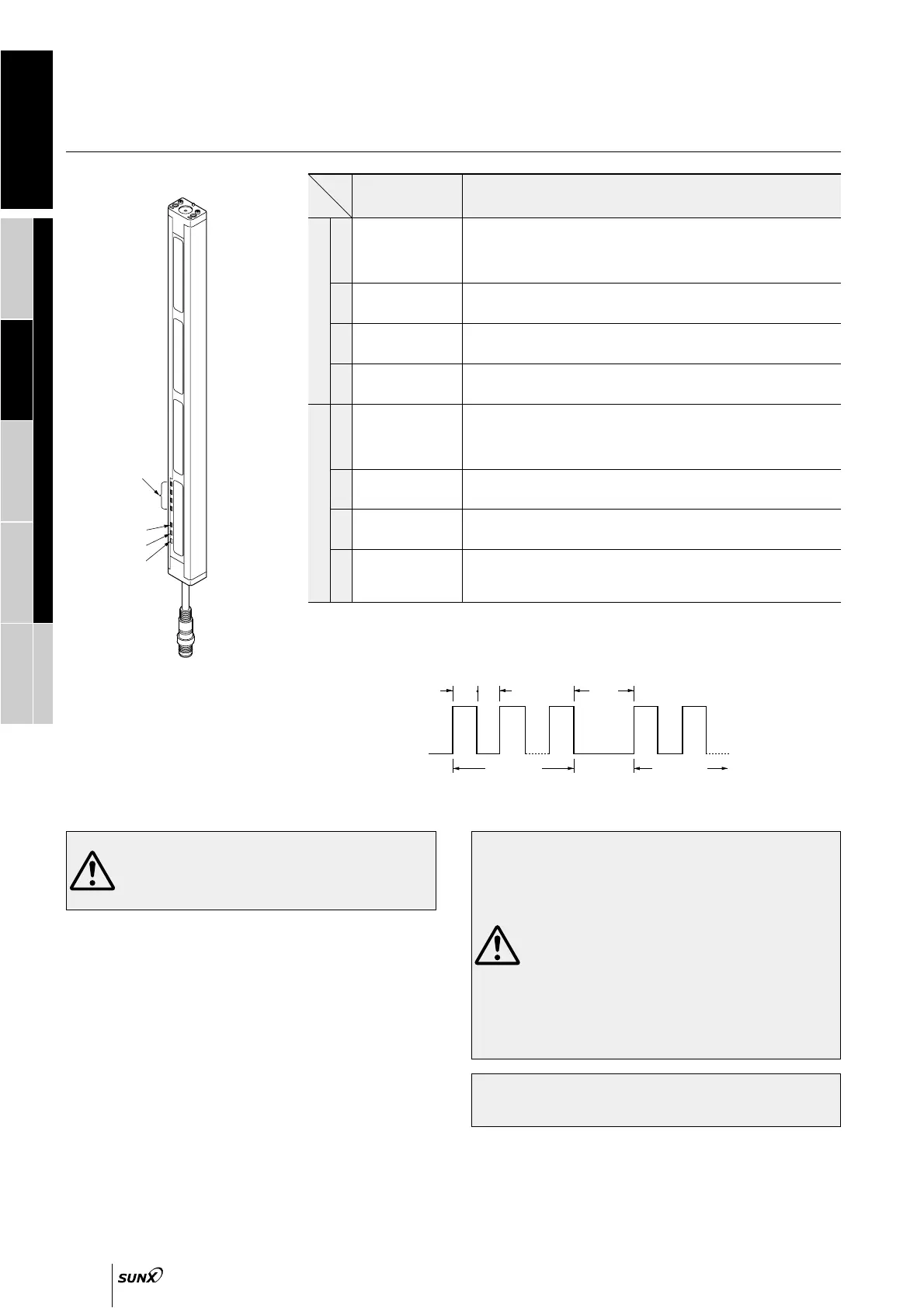
Notes: 2) The blinking cycle of the fault indicator is illustrated below. The number of blinks indicate what kind of
fault has occurred. There is an interval of approx. 1 sec. between blinking.
Wiring
Refer to the applicable regulations for the region where
this device is to be used when setting up the device. In
addition, make sure that all necessary measures are
taken to prevent possible dangerous operating errors
resulting from earth faults.
• Do not utilize this sensor in ‘PSDI Mode’, in which the
sensor is utilized as an activator for machinery.
• To use this product in the U.S.A., refer to OSHA 1910.
212 and OSHA 1910. 217 for installation, and in
Europe, refer to EN 999 as well. Observe your national
and local requirements before installing this product.
• This sensor is a Type 2 electro-sensitive protective
equipment. It is specified that this sensor be utilized
only within systems implementing safety categories 2,
1 and B (safety-related categories for control systems),
as determined by European Standard EN 954-1. This
sensor must never be utilized in any system that
requires the usage of category 4 equipment, such as
press machines; nor for systems requiring category 3
equipment.
• This catalog is a guide to select a suitable product. Be sure to
read the instruction manual attached to the product prior to its
use.
• Make sure to carry out the test run before regular operation.
• This safety system is for use only on machinery in which the
dangerous parts can be stopped immediately, either by an
emergency stop unit or by disconnecting the power supply. Do not
use this system with machinery which cannot be stopped at any
point in its operation cycle.
• Make sure that the power supply is off while wiring.
• Verify that the supply voltage variation is within the rating.
• If power is supplied from a commercial switching regulator,
ensure that the frame ground (F.G.) terminal of the power supply
is connected to an actual ground.
• In case noise generating equipment (switching regulator, inverter
motor, etc.) is used in the vicinity of this sensor, connect the frame
ground (F.G.) terminal of the equipment to an actual ground.
•
Do not run the wires together with high-voltage lines or power lines
or put them in the same raceway. This can cause malfunction due
to induction.
Others
• Do not use during the initial transient time (2 sec.) after the power
supply is switched on.
• Avoid dust, dirt and steam.
• Take care that the sensor does not come in direct contact with
water, oil, grease, or organic solvents, such as, thinner, etc.
• Take care that the sensor is not directly exposed to fluorescent
light from a rapid-starter lamp or a high frequency lighting device,
as it may affect the sensing performance.
Blinking cycle of fault indicator
Top:
Blinks in red when the topmost beam channel receives light, lights up in red when sensor top receives light.
Upper middle: Lights up in red when sensor upper middle receives light.
Lower middle: Lights up in red when sensor lower middle receives light.
Bottom:
Blinks in red when the bottommost beam channel receives light, lights up in red when sensor bottom receives light.
Lights up in green when all beam channels (top, upper middle, lower middle and bottom) receive light.
Lights up in red when control output (OSSD) is OFF, lights up in green
when control output (OSSD) is ON.
Lights up when emission halts.
Lights up or blinks when a fault occurs in the sensor. (Note 2)
Lights up: Malfunction of internal circuit
Blinks: Effects from noise, power supply or malfunction of internal circuit
Top:
Blinks in red when the topmost beam channel receives light, lights up in red when sensor top receives light.
Upper middle: Lights up in red when sensor upper middle receives light.
Lower middle: Lights up in red when sensor lower middle receives light.
Bottom:
Blinks in red when the bottommost beam channel receives light, lights up in red when sensor bottom receives light.
Lights up in green when all beam channels (top, upper middle, lower middle and bottom) receive light.
Lights up in red when control output (OSSD) is OFF, lights up in green
when control output (OSSD) is ON.
Lights up when light received is unstable.
Lights up or blinks when a fault occurs in the sensor. (Note 2)
Lights up: Fault occurs in OSSD circuit. (please contact our office.)
1 blink: Received extraneous light error
2 blinks: Effects from noise, power supply or malfunction of internal circuitry
Beam-axis
alignment indicators
[RECEPTION]
(Red / Green LED)
Operation indicator
[OSSD] (Note 1)
(Red / Green LED)
Emission halt indicator
[HALT]
(Orange LED)
Fault indicator
[FAULT]
(Yellow LED)
Beam-axis
alignment indicators
[RECEPTION]
(Red / Green LED)
OSSD indicator
[OSSD]
(Red / Green LED)
Unstable incident beam
indicator
[STB.] (Orange LED)
Fault indicator
[FAULT]
(Yellow LED)
1
2
3
4
1
2
3
4
Description Function
EmitterReceiver
Refer to p.1135 l for general precaution.


 To Next Page
 Loading...