EasyManua.ls Logo

Superlux E205U - User Manual

Superlux E205U
19 pages
Print Icon
To Next Page IconTo Next Page
Loading...
1
English
Contact
Marketing and sales
Goang-Fann Co., Ltd.
+886-2-26931323
sales@superlux.com.tw
support@superlux.com.tw
Manufacturing & logistics
Superlux Enterprise
Development ( Shanghai ) Co., Ltd.
E205U
USB CONDENSER
MICROPHONE

Other manuals for Superlux E205U

Question and Answer IconNeed help?

Do you have a question about the Superlux E205U and is the answer not in the manual?

Summary

Contact and Company Information

Marketing and Sales Contacts

Contact details for Goang-Fann Co., Ltd. for marketing and sales inquiries.

Manufacturing and Logistics

Details for Superlux Enterprise Development (Shanghai) Co., Ltd.

Product Description and Features

Product Description

Overview of the E205U's capabilities and compatibility with recording software.

Key Features

Highlights of the microphone's smooth frequency response, plug-and-play, and USB power.

Technical Specifications

Frequency Response and Polar Pattern

Graphical representation of the microphone's frequency response and polar pattern.

Detailed Specifications

Comprehensive list of technical parameters like sensitivity, SPL, and connectors.

System Requirements and Accessories

System Requirements

Specifies required USB, Operating System, and RAM for the E205U.

Included Accessories

Lists the items provided with the E205U microphone package, such as cables and mounts.

Microphone Functionality

Component Descriptions

Explains the USB power indicator, volume control, headphone output jack, and USB connector.

Installation and Connection Guide

Mounting Options

Describes how to mount the E205U on a table or microphone stand for recording.

USB Connection

Details on connecting the microphone to a computer via USB for audio input.

Quick Start Guide

Initial Setup Steps

A guide to quickly set up and start using the E205U microphone with your DAW.

Driver Setup: Windows

Windows OS Driver Installation

Step-by-step guide for installing and setting up the USB audio driver on Windows.

Driver Setup: Mac OS

Mac OS System Preferences

Guide to configuring audio input and output in Mac OS System Preferences.

Mac OS Direct Monitoring

Instructions for enabling direct monitoring using Audio/MIDI Setup on Mac OS.

Troubleshooting

Common Issues and Solutions

Addresses problems like no sound, weak/distorted audio, and headphone volume.

Warranty and Safety Information

Limited Warranty Policy

Details Superlux's one-year warranty policy and exclusions.

Safety Precautions

Warns about hazardous situations, misuse, and environmental factors.

Overview

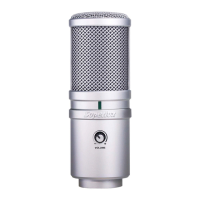
The Superlux E205U is a high-quality USB condenser microphone designed for digital recording. It features an advanced A/D and USB interface, enabling instant digital recording without the need for external digital interfaces or software drivers. The microphone is compatible with Mac, Windows, and most Digital Audio Workstation (DAW) software programs, including GarageBand.

Function Description:

The E205U provides premium quality audio recording with ease and mobility. It includes a headphone output and volume control for real-time monitoring. The USB Power Indicator lights up when the USB connection is established and the microphone is receiving power. The Headphone Volume Control is a pop-out level control that adjusts the overall volume of the headphone output. The Headphone Output Jack is a 1/8-inch (3.5mm) stereo jack for connecting headphones or studio monitors. The USB connector is a USB B-type, allowing connection to a laptop with a USB A-type jack.

Important Technical Specifications:

  • Type: Back Electret Condenser
  • Polar Pattern: Supercardioid
  • Frequency Response: 30-18,000 Hz
  • Sensitivity (at 1k Hz Open Circuit Voltage): -38 dBV/Pa (12.6 mV)
  • Max. SPL: >135 dB SPL
  • Power Requirements: USB 5V, 30 mA
  • Resolution: Up to 16 bit/48 kHz sampling rate
  • Finish: Champagne silver
  • Connectors: USB B-TYPE, 1/8" (3.5mm) phone connector
  • Dimensions: Ø54 x 150 mm (Ø2.13" x 5.9")
  • Net Weight: 422 g (14.9 oz)

System Requirements:

  • USB: USB 1.1 or 2.0, powered
  • RAM: 64MB RAM (minimum)
  • Operating System:
    • Microsoft Windows 7
    • Microsoft Windows 10
    • Microsoft Windows 2000 Professional Edition
    • Microsoft Windows XP Home / Professional Edition (service pack 1.0 or later, or use the USB audio driver update from Microsoft)
    • Microsoft Windows Vista™ Business Edition
    • Apple Computer Mac OS X 10.0 or later Edition
    • Apple Computer Mac OS X 10.1 or later Edition

Usage Features:

  • Smooth, flat frequency response: Ensures accurate audio capture.
  • Plug and play: No drivers required for immediate recording.
  • USB powered: Eliminates the need for an external power supply.
  • Headphone output and volume control: Allows for direct monitoring of audio.
  • Pivoting stand mount: Provides flexibility in positioning the microphone.
  • 9.8 ft. (3-meter) USB cable: Offers ample length for various setups.
  • Versatile installation: Can be placed on a table using an optional table stand (HM6) or mounted on a microphone stand.
  • Quick Start Guide: Provides clear instructions for setting up and recording, including:
    • Positioning the microphone with the grille net side towards the sound source and the Superlux logo/LED indicator facing the sound source.
    • Connecting the USB cable to the microphone and a powered USB port on the computer.
    • Setting up a mono record track in the DAW.
    • Adjusting the microphone's input level in Windows Sound playback or Mac OS System Preferences.
    • Adjusting the headphone output volume for comfortable listening.

Furnished Accessories:

  • YA2 threaded adapter
  • HM85 pivoting stand mount
  • Pouch
  • 3-meter cable (USB A-type connector for laptop; for other connector types like C-type, an adapter is needed)
  • DS01 Table stand

Maintenance Features:

  • Troubleshooting Guide: Addresses common issues:
    • No sound in headphones: Check headphone volume control and microphone gain at the computer control panel.
    • Microphone sound too weak or distorted:
      • Windows: In Audio tab, click Volume under Record and turn up Microphone Gain Control.
      • Mac: From System Preferences, choose Sound, select Input tab and turn up Input gain.
    • Headphones not loud enough:
      • Windows: In Audio tab, click Volume under Sound playback and turn up Volume Control.
      • Mac: From System Preferences, choose Sound, select Output tab and turn up Output volume.

Limited Warranty:

Superlux Enterprise provides a one-year warranty from the purchase date for material and manufacturing quality. The warranty period may vary by country/area. Contact a local distributor for more information. The warranty covers repair or replacement of parts for material, manufacturing, or functional defects. The warranty is valid only for products sold by authorized Superlux distributors or agents.

Exclusions from Warranty:

  • Damage caused by accident, abuse, improper instructions, self-modification, repair, or transportation.
  • Non-compliance with manual instructions.
  • Repairs by unauthorized companies or distributors.
  • Unidentified, modified, or removed serial number stickers.

All repairs must be performed by authorized Superlux repair centers, distributors, or agents. To claim warranty service, provide the selling receipt from an authorized distributor or agent. For warranty inquiries, contact an authorized distributor, agent, or email support@superlux.com.tw.

Safety Warnings:

  • Do not expose the unit to rain or liquids to prevent fire or electric shock.
  • Do not attempt to modify the product to avoid personal injury or product failure.
  • Do not subject the cable to extreme force or pull on it to prevent product failure.
  • Keep the product and associated equipment dry, and avoid exposure to extreme high temperatures and humidity.

Superlux E205U Specifications

General IconGeneral
BrandSuperlux
ModelE205U
CategoryMicrophone
LanguageEnglish

Related product manuals