ENGLISH
14
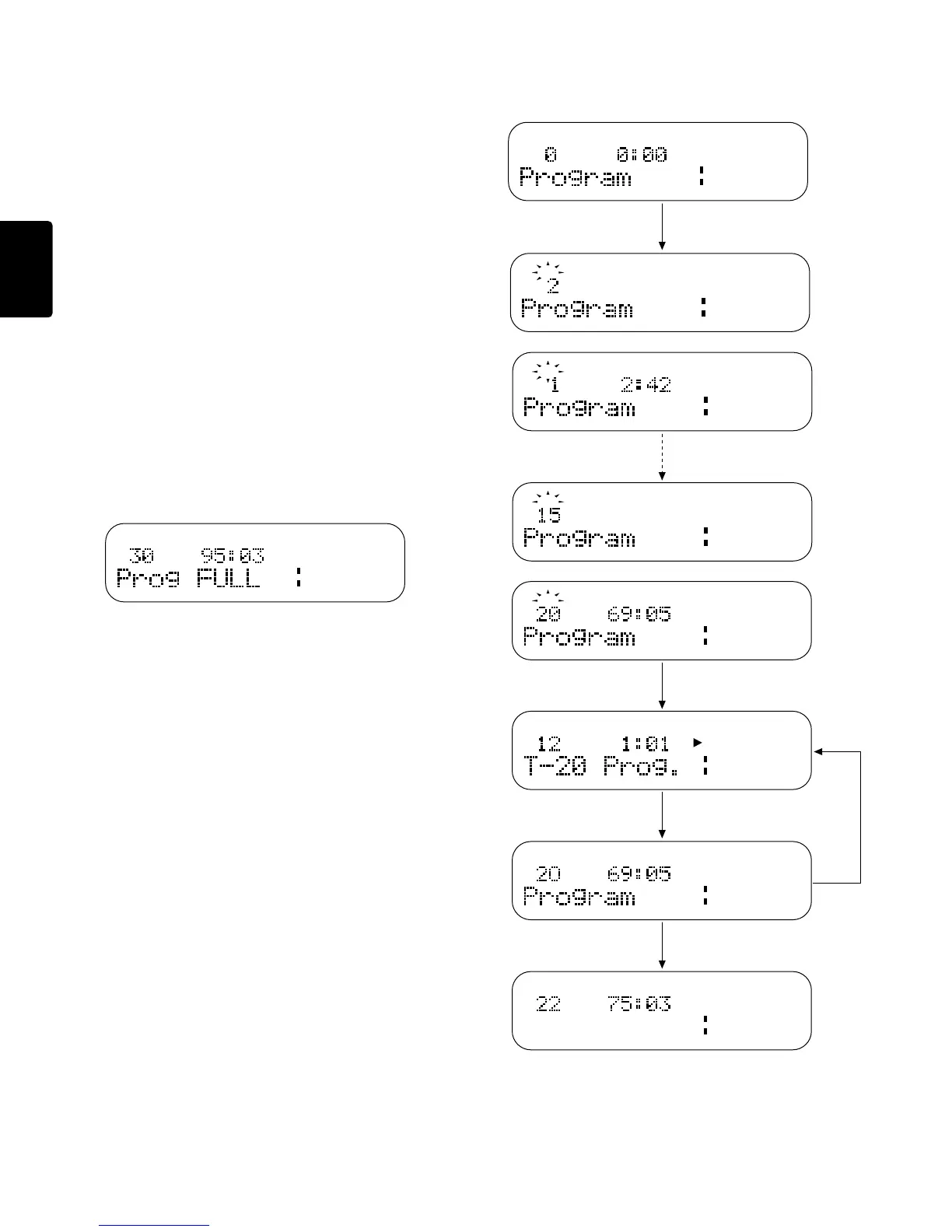
Programming Playback Tracks
This procedure allows you to program selected tracks for playback in the
order you desire.
1. By pressing the PROGRAM button while in the stop mode, the CD
player will enter the programming mode.
"Program" appears on the display, and the track indicator begins to
flash.
2. By pressing the 1 / 4 and ¢ / ¡ buttons, select the tracks to
be programmed. When the desired track number has been selected,
leave the CD player untouched for approximately 1.5 seconds and
the selected track will be stored in the program. Continue this
procedure until all desired tracks (30 tracks maximum) have been
programmed.
3. By pressing the PLAY/PAUSE button, the CD player will exit the
program entry mode and enter the program play mode. The CD player
will then begin to play in the order selected during the programming.
4. When the STOP button is pressed, the CD player will stop playing but
the program will remain in memory.
5. When the STOP button is pressed while the CD player is in the stop
mode, the memorized program will be cleared.
Notes
¡ The display shows “Prog FULL” when you attempt to program the 31st
track.
¡ The PROGRAM and STOP buttons can also be used to exit the
program entry mode.
¡ Tracks can be added to an already stored program by re-entering the
program entry mode and following all the above steps.
L
R
TRACK
TOTAL
40 20 12 6 2 0
OVER
∞-dB
Press the PROGRAM button once
Select TRACK
Select TRACK
PROGRAMED TRACK
Press 6
Program is cleared
Press 7 once
Press 7 again
Press 6
Display after programming 20 tracks
L
R
TRACK
TOTAL
40 20 12 6 2 0
OVER
∞-dB
L
R
TOTAL
40 20 12 6 2 0
OVER
∞-dB
L
R
TOTAL
40 20 12 6 2 0
OVER
∞-dB
L
R
TOTAL
40 20 12 6 2 0
OVER
∞-dB
L
R
TOTAL
40 20 12 6 2 0
OVER
∞-dB
L
R
TRACK
40 20 12 6 2 0
OVER
∞-dB
L
R
TRACK
TOTAL
40 20 12 6 2 0
OVER
∞-dB
TRACK
TRACK
TRACK
TRACK
Total Program
Program playback
L
R
TRACK
TOTAL
40 20 12 6 2 0
OVER
∞-dB


 To Next Page