ENGLISH
11
CONNECTIONS
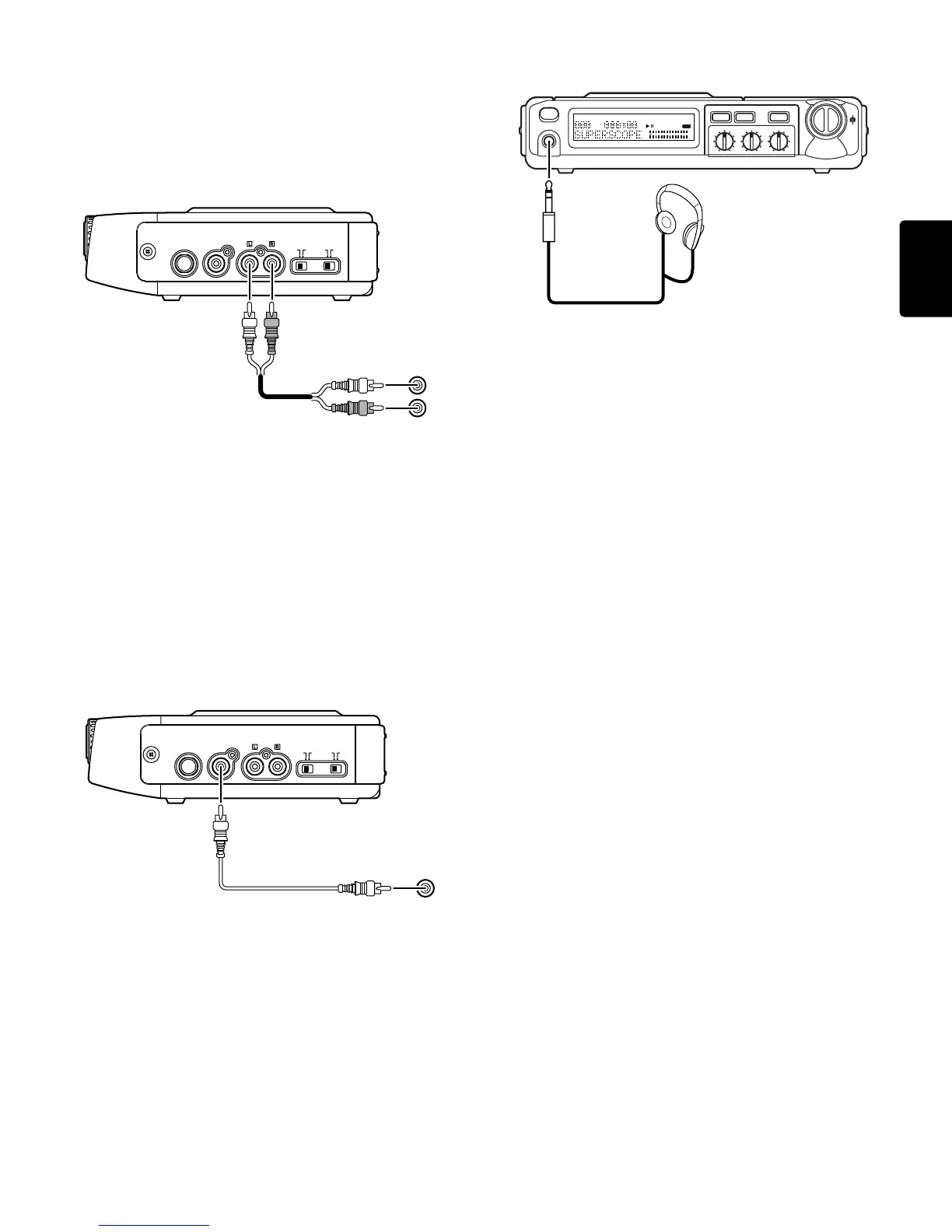
Connection to an Analog Component
The PSD220/230 provides a LINE OUT so that the sound of the CD, along
with any enhancements made to the sound, can be sent to another
analog amplification device (amplifier, powered speakers, stereo sys-
tem, etc.), a recording device (tape deck, CD recorder, etc.), or a mixer.
1. Minimize the volume of the analog component you plan to connect
with the PSD220/230.
2. Connect, via a stereo RCA patch cable, the LINE OUT of the PSD220/
230 to the CD, AUX, or LINE IN of the analog component.
Notes
• The VOLUME control knob on the PSD220/230 does not effect the
level of the LINE OUT signal.
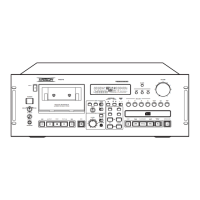
Connection to a Digital Component
The PSD220/230 provides a DIGITAL OUT so that the digital data from
the CD can be sent to another digital component (digital recorder, mixer,
speakers, etc.).
1. Connect, via a digital RCA (or Coaxial) patch cable, the DIGITAL OUT
of the PSD220/230 to the DIGITAL IN of the digital component.
Notes
• The DIGITAL OUT signal of the PSD220/230 is a direct output of the
data on the CD and is not effected by sound enhancement features
such as TEMPO control, KEY control, VOICE REDUCTION, and the
EQ controls.
• On the PSD230, an input microphone or line level signal is not mixed
with the DIGITAL OUT signal.
• The VOLUME control knob on the PSD220/230 does not effect the
level of the DIGITAL OUT signal.
• The format of the DIGITAL OUT is SPDIF (IEC-958-2).
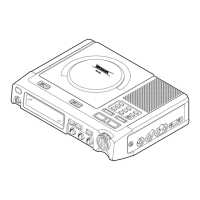
Connection of Headphones
1. Plug commercially available headphones into the HEADPHONE
jack.
Notes
¡ The PSD220/230 HEADPHONE jack accepts a 1/4” plug. Many
headphone’s in the market have a 1/8” plug. An adapter plug that will
convert 1/8” to 1/4” is available at most audio/video specialty stores.
Caution for headphone listening:
¡ Traffic safety
Never wear headphones during riding a bicycle, motorbike or auto-
mobile. Even during walking, increasing the headphone volume too
high is dangerous because this isolates you from the ambient sound.
Be specially careful on railroad or pedestrian crossings.
¡ Protection of the ears
Listening to the headphones for long hours at a high volume may
affect your sense of audition. To protect your ears, do not maintain
high headphone volume.
Connection of a Microphone or Line Level
Source (PSD230)
The PSD230 provides an XLR / 1/4” MIC/LINE IN jack that can be used
to input a microphone (dynamic type) or a line (music instrument) level
signal for purposes of mixing with the CD.
1. Select the type of input you are planning to use via the input level
switch located to the left of the MIC/LINE IN jack. The MIC position is
for a microphone level signal and the LINE position is for a line level
signal.
¡Most electric guitars output a microphone level signal.
2. Connect the output of the microphone or line level source to the MIC/
LINE IN jack of the PSD220/230.
3. Use the MIX/SPLIT control to decide how the input microphone or line
level signal is mixed with the CD. The MIX position will mix (combine)
the input signal with both the left and right channels of the CD playing
back. The SPLIT position will separate the input signal and the CD
playing back by sending the input signal to the right channel and both
channels of the CD to the left channel.
4. Use the LEVEL control to determine how much of the input signal you
want to mix with the CD. The VOLUME control knob determines the
overall output level through the headphones and built-in speaker,
while the LEVEL control determines the volume level of the input
signal compared to the CD sound.
Controlling the Volume
The VOLUME control knob adjusts the sound level of the headphone
jack and the built-in speaker, and does not effect the level of the LINE
OUT and DIGITAL OUT signals.
ONON
LINE
OUT
DIGITAL
OUT
OFF
REDUCTION
VOICE
OFF
SPEAKER
IN
FOOT PEDAL
CD , AUX
or LINE IN
L
R
ONON
LINE
OUT
DIGITAL
OUT
OFF
REDUCTION
VOICE
OFF
SPEAKER
IN
FOOT PEDAL
DIGITAL
IN
HEADPHONE
TREBLE
TIME
SCROLL
VOL
L
R
IR
MID
LIGHT
BASS
TOTAL
REMAIN
026
122040
OVER
R
L
-dB
TRACK
REPEAT 1 A– B


 To Next Page