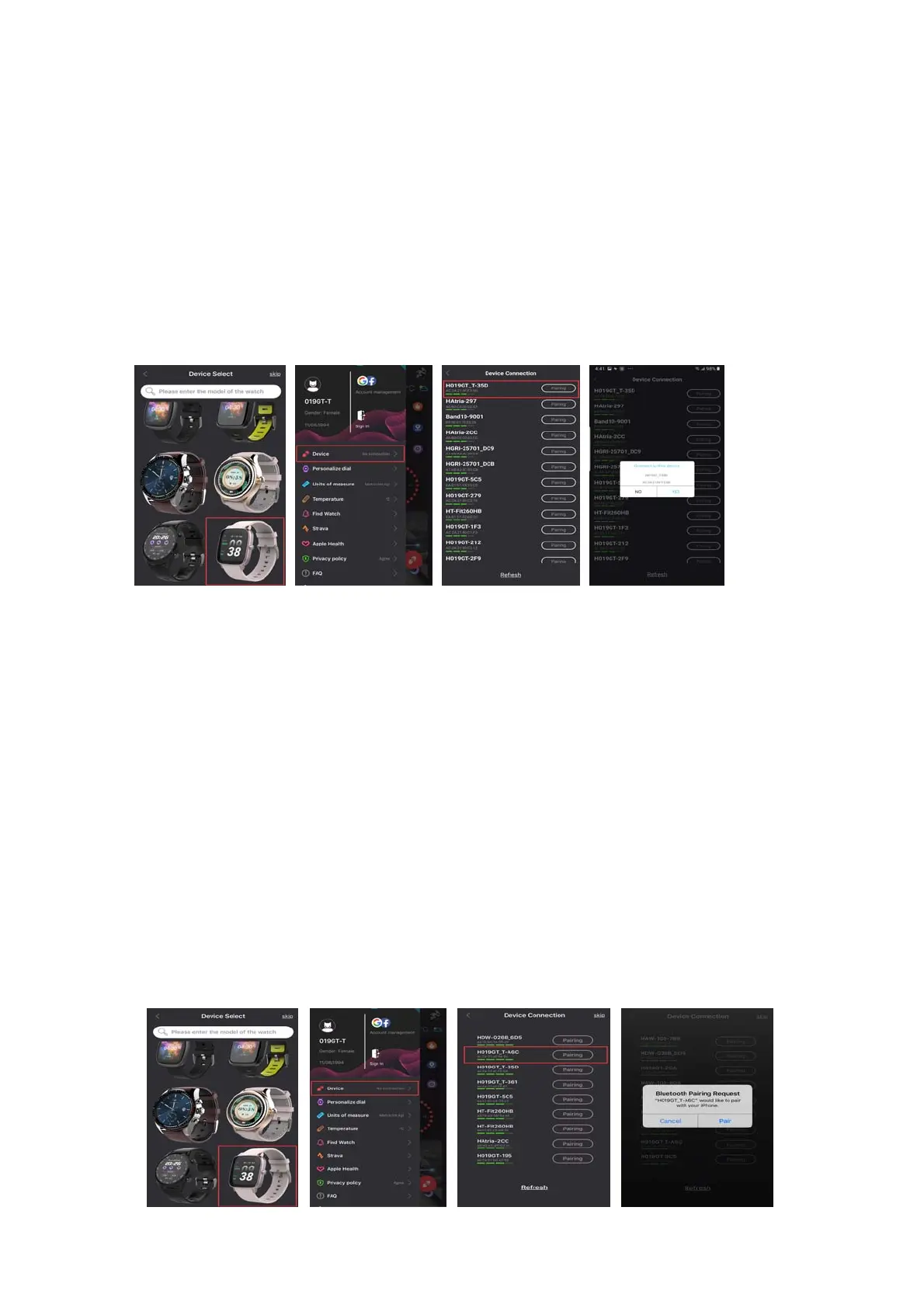
OpenHitFitPro‐‐Click“Device”inbottom‐‐“DeviceConnection”
‐‐SearchingDevice.
ClickOKandClickPairtobindwatchasbelow.
Open“HitFitPro”‐leftslidemenubar‐Device‐selectthe
correspondingdeviceicon‐searchforthecorrespondingBluetooth
addresspairing
4.3.1.2ForIOS10.0:
Connectstep1:Open“HitFitPro” app, “Adddevice ” on
“Me” screentosearchBluetoothdevicesnearby,findwatchname
DW‐019GT_Tandpaireditinapp.OnceDW ‐019GT_Tconnecte dwill
showinthephone'sBluetoothmenuscreenasbelowpictur es.
Open“HitFitPro”‐leftslidemenubar‐Device‐select
the
‐correspondingdeviceicon‐searchforthecorrespondingBluetooth
addresspairing.


 To Next Page