4. CONNECTIONS
Before connecting, make sure to turn off power of all apparatus.
After finishing connection, turn on the power again.
Wires must be connected properly, depended on the silkscreen on the rear panel. Especially the
play shall be fully inserted.
Warning:
Do not connect any amplifier with coaxial connector that does not contain Dolby digital AC 3 or DTS
decoder. Any attempt to do so and play of DVD disc will result in damaging your speakers and
causing possible hearing injury. Other than DVD disc, VCD and CD can be operated normally
without conforming to the above restriction.
Setting of TV system
If you find the image like non-fully zoomed picture, brim picture covered or black & white picture etc,
please select PAL or NTSC by systems setting or press N/P button to switch the TV system on the
remote control. This DVD disc is capable of supporting different scales picture, as a result, non-full
zoomed picture could appear or picture be partially covered on user’s TV set.
5. FUNCTION OPTIONS
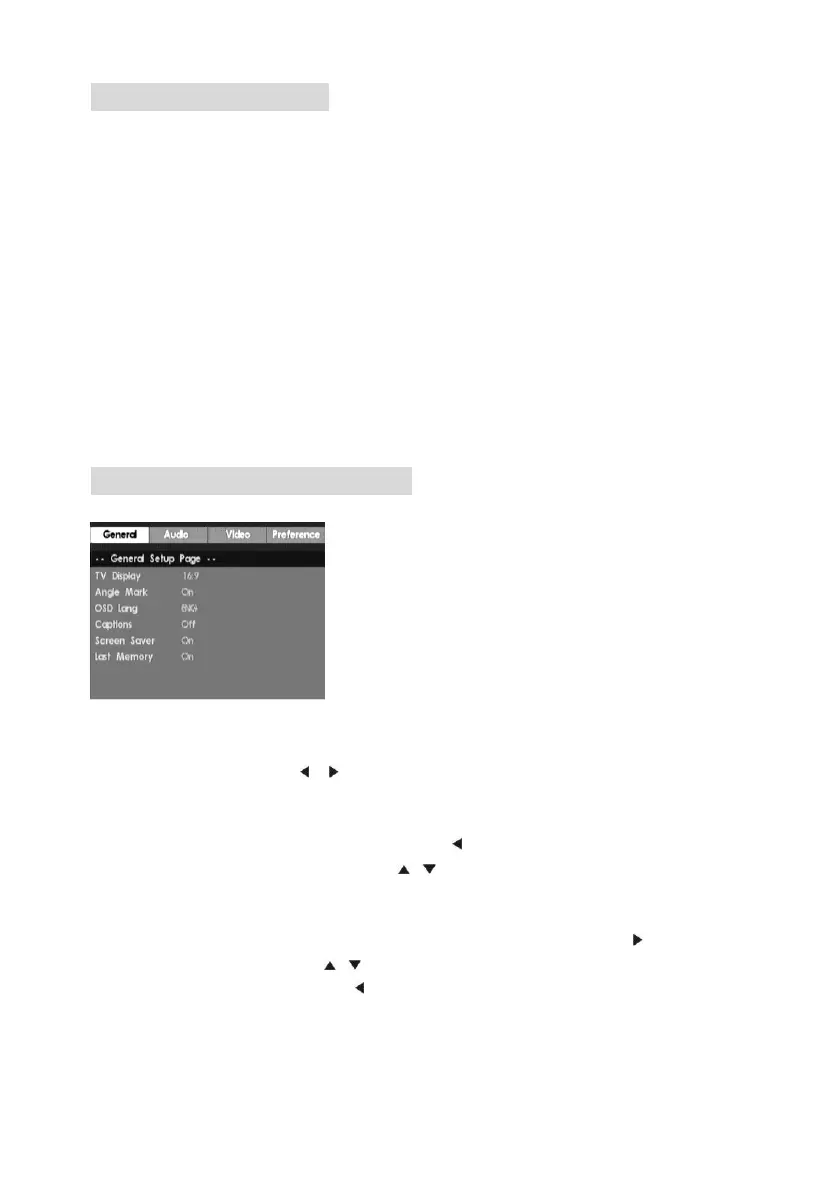
You can use the player's setup menu to configure its functions and preferences.
Press the SETUP button to enter the setup menu.
① Main menu:
Use the left and right arrow ( / ) buttons to move the cursor to highlight the header of
the main menu's submenu.
② Submenu:
Press PLAY to enter the submenu. Pressing the button exits the submenu and
returns you to the main menu. Press the / buttons to browse the various submenu
options.
③ Option menu:
Select the option that you want to configure and then press PLAY or to enter the
option's setup menu. Use the / buttons to select the required setting and then
press PLAY to enable it. Pressing returns you to the submenu..


 To Next Page