6
Introduction
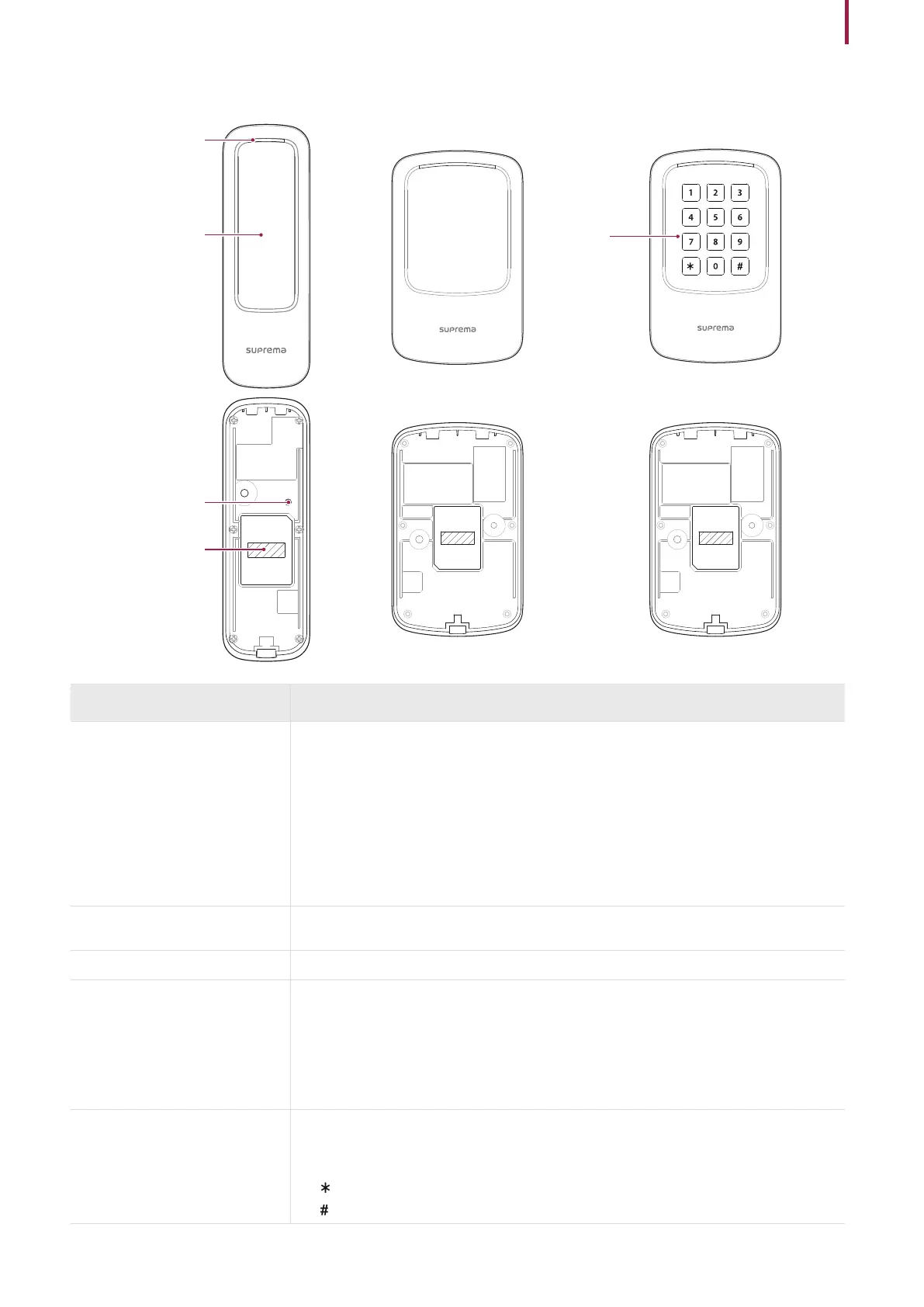
Name and function of each part
LED Indicator
RF card and
mobile access card
authentication unit
Reset Button
Cable
Name Description
LED Indicator
Indicates the operational status of the device with the color of the LED.
•
Green solid: Authentication success
•
Red solid: Authentication failure
•
Blue/Sky blue blinking: Normal operation
•
Blue/Green blinking: When initializing network settings
•
Green blinking: Waiting for an input
•
Green/White blinking: Connecting with the Airfob Pass (BLE) application of Suprema
•
White blinking: Connecting with the Device Manager application of Suprema
RF card and mobile access card
authentication unit
Reads RF cards for entering and exiting.
Reset button
Initialize the device.
Cable
•
Power cable
•
RS-485 cable
•
Wiegand output cable
•
LED input cable
•
Beep Input cable
•
Tamper cable
Keypad
Used to authenticate by entering the card ID directly. If you want to enter the ID directly,
change the authentication method settings in BioStar 2.
•
0 ~ 9: Enters number.
•
: Separates the FC code from the ID when entering the Wiegand card ID.
•
: Used to finish entering.
Keypad



 To Next Page