8
Installation
Installation
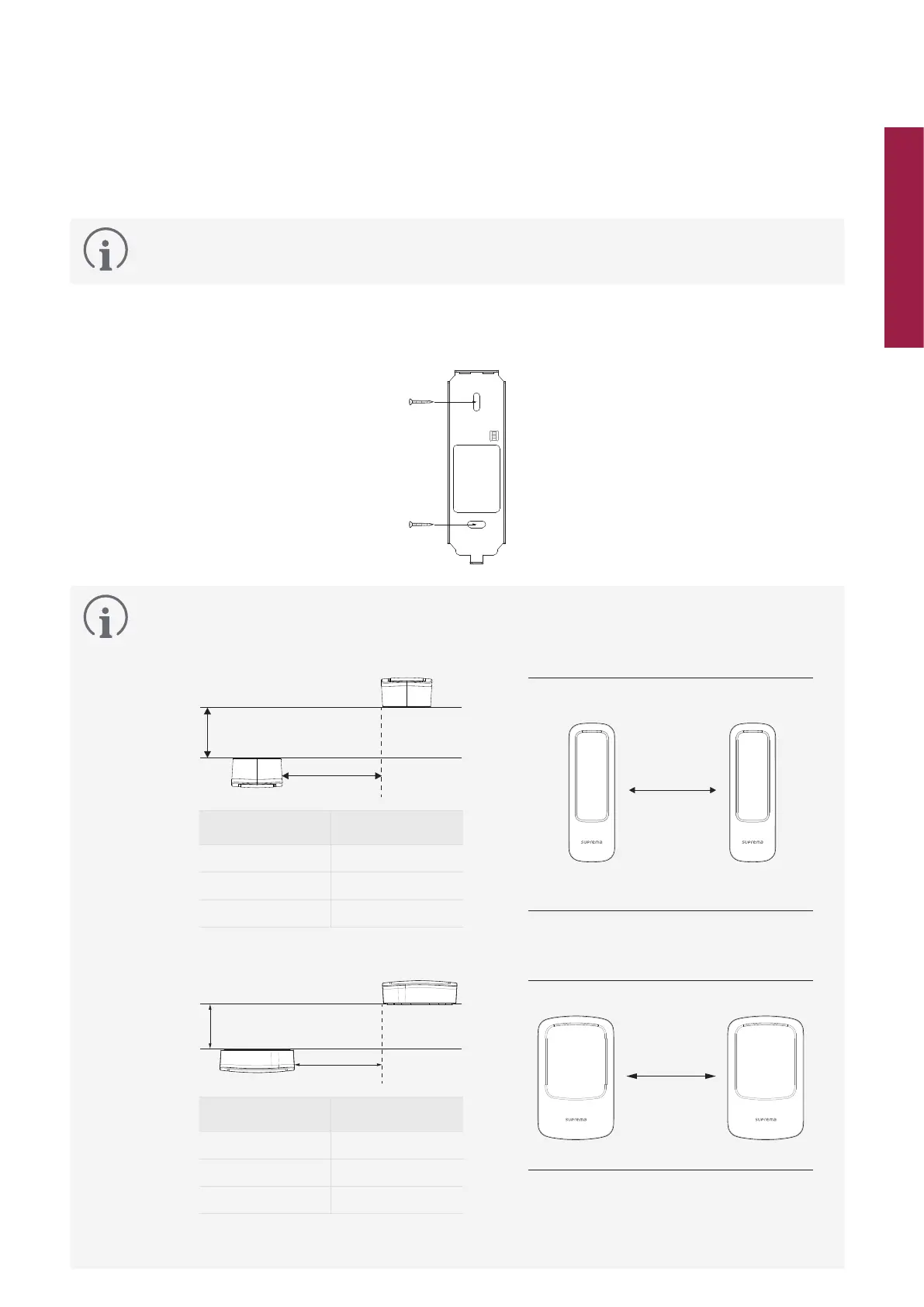
Fixing the bracket and the product
This document describes the installation method using XP2-MDPB model. Install XP2-GDPB and XP2-GKDPB
models in the same way.
1
Determine the correct position to install the bracket using the provided drilling template. Fix the bracket firmly using
fixing screws through the bracket to the position where XPass 2 will be installed.
•
If installing XPass 2 on a concrete wall, drill holes, insert PVC anchors, and fix them with fixing screws.
•
To avoid RF interference, a minimum separation distance must be maintained.
XP2-MDPB
Wall thickness
Distance
Wall
Wall thickness Distance
100 mm 360 mm
120 mm 360 mm
150 mm 300 mm
Wall
400 mm
XP2-GDPB, XP2-GKDPB
Wall thickness
Distance
Wall
Wall thickness Distance
100 mm 400 mm
120 mm 380 mm
150 mm 380 mm
Wall
430 mm
•
When using Suprema Mobile Access, install a minimum distance of 1 m between devices to avoid BLE interference.



 To Next Page