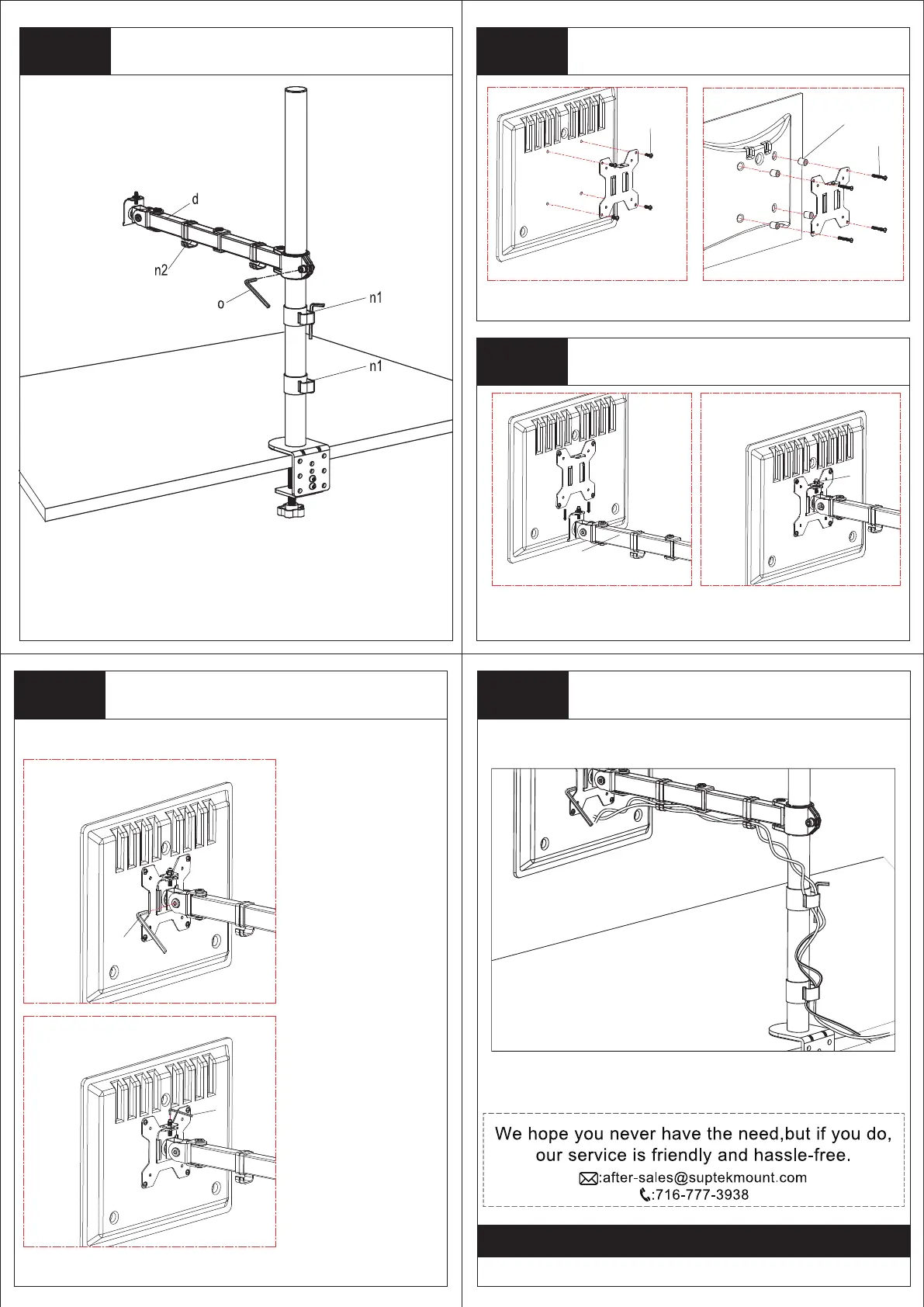
Install arm to the pole
Place the swivel arm (d) over the pole,
and tighten with allen key (o).
o
o
Make the necessary adjustments
Adjust and tighten the
bolt with the supplied
allen key (o) to fix the
tilt angle.
By adjusting the
tightness of the screws,
the height of the monitor
can be adjusted.
Manage the wires and store the allen
keys on wire clip
Step 2
q
s
r
Attach the VESA plate to the monitor
For Monitor with Flat Back
For monitor with curved or
recessed back
Step 3
h
d
Slide the monitor to the head of swivel arm
Step 4
Install the security nut (h). Make
sure the security nut is
installedbefore you rotate the
monitor.
Slide the monitor onto the head of
swivel arm (d) as the above
diagram.
Step 5 Step 6
Thank you for choosing our products!


 To Previous Page