Q: Is it possible to “retrofit” older generation hearing aids with some type of “neck loop,”
allowing those patients to use the SurfLink Media TV streamer?
A: There are no plans to offer a “neck loop” system that would convert a 900 MHz wireless signal from
the SurfLink Media and then connect to the telecoil of an older generation hearing aid.
Q: Can Starkey Hearing Technologies wireless hearing aids stream audio directly
from 900MHz RF wired public theater systems without the use of the public
theater’s headphones?
A: Our Wireless hearing aids use a proprietary digital radio and communications protocol to prevent
random 900 MHz signals from impacting a patient’s hearing aids. As a result, Starkey Hearing
Technologies hearing aids
will not, accidentally or intentionally, process other 900 MHz signals.
Q: What is the upper frequency response/range for the SurfLink Media?
A: Up to 4000Hz. The SurfLink Media was designed for maximizing speech audibility, not perfect
replication of music.
Q: Which SurfLink Remotes and SurfLink Medias are compatible?
A: Valid US system: SurfLink Media (Serial number starts with “M”) and SurfLink Remote (Serial number
starts with “N”).
Q: Why is there a slight delay when using the SurfLink Remote with a SurfLink Media?
A: • A SurfLink Advanced Remote button push event is not an instantaneous event. It gets routed
through the SurfLink Media, which may add a slight delay (up to ve seconds), on its way to the
Hearing Aids.
• The SurfLink Media sends out non-audio (informational) data to Hearing Aids within range at least
every ve seconds. Five seconds balances the hearing aid “looking for information” and
“processing sounds.”
Q: When would I use an External Microphone?
A: • Many older televisions and many new at-panel televisions have no Audio Output jacks.
The External Microphone (part# 52640-000) provides a means to receive audio and stream it
to the patient’s hearing aids.
• For patients participating in multi-speaker conversations, placing two External microphones 6-9
feet [2-3 meters] apart can increase speech intelligibility. For this type of set up, two External
Microphones are inserted into a specialty Splitter Cable (part# 52624-000), which consolidates the
audio gathered by both microphones prior to transmission by the SurfLink Media.
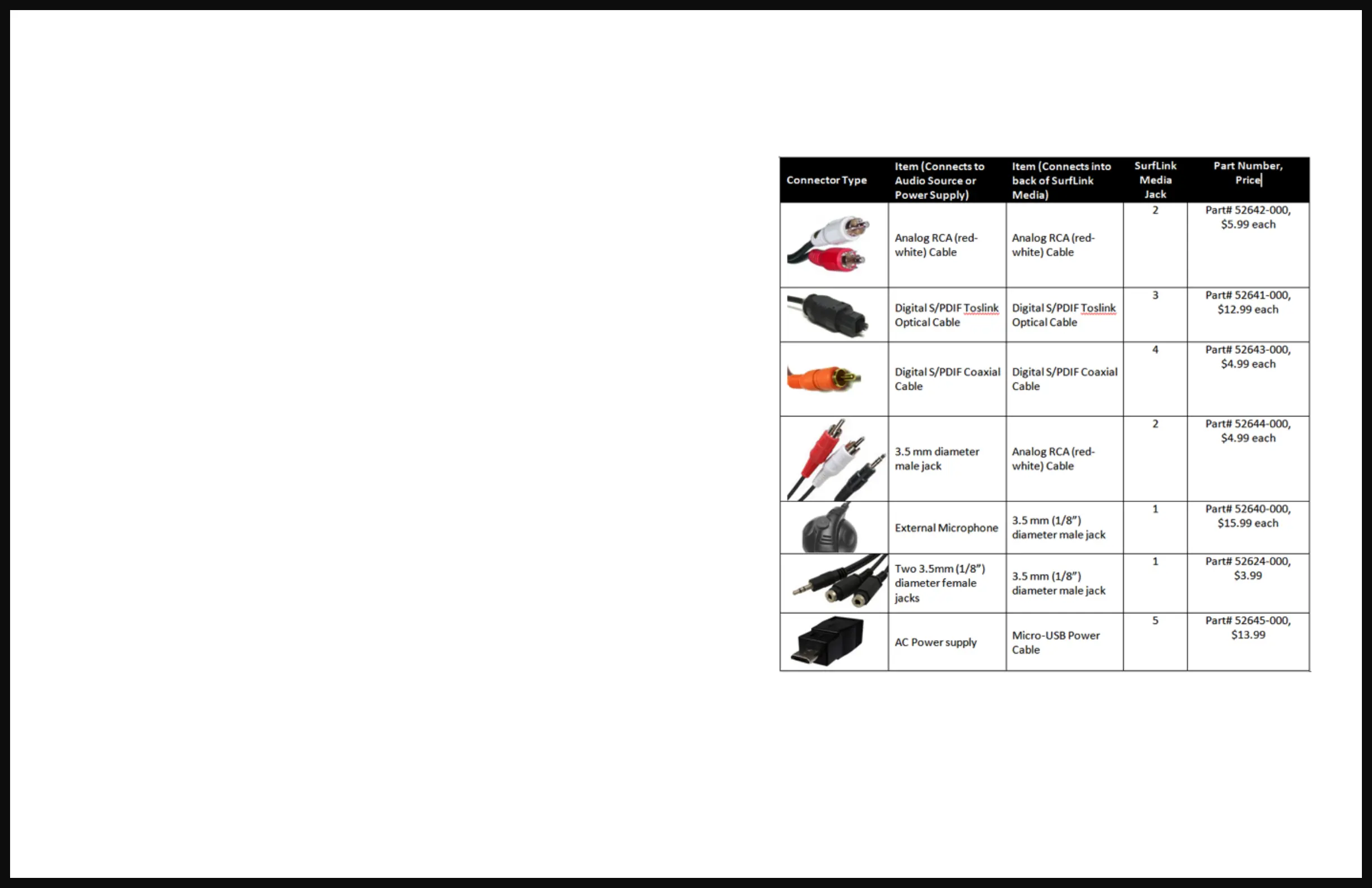
Q: When setting up a SurfLink Media, which cable should I use?
A: We suggest the options below (in this order) during the initial set up.
FAQ (cont.)


 To Next Page
 Loading...