Need help?
Do you have a question about the Suunto AMBIT3 PEAK 1.5 and is the answer not in the manual?
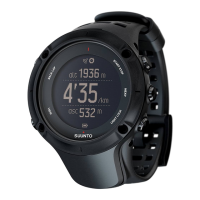
Essential safety guidelines, warnings, and precautions for using the Suunto Ambit3 Peak device.
Explains the function of each button and how to navigate the device's menus and displays.
Step-by-step guide for the initial setup of the Suunto Ambit3 Peak, including language and pairing.
Instructions on how to modify various settings directly on the Suunto Ambit3 Peak watch.
Tracks daily and exercise activity, calorie burn, and recovery time for a complete fitness picture.
Using the Alti-Baro feature for altitude and barometric pressure readings and settings.
Utilizing the Altimeter profile for accurate altitude readings based on reference values.
Employing the Barometer profile to monitor sea level air pressure with graphical trend displays.
Automatic switching between Altimeter and Barometer based on user movement and weather changes.
Setting up automatic pausing of recordings and display scrolling during exercise.
Managing backlight modes and locking buttons to prevent accidental input during activities.
Using the tilt-compensated digital compass, including calibration and declination settings.
Setting and using the countdown timer with sound alerts for timed intervals.
Adjusting display contrast, inverting colors, and managing which displays are shown.
Recording activities using sport modes and viewing real-time exercise data.
Connecting and using the Suunto Smart Sensor for enhanced heart rate monitoring during exercise.
Steps to start recording an exercise, view data during activity, and manage tracks/laps.
Using GPS for navigation during exercise, including routes, POIs, and compass display.
Navigating back to the start point and updating the watch's software.
Explains FusedAlti for altitude and FusedSpeed for accurate speed measurement.
A guide to understanding the various icons displayed on the Suunto Ambit3 Peak screen.
Setting up interval timers and performing guided interval workouts for structured training.
Storing, viewing, and managing recorded exercise logs and available memory.
Using Movescount.com and the mobile app for activity management, customization, and synchronization.
Utilizing multisport modes for training sessions involving sequential sports activities.
How the watch uses GPS for positioning, acquiring signals, and understanding grids/formats.
Receiving smartphone notifications and pairing Bluetooth Smart sensors like PODs and HR sensors.
Using and calibrating foot PODs for speed/distance and power PODs for performance metrics.
Navigating to saved locations (POIs) and checking current location coordinates.
Creating, deleting, and navigating routes on the Suunto Ambit3 Peak.
Accessing the service menu for diagnostics and setting up custom shortcuts for quick access.
Configuring sport modes for activities and using the stopwatch feature for timing.
Customizing the watch with Suunto Apps and recording swimming activities like pool and openwater swims.
Adjusting time, date, and setting the alarm clock function on the watch.
Syncing watch time with GPS/mobile and using Track Back to retrace routes.
Planning training programs and understanding weather trend and storm alarm indicators.
Guidelines for proper handling, water resistance, and battery charging of the Suunto Ambit3 Peak.
Instructions for replacing the battery in the Suunto Smart Sensor accessory.
Resources and contact methods for getting technical assistance and product support from Suunto.
Detailed technical data including operating temperature, weight, water resistance, and battery life.
Regulatory compliance information, FCC/IC statements, trademarks, and patent details.
Details on the limited warranty period, coverage, exclusions, and limitations for the Suunto Ambit3 Peak.
Copyright information and legal notices regarding the user manual's content and distribution.
 General
| GPS | Yes |
|---|---|
| Compass | Digital |
| Barometer | Yes |
| Altimeter | Yes |
| Connectivity | Bluetooth Smart |
| Dimensions | 50 x 50 x 18 mm |
| Weight | 89 g |
| Bezel Material | Steel |
| Lens Material | Mineral crystal |
| Case Material | Polyamide |
| Strap Material | Silicone |
| Battery Type | Rechargeable lithium-ion |
| GPS Recording Rate | 1 second |
| Operating Temperature | -20°C to +60°C / -5°F to +140°F |
| Display Type | Matrix |
| Display Resolution | 128 x 128 pixels |
| GLONASS | No |
| Mobile Notifications | Yes |
| Water Resistance | 100 m (ISO 6425) |

 To Next Page