Need help?
Do you have a question about the Suunto AMBIT3 VERTICAL 1.0 and is the answer not in the manual?
Describes the watch's physical buttons and their functions.
Guides the user through the initial configuration and language selection.
Explains how to change various settings directly on the watch.
Measures distance accounting for elevation changes.
Displays historical data on elevation gain over time.
Tracks daily and exercise activity, including calorie burn.
Automatically pauses exercise recording when speed drops below a threshold.
Automatically advances through sport mode displays during exercise.
Controls backlight activation and available modes (Normal, Off, Night).
Locks/unlocks device buttons to prevent accidental input.
Provides directional orientation relative to magnetic north.
Instructions for calibrating the compass for accurate readings.
Adjusts the compass for magnetic declination for true north alignment.
Marks a specific direction or bearing for navigation.
Allows setting and using a countdown timer with alarms.
Manages and customizes watch display screens.
How to increase or decrease screen contrast.
Changes the display between light and dark themes.
Using sport modes to record activities and view data.
Details on using a Bluetooth Smart compatible heart rate sensor.
Guides on correctly wearing the heart rate sensor.
Step-by-step instructions to begin recording an exercise.
Information available and how to view it during an exercise session.
How the watch records movement paths using GPS.
Manually or automatically creating laps during an exercise.
Using GPS navigation features while exercising.
Activating and using the compass during an exercise.
Feature to navigate back to the starting point of an activity.
Process for updating the watch's software.
Technology for measuring altitude using GPS and barometric data.
Technology for accurate speed measurement using GPS and motion sensors.
Explains the meaning of various icons displayed on the watch.
Setting up and using interval timers for structured workouts.
How to perform guided interval training sessions.
Stores and allows review of recorded activities.
Displays the amount of available memory on the watch.
Introduction to the online platform for managing data.
Using the mobile app to enhance the watch experience.
Using a smartphone as a secondary display for the watch.
Details on automatic and manual data synchronization.
Supports training in multiple sports and switching between modes.
How to change sport modes during an exercise.
Creating and using custom multisport profiles.
Overview of GPS navigation capabilities.
Process of acquiring a GPS fix.
Explains coordinate systems and display options.
Optimizing GPS settings for battery life and accuracy.
Receiving smartphone notifications on the watch.
Connecting external sensors like bike or heart rate sensors.
Steps to pair sensors with the watch.
How to use and calibrate the foot POD for running metrics.
Calibrating power sensors and slope measurements.
Navigating to saved locations (POIs).
Viewing current GPS coordinates.
Saving the current location as a Point of Interest.
Removing Points of Interest from the watch.
Indicators for post-training recovery status.
Estimates the time needed for the body to recuperate.
Assesses stress and provides recovery status, including tests.
Creating and managing routes for navigation.
Instructions for following a route on the watch.
Information and views available while navigating a route.
Measures and estimates running performance and fitness.
Accesses diagnostic and testing features of the watch.
Customizing button presses for quick access to features.
Overview of selecting, creating, and customizing sport modes.
How to activate and use the stopwatch feature.
Customizing the watch with downloadable apps.
Using the watch for swimming activities.
Specific settings and usage for pool swimming.
Teaching the watch to recognize different swimming strokes.
Performing and logging swimming drills.
Specific settings and usage for openwater swimming.
Displays and settings related to time and date.
Setting and managing the alarm clock function.
Methods for keeping the watch time accurate.
Adjusting audio and vibration alerts.
Retracing routes or paths during an exercise.
Planning and following structured training plans.
Recommendations for proper care and handling of the device.
Information on the watch's water resistance rating and usage.
Instructions and tips for charging the watch's battery.
Steps to replace the battery in the Smart Sensor.
Resources for obtaining technical assistance and support.
Detailed specifications of the watch's hardware and features.
Regulatory compliance information (CE, FCC, IC).
Information regarding Suunto trademarks.
Details of patents associated with the product.
Information about the product's warranty terms and period.
Copyright notice for the manual and its contents.
 General
| GPS | Yes |
|---|---|
| Connectivity | Bluetooth Smart |
| Altimeter | Yes |
| Compass | Yes |
| Bezel Material | Stainless steel |
| Lens Material | Mineral crystal |
| Case Material | Polyamide |
| Strap Material | Silicone |
| Barometric Altitude | Yes |
| Storm Alarm | Yes |
| Vibration Alert | Yes |
| Category | Fitness Electronics |
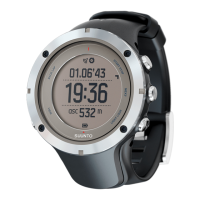
| Device Name | Suunto AMBIT3 VERTICAL 1.0 |
| Type | GPS watch |
| GLONASS | Yes |
| Bluetooth | Yes |
| Mobile Notifications | Yes |
| Battery Life | Up to 14 days in time mode |
| Water Resistance | 100 meters |
| Weight | 74 g |
| Operating Temperature | -20°C to +60°C / -5°F to +140°F |
| Storage Temperature | -30°C to +60°C / -22°F to +140°F |
| Display | Matrix |
| Color Options | Black, White, Blue, Lime |

 To Next Page