EasyManua.ls Logo

Suzuki 990E0-54P56-010 - User Manual

Suzuki 990E0-54P56-010
13 pages
Print Icon
To Next Page IconTo Next Page
Loading...
SUZUKI GENUINE ACCESSORIES
English_I-M 990E0-54P56-010 Rev00 03/09/2018
1
Description:
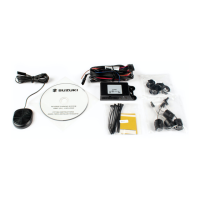
Front parking system
Part number:
990E0-54P56-010
Applications:
VITARA (LY) TSMLY…600001 - … LHD/RHD
Fitting time:
1h
Beschreibung:
ParkAssistent vorn
Teile Nr:
990E0-54P56-010
Verwendung:
VITARA (LY) TSMLY…600001 - … LHD/RHD
Montagezeit:
1h
Désignation:
Système d'aide au stationnement avant
N° de code:
990E0-54P56-010
Utilisations:
VITARA (LY) TSMLY…600001 - … LHD/RHD
Temps
de montage:
1h
Descrizione:
Sensori di parcheggio anteriori
Numero di codice:
990E0-54P56-010
Applicazioni:
VITARA (LY) TSMLY…600001 - … LHD/RHD
Tempo
d’installazione:
1h
Descripción:
Sensores de aparcamiento delanteros
Código:
990E0-54P56-010
Aplicación:
VITARA (LY) TSMLY…600001 - … LHD/RHD
Tiempo de
instalación:
1h
INSTALLER AND USER INSTRUCTIONS
MANUALE DI INSTALLAZIONE ED USO
INSTALLATIONS-UND BEDIENUNGSANLEITUNG
MANUAL PARA INSTALADOR Y USUARIO
MANUEL INSTALLATEUR ET UTILISATEUR
GB
ΕΓΧΕΙΡΙ∆ΙΟ ΕΓΚΑΤΑΣΤΑΣΗΣ ΚΑΙ ΧΡΗΣΗΣ
FR
DE
IT
ES
TELEPÍTÉSI ÉS KEZELÉSI UTASÍTÁSOK
INSTRUKCJA MONTAŻU I OBSŁUGI
INSTALLERINGS- OG BRUGERVEJLEDNING
INSTRUCTIES VOOR DE INSTALLATEUR EN DE GEBRUIKER
ИНСТРУКЦИЯ ПО УСТАНОВКЕ И ЭКСПЛУАТАЦИИ
INSTALLASJONS- OG BRUKERVEILEDNING
NÁVOD NA INSTALACI A POUŽITÍ
ASENTAJAN JA KÄYTTÄJÄN OHJEET
ІНСТРУКЦІЯ З МОНТАЖУ ТА ЕКСПЛУАТАЦІЇ
NÁVOD NA INŠTALÁCIU A POUŽITIE
INSTALLATIONS- OCH ANVÄNDARINSTRUKTIONER
INSTRUCŢIUNI DE INSTALARE ŞI UTILIZARE
KORISNIČKI PRIRUČNIK S UPUTAMA ZA POSTAVLJANJE
KURUCU VE KULLANICI TALİMATLARI
NAVODILA ZA MONTAŽO IN UPORABO
INSTRUÇÕES PARA O INSTALADOR E UTILIZADOR


Questions and Answers

Summary

Set Contents

Tools

Before Installation

System Operation

Troubleshooting Guide

Low Power Supply Signal

Indicates low battery issues affecting system operation and sensor status.

Faulty Sensors

Describes how faulty sensors or connection issues are indicated by audio signals and display errors.

Others

Covers other potential issues like ice on sensors or contact with frame, with solutions.

Detection Zones

Warranty Conditions

Technical Specifications

Waste Electrical and Electronic Equipment (WEEE) Directive

Programming

Setting of Parameters

Testing

Installation

Cable Routing

Control Unit - Buzzer and On;Off Button with LED Indicator

Overview

This document describes the Suzuki Genuine Accessories Front Parking System, part number 990E0-54P56-010, designed for the VITARA (LY) TSMLY...600001 - ... LHD/RHD models. The estimated fitting time for this system is 1 hour.

Function Description

The front parking system is an aid designed to assist drivers during parking maneuvers by detecting obstacles in front of the vehicle. It utilizes ultrasonic sensors to measure distances and provides audible warnings to the driver.

System Operation

The parking system activates automatically when the ignition is turned ON, indicated by an LED lighting up. The sensors remain active as long as the vehicle speed is below approximately 15 km/h. If the speed exceeds 15 km/h, the parking aid is automatically disabled, and the LED turns OFF.

To temporarily deactivate the sensors (e.g., when in a queue), the button on the LED receptacle can be pressed:

  • A short press (approx. 1 second) disables the sensors until the button is pressed again.
  • A long press (hold for approx. 5 seconds until a beep is heard) keeps the sensors disabled until the ignition is turned OFF and ON again.

Obstacle detection is signaled by a buzzer, which emits an audible proximity warning. The beeping frequency increases as the vehicle approaches an obstacle, indicating a closer distance. The buzzer emits a continuous tone when the vehicle is approximately 30-50 cm from an obstacle. This continuous tone distance is a user-selectable setting.

Detection Zones

The system defines three detection zones:

  • FC (STOP zone): The minimum distance detected between an obstacle and the sensor. In this zone, the warning tone is solid. The factory default for central sensors is 35 cm, and for outer sensors, it is 30 cm.
  • F1: A detection zone further out than FC. The factory default for central sensors is 60 cm.
  • F2: The outermost detection zone. The factory default for central sensors is 85 cm.

The stage-by-stage sound alert varies according to the detection zone.

Important Usage Warnings and Cautions

  • Always look around the vehicle while parking. The parking system is an aid and should not replace driver care and attentiveness. Always check the environment and maintain a slow speed to avoid unexpected hazards.
  • The system may not detect human beings, animals, small obstacles (smaller than 35 cm), or objects/materials with low reflectance.
  • In heavy rain or snow, the system might give an audible alert even if no obstacles are present. This does not necessarily indicate a defect.
  • Only expert users should modify the system settings to avoid malfunctions.

Troubleshooting Guide

  • Low Power Supply Signal: If the battery level is too low to guarantee system accuracy, the buzzer will emit a deep warning tone for 5 seconds, and the LED will blink rapidly. This indicates that all sensors are inoperative due to low power, and the driver must proceed without the system.
  • Faulty Sensors: If a sensor is inoperative or not connected, an audio signal will sound for 3 seconds. If multiple sensors are faulty, the number of faulty sensors will be displayed on the main control unit (e.g., "E1" for sensor 1, "E4" for sensor 4). A single faulty sensor affects the entire system's correct functioning.
  • Other Issues:
    • Ice on sensors: Clean the sensors.
    • Back part of sensors in contact with frame: Create a separation between the sensors and the vehicle.
    • If the buzzer keeps beeping after activation, and no obstacle is present, the parking system is defective. Contact your SUZUKI dealer.

Technical Specifications

  • Supply voltage: 9 Vdc to 30 Vdc
  • Current consumption (system ON): 200 mA max.
  • Operating temperature range: -30°C to +70°C
  • Ultrasonic frequency: 40 kHz

Programming and Settings

The system is factory-configured, but parameters can be modified if necessary. To enter programming mode: Press and hold one of the two buttons on the control unit for at least 2 seconds. The display will show "01".

  • Use the LEFT button to go back to the previous parameter.
  • Use the RIGHT button to move to the next parameter.
  • To modify a parameter, press and hold one of the buttons until the display blinks. Then, use the LEFT button to decrease the value and the RIGHT button to increase it.
  • To register the new value, press and hold one of the buttons for at least 2 seconds. The display will stop blinking, and the selected parameter will be shown.
  • If no button is pressed within 10 seconds, the system will exit programming mode.
  • To reset to factory settings (FS), simultaneously press both buttons on the control unit for more than 2 seconds.

Adjustable Parameters (with Factory Defaults):

  • 01 - Volume of buzzer: 0 (OFF), 1 (Low), 2 (High). Factory default: 2 (High).
  • 02 - Detection range - Central sensors: 50-95 cm. Factory default: 90 cm.
  • 03 - Detection range - Outer sensors: 50-95 cm. Factory default: 50 cm.
  • 06 - STOP zone - Central sensors: 30-50 cm. Factory default: 50 cm.
  • 07 - STOP zone - Outer sensors: 30-50 cm. Factory default: 30 cm.
  • 11 - Number of speed signal pulses: 1-99. Factory default: 2. (Used for vehicle approximate speed calculation).
  • 12 - Delay of sensors deactivation: 00 (system activated every time ignition is ON), 10-60 sec. Factory default: 00.
  • 15 - Service display (testing): 0 (OFF), 1 (Distance from closest obstacle), 3 (Vehicle approx. speed). Factory default: 0.
  • 16 - Continuous detection - zones F1 and F2: 0 (OFF), 1 (ON). Factory default: 1 (ON).
  • 17 - Sensitivity: 1 (Low), 2 (Medium), 3 (High). Factory default: 1 (Low).

Testing

To test the system:

  1. Enter programming mode (press and hold one button for 2 seconds).
  2. Select parameter "15".
  3. Press and hold one button and select "1" (to test sensors) or "3" (to detect speed).
  4. Press and hold one button; the display will show "--".
  5. Test the sensors; the system will indicate the actual distance.
  6. Reset parameter "15" to "00".
  7. When testing is complete, press and hold one button until parameter "15" is displayed again.
  8. The system will automatically exit programming mode after 10 seconds of inactivity.

Installation Notes

  • Drill through factory markings on the inside of the bumper using a 22mm drill bit for central sensors and a 26mm drill bit for outer sensors.
  • Snap the brackets (6 and 7) into the holes from the OUTSIDE of the bumper, ensuring correct orientation for bracket 7.
  • Insert the sensors into the brackets (6 and 7) in the appropriate direction. Sensor 1 has the shortest cable, and Sensor 4 has the longest cable.
  • Route wiring through the door sill to the right front inner wheelhouse.
  • Use supplied clips to hold cables in place.
  • The control unit, buzzer, and ON/OFF button with LED indicator can be positioned according to customer request, ensuring the button is readily seen and easily reached.

General Cautions for Installation

  • Before starting, park the vehicle on a level surface, pull the parking brake, and remove the ignition key.
  • Be careful not to damage any vehicle parts.
  • Ensure all parts are included in the kit.
  • Disconnect the negative pole of the battery before connecting any wire.
  • All connections must be soldered.
  • Installation and connections should be done by qualified personnel only.

Warranty Conditions

This product is guaranteed against manufacturing defects for 24 months from the purchase date (validated by receipt or invoice). If these documents are unavailable, the warranty starts from the manufacturing date. The warranty covers repair or replacement of defective parts; direct labor, transport, and other charges are excluded. The warranty does not apply to malfunctions caused by negligence, improper installation, tampering, or improper use. For warranty requests, contact your SUZUKI dealer.

Waste Electrical and Electronic Equipment (WEEE) Directive

This device does not fall within the scope of Directive 2002/96/EC on Waste Electrical and Electronic Equipment (WEEE) as specified in art. 2.1 of L.D. no. 151 of 25/07/2005.

Suzuki 990E0-54P56-010 Specifications

General IconGeneral
BrandSuzuki
Model990E0-54P56-010
CategoryAutomobile Accessories
LanguageEnglish

Related product manuals