en | 45
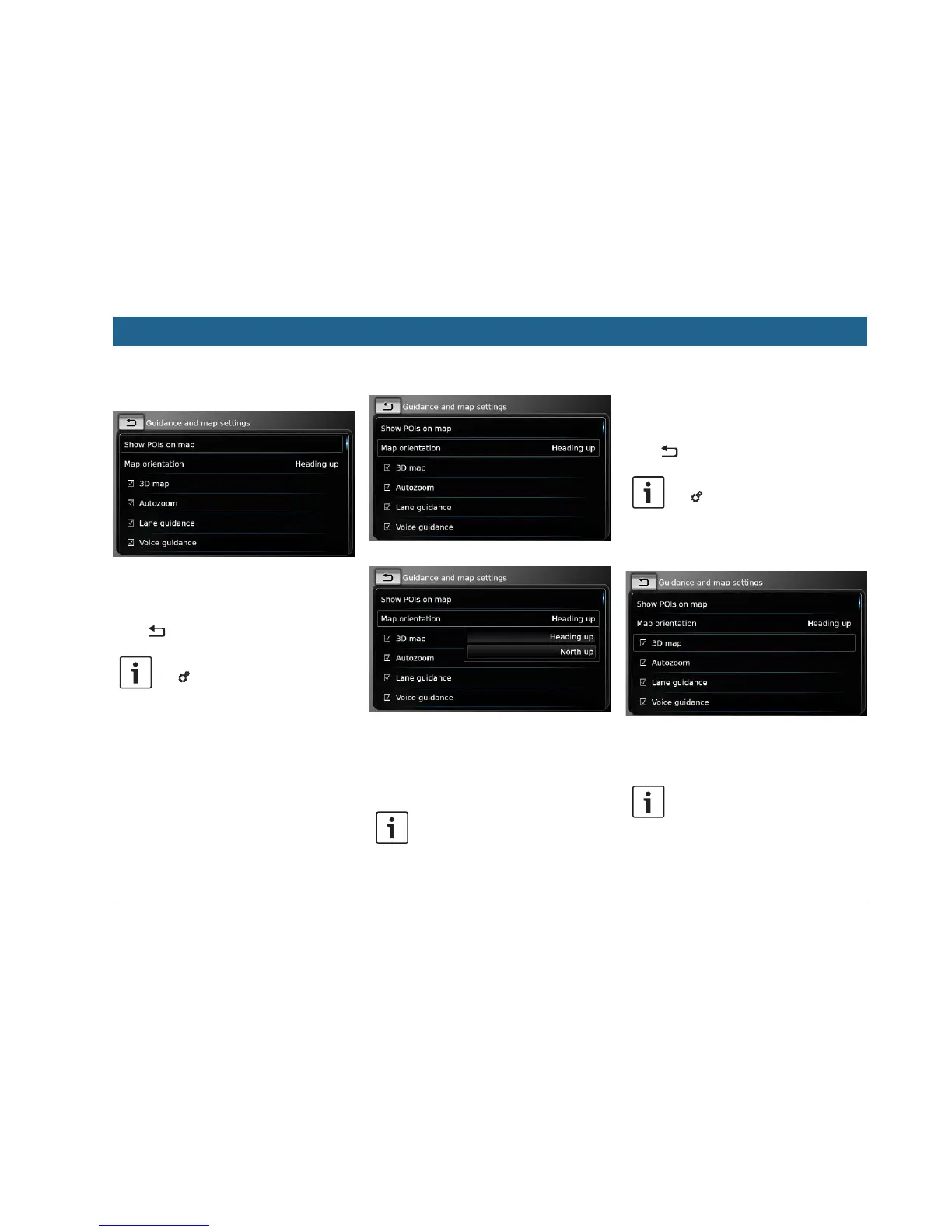
7.9.2 Displaying points of interest
on the map
f Tap Show POIs on map.
f Tap the desired categories.
The map shows points of interest from the cat-
egories whose checkbox contains a check mark.
f Tap .
Note:
Tap 6 to close the options display.
7.9.3 Selecting the map orientation
f Tap Map orientation.
f Tap the relevant item:
f Heading up:
Map aligned with your heading
f North up:
Map aligned with north
Note:
f In the map view, you can also
change the map orientation (see the
section entitled “Changing the map
view mode” (page 42)).
f If the North up option is selected,
3D map view is not available.
f Tap .
Note:
Tap 6 to close the options display.
7.9.4 3D map view – on/off
Instead of the normal view from above, the 3D
map view displays a perspective view.
f Tap 3D map.
3D map view is activated when the check mark
is displayed in the checkbox.
Notes:
f You can also activate 3D map view
while in the map view (see the
section entitled “Changing the map
view mode” (page 42)).
Navigation


 To Next Page