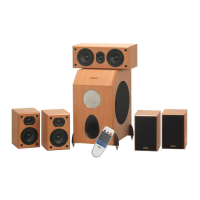
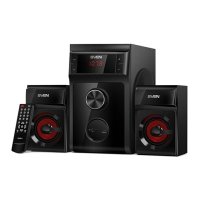
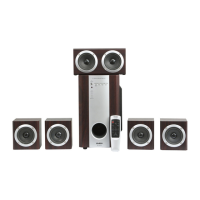
The SVEN HT-435D is an active 5.1 home theatre speaker system designed to deliver an immersive audio experience. This system integrates a powerful amplifier directly into the subwoofer, allowing for versatile connectivity with a wide range of audio sources. A remote control is included for convenient operation.
Function Description
The HT-435D system is built around a central subwoofer unit that houses the main amplifier and digital decoders. This subwoofer is responsible for processing audio signals and distributing amplified sound to the five satellite speakers: two front, two rear, and one central. The integrated DD5.1/DTS decoders enable the system to process multi-channel digital audio signals, providing a true surround sound experience for movies, games, and music.
The system offers multiple input options to accommodate various audio sources. It features an optical input and a coaxial input for connecting digital audio devices such as DVD players, sound cards, or modern televisions, ensuring high-fidelity sound transmission. For analog audio sources, an additional stereo AUX input (RCA L/R) is provided, allowing connection to PCs, CD/MP3 players, tape recorders, and other stereo devices. A notable feature is the system's ability to convert a stereo signal from the AUX input into a 5.1 surround sound output, effectively utilizing all satellite speakers even with two-channel audio.
The control panel on the subwoofer provides essential controls and indicators. A STANDBY indicator shows the system's power status, while a POWER button allows switching between standby and operational modes. An IR receiver window ensures seamless communication with the remote control. Dedicated LED indicators for OPTICAL, COAX, and AUX inputs clearly show which audio source is currently active. A DOLBY/DTS indicator illuminates in red for Dolby Digital signals and blue for DTS signals, confirming the format of the incoming digital audio stream. Volume control buttons (VOL-/VOL+) are available for adjusting the overall system volume, and a 2.1/5.1 button allows switching between stereo and surround sound playback modes. An INPUT SELECT button cycles through the available audio inputs.
The rear panel of the subwoofer features the physical connections for all audio inputs and speaker outputs. It includes the OPTICAL INPUT, AUDIO INPUT (AUX L/R), and COAX INPUT. The AUDIO OUTPUT section provides clearly labeled jacks for connecting the front (FR-/FR+), left (FL-/FL+), central (CEN-/CEN+), right rear (SR-/SR+), and left rear (SL-/SL+) satellite speakers. A FUSE holder for the mains fuse and a POWER on/off switch are also located on the rear panel, along with the power cord.
Usage Features
Setting up the HT-435D involves strategically placing the satellite speakers around the listening area, typically with the central channel positioned under a TV or monitor, as illustrated in the manual. Before making any connections, it is crucial to ensure all devices are disconnected from the mains and the subwoofer's volume is turned down. The satellite speakers are then connected to their respective output jacks on the subwoofer using the provided acoustic cables.
Connecting audio sources is straightforward due to the variety of inputs. For digital audio, an optical or coaxial cable connects the source (e.g., DVD player, sound card, TV) to the corresponding input on the subwoofer. For analog stereo sources, an RCA to mini-jack cable or an RCA L/R cable connects the device to the AUX input.
Once connected, the system is powered on using the rear POWER switch, which initially puts it into standby mode. Pressing the STANDBY button on the remote control or the subwoofer's front panel activates the system. By default, the AUX stereo input is active. Users can select their desired input using the INPUT SELECT button on the front panel or the dedicated OPT, COAX, or AUX buttons on the remote control.
Volume adjustment is flexible, with master volume control available via the VOL-/VOL+ buttons on both the subwoofer and the remote. When playing multi-channel digital signals through the COAX or OPTICAL inputs, independent volume control is possible for the front (FRONT+/-), central (CEN+/-), and rear (REAR+/-) channels using the remote control, allowing for fine-tuning of the surround sound balance. The 2.1/5.1 mode button on the remote enables the system to play stereo signals from the AUX input through all satellites, creating an expanded soundstage. A RESET button on the remote allows users to revert to default settings.
For optimal remote control performance, it should be used within a 7-meter range and at an angle not exceeding 30 degrees, directed towards the IR receiver on the subwoofer.
Maintenance Features
Maintaining the SVEN HT-435D is relatively simple, focusing on safe handling and proper cleaning. Users are advised not to open the speaker system or attempt repairs themselves, as this could lead to electric shock due to high voltage components inside. It is also important to prevent short circuits between speaker wires or with the amplifier's radiator or ground, as this can damage the output stages.
To protect the system, foreign objects such as needles, hairpins, coins, or insects should not be allowed into the HTSS openings. The system should be kept away from high humidity, water, dust, and direct sunlight or other heat sources to prevent damage.
For cleaning, only a soft, dry cloth should be used. Harsh chemicals like gasoline, alcohol, or other solvents are strictly prohibited as they can damage the painted surfaces. Mechanical stress on the speaker diaphragms should also be avoided.
Regarding the remote control, batteries (AAA type) should be inserted correctly. If the remote control malfunctions, users should first check the batteries or replace them with new ones. For prolonged periods of non-use (more than a week), it is recommended to remove the batteries from the remote control to prevent leakage and potential damage.
For extended periods of inactivity, it is advised to switch the POWER button on the subwoofer's rear panel to the OFF position and unplug the power cable from the mains. This helps conserve energy and protects the system from potential electrical surges.
In case of any operational issues that cannot be resolved using the troubleshooting guide provided in the manual, users are encouraged to seek professional advice from their nearest service center rather than attempting self-repair. The manual includes a troubleshooting section that addresses common problems such as the system not turning on, no sound, low volume, or sound distortion, offering practical solutions like checking connections, adjusting volume levels, or ensuring correct audio source setup.


 To Next Page

 General