ENG
6
Party Speaker System
withBluetooth and FM-radio
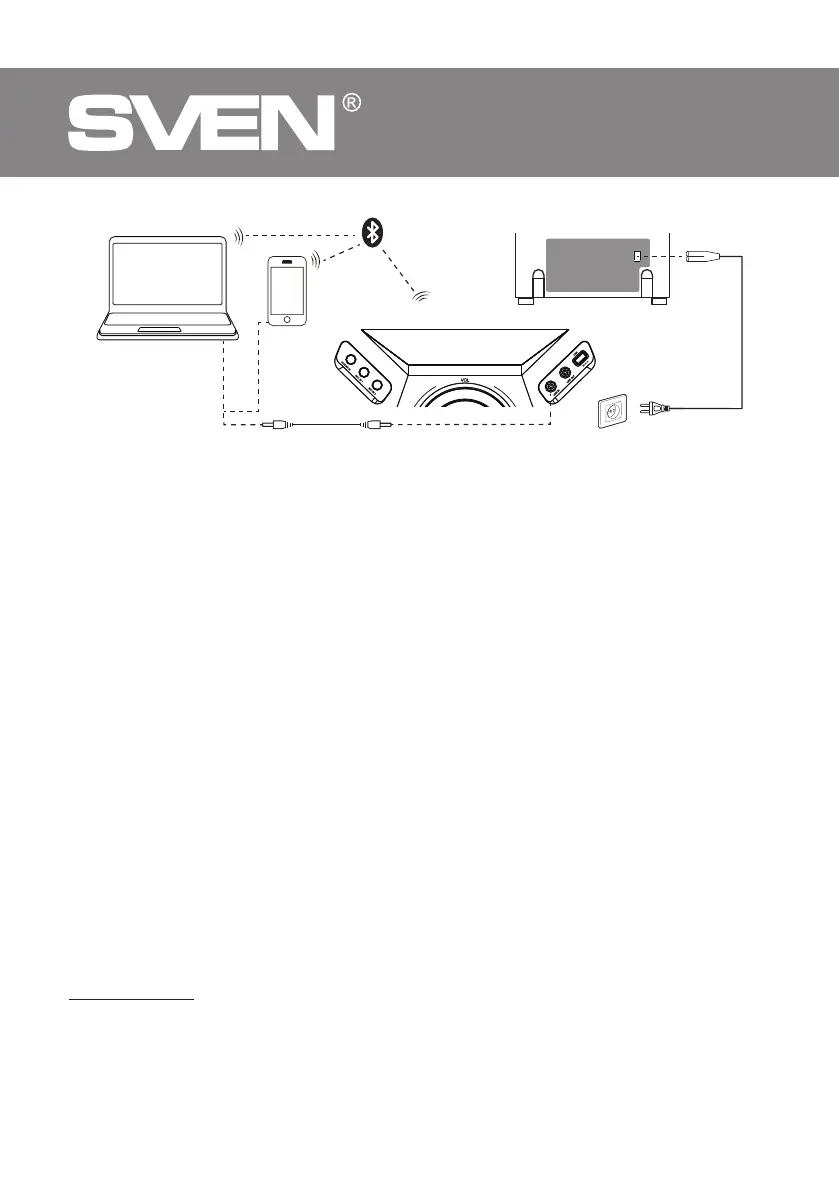
Fig.2. Connection diagram
CONNECTION AND OPERATION
Connect speaker system to AC power.
OPERATION MODES
Bluetooth mode
• Wireless data transfer via the Bluetooth protocol enables to connect speaker system
to compatible devises. Maximum radius of action of data transfer is 10 m. Such obsta-
cles as walls orother electronic devices can interfere with the signal transfer.
• Turn on the speaker system Bluetooth mode — press button BT, display ashes “BT” in-
scription.
• It is necessary to select the search mode of devices with Bluetooth on a signal source (tele-
phone, notebook, smartphone, etc.). “SVEN PS-1900”, massage will be displayed onthescreen
whichis to be connected to*.
• When connection is successful, there will be a short beep and the indication of the search
mode on speaker system is over**.
Connecting to the speaker via Bluetooth using NFC
NFС works only with Android devices (version 4.1 and later).
To connect the speaker to a smartphone, the smartphone must be equipped with an NFC
chip.
It must be enabled in the wireless settings.
• Turn on the speaker system Bluetooth mode — press button BT, display ashes “BT” in-
scription.
• Hold the phone close to the NFC mark r on the top panel and wait for a short beep to con-
rm a successful speaker connection.
Note. You need to allow connections on the phone (depending on the phone’s operating system).
* You might have to enter “0000” code to connect some models of devices via Bluetooth.
** If the item has been already registered in the device list of a source, then the second search
mode activation is not obligatory. Choose the item name “SVEN PS-1900” andthe “connect”
command on the source.
PC
Mobile
device
Mini-jack to mini-jack signal cable
Socket
TOP Panel
Back side


 To Next Page