OPERATING INSTRUCTIONS
INTALLING THE BATTERIES
Remove the battery compartment panel ○
12
, install 3 AAA batteries according to the image
inside the battery compartment properly, close and secure the battery compartment.
CONNECTING POWER
Connect the power cord to the DC-IN jack on the bottom of the unit, and then plug the power
cord onto wall outlet.
SETTING THE TIME
Switch the Time Setting Switch ○
7
to the SET mode, the number on the display starts to flash,
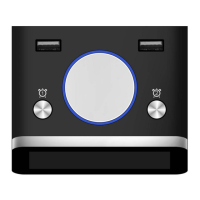
softly spin the Rotating Button ○
1
clockwise or counterclockwise to set time. When the
correct time is set, switch the Time Setting Switch ○
7
to the LOCK mode, and the display will
stop flashing and the time is saved.
SETTING ALARM 1& ALARM 2
Press down the Alarm Button 1 ○
2
, the alarm 1 icon and number will light up and flash. Spin
the Rotating Button ○
1
clockwise or counterclockwise to set the desired alarm time. When
the alarm time is set, the alarm 1 icon and time will flash about 5 seconds then the desired
alarm time will be saved automatically. Repeat the same settings for setting alarm 2.
SNOOZE FUNCTION
When alarm is sounding, press the Rotating Button ○
1
once to stop alarm for 9 minutes and
then resume. Pressing and holding the Rotating Button ○
1
about 3 seconds will cancel the
snooze function in snooze mode. Snooze function will also stop automatically after 30 minutes
if there is no operation.
ALARM DURATION
The alarm will sound for 30 minutes if no key is pressed, then it will stop automatically and
resume at the same alarm time on next day. To stop Alarm 1 and/or Alarm 2 when sounding,
press the Alarm Button 1 ○
2
or Alarm Button 2 ○
3
to raise then the alarm icon and time will
not be displayed; or press the Rotating Button ○
1
once to be in snooze mode then press and
hold the Rotating Button ○
1
about 3 seconds to stop alarm.
12H/24H SWITCH
Use the 12H/24H Switch Button ○
10
on the back of the unit to select 12 hour or 24 hour time
mode
THERMOMETHER DISPLAY


 To Next Page