Use the Thermometer C/F Switch ○
8
to switch between Celsius or Fahrenheit display
ADJUSTING LCD BRIGHTENSS
There are four dimming opons available HIGH/MEDIUM/LOW/FAINTNESS. Press the Rotang
Buon ○
1
to toggle between the four brightness sengs.
USB CHARGING FUNCTION
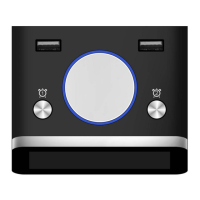
This alarm clock is equipped with 2 convenient & fast USB charging ports on the top that
allows you to recharge many brands of smart phone, tablet and portable music player. To
charge your device, connect the USB charging cable that is connected to your handheld device
to the USB charging ports ○
4
○
5
on the top of this alarm clock.
ADJUSTING VOLUME
Use the Volume Control Wheel ○
11
to adjust the alarm sound from minimum to maximum.
BATTERY BACKUP
This alarm clock is equipped with a baery backup feature. This feature will restore your alarm
clock sengs in the event of a power outage. Branded new long life AAA baeries are
recommended.
SPECIFICATIONS
Display Size: 3.2”
Display Type: LCD
Baery Required: 3 x AAA
USB Charging: 3000mA Total
Speaker Size: 1”, 1.0W
Power Input: 100-240V 50-60 Hz
Input: DC5V = 3.0A
CLARE AND MAINTENANCE
1. Disconnect the unit from any power sources before cleaning
2. Keep the unit away from magnec objects, water or heat sources
3. Clean only with a dry cloth


 To Next Page