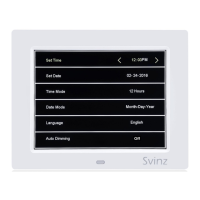
4. DATE MODE: Press the MENU button to access the setting page. Press the DOWN button
to access the 4
th
line titled Date Mode. Press the RIGHT/LEFT button to switch between:
Month-Day-Year(Standard U.S. Mode).
Day-Month-Year(Standard European Mode).
Press the MENU button to go back to the main display or press the UP/DOWN button to
access other settings.
5. LANGUAGE: Press the MENU button to access the setting page. Press the DOWN button to
access the 5
th
line titled Language. Press the RIGHT/LEFT button to select a language
(English, French, German, Dutch, Polish, Spanish, Italian and Welsh are available). Press the
MENU button to go back to the main display or press the UP/DOWN button to access other
settings.
6. AUTO DIMMING: Press the MENU button to access the setting page. Press the DOWN
button to access the 6
th
line titled Auto Dimming. Press the RIGHT/LEFT button to switch
between: Mid, Low, Off
Mid means the brightness automatic dims to dark at 7:00 PM and dims to bright at 7:00AM
(For this mode, the brightness of the day is 50cd/m2 and of the night is 10cd/m2)
Low means the brightness automatic dims to dark at 7:00 PM and dims to bright at 7:00AM
(For this mode, the brightness of the day is 50cd/m2 and of the night is 5cd/m2)
Off means the brightness does not change during the day and the night.
(For this mode, the brightness of the day and the night is both 50cd/m2)
7. COLOR MODE: Press the MENU button to access the settings page. Press the DOWN
button to access the 7
th
line titled Color Mode. Press the RIGHT/LEFT button to switch
between: White or Yellow. Press the MENU button to go back to the main display or press
the UP/DOWN button to access other settings.
8. ALARM 1 SETTING: Press the MENU button to access the settings page. Press the DOWN
button to access the 8
th
line titled Alarm 1 Setting. Press the RIGHT/LEFT button to select
the field to be modified. When the field is underlined with blue, use the UP/DOWN button
to adjust the number. After the changes are complete, press the OK button to save the
settings. Press the DOWN button to access alarm 1 frequency settings.
9. ALARM 1 FREQUENCY: Press the DOWN button to access the 9
th
line titled Alarm 1
Frequency. Press the RIGHT/LEFT button to switch between: Off, Once, Everyday, Mon. to
Fri, Weekend. Press the MENU button to go back to the main display or press the
UP/DOWN button to access other settings. PLEASE NOTE: The alarm will ring for 60
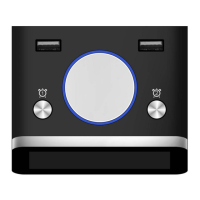
seconds and then go off on its own, or you can manually stop it by pressing any button in
the back of the clock.


 To Next Page
 Loading...