
 Need help?
Do you have a question about the Swann SWNHD-818CAM and is the answer not in the manual?
Outstanding 4MP Super HD video clarity, 75% more pixels than 1080p, enhanced digital zoom.
Allows users to see and hear what is happening, enhancing situational awareness.
Wide 75° viewing angle and IR cut filter for clear vision up to 100ft/30m day and night.
IP66 rated weatherproof casing suitable for installation in any indoor or outdoor conditions.
Comes with Cat 5E Ethernet cable and necessary components for straightforward HD security setup.
Requires specific Swann Super HD NVRs for cutting-edge IP surveillance functionality.
Provides peace of mind with detailed viewing for license plates, faces, and clothing colors.
Lists all items included in the box for installation and setup.
Compares 1080p HD resolution with 4MP Super HD resolution, highlighting detail differences.
Details video quality, backlight compensation, wide dynamic range, and viewing angle.
Covers microphone availability and audio range for enhanced monitoring.
Outlines night vision distance and IR cut filter capabilities.
Includes indoor/outdoor rating, power requirements, operating temperature, and body construction.
Provides physical dimensions and weight of the camera unit.
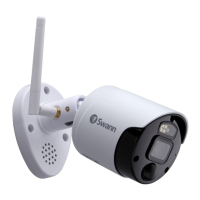
Identifies key camera parts like the weatherproof casing, viewing angle, and image sensor.
Swann offers lifetime support for its products, available 24/7 via helpdesk.
Explains simple DIY installation with resources available online and in the manual.
Information on finding a professional installer for your region if DIY is not preferred.
Outlines the one-year warranty, exclusions, and user responsibilities for defects and shipping.
Details FCC compliance for Class B digital devices and measures to correct interference.
Essential safety guidelines for product installation and operation to prevent hazards.
Step-by-step guide on connecting the camera to the NVR using Power Over Ethernet (PoE).
Advice on preventing strain, proper unplugging, and weatherproofing network cable connections.
Explains automatic detection, IP address assignment, and accessing camera settings via the NVR.
Factors to consider for optimal camera placement, including view, connectivity, and protection.
Instructions on securely mounting the camera to various surfaces using screws and plugs.
Guidance on using the L-wrench to adjust and lock the camera's pan, tilt, and rotation.
Steps to resolve issues where the NVR fails to detect the connected camera.
Solutions for common night vision problems like black or white images and IR light bounce-back.
Procedure to restore the camera to factory default settings using the reset button.
Contact information for telephone helpdesk and email support for all countries.
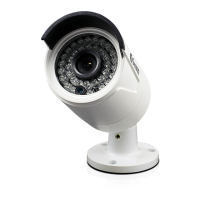
The Swann Super HD Security Camera is a 4 Megapixel bullet camera designed for use with HD NVRs, offering advanced surveillance capabilities for both home and business environments. This camera provides outstanding 4 Megapixels Super HD video image clarity, boasting 75% more pixels than 1080p, which allows for enhanced digital zoom and close-up detail that needs to be seen to be believed.
The primary function of this device is to capture high-definition video surveillance footage. It is equipped with a built-in microphone, enabling users to not only see but also hear what is happening in the monitored area. The camera offers comprehensive day and night vision capabilities, featuring a wide 75° viewing angle and the latest infrared cut filter for amazing night vision up to 100ft (30m). This ensures continuous monitoring regardless of lighting conditions. The camera is built to withstand various environmental conditions, with a weather-resistant rating of IP66, making it suitable for both indoor and outdoor installation. It utilizes Power Over Ethernet (PoE) technology, simplifying installation by allowing both power and data to be transmitted over a single Ethernet cable when connected directly to a compatible Swann NVR. This professional surveillance camera is designed to provide peace of mind by capturing crucial details such as license plates, faces, and clothing colors in stunning 4 Megapixels.
The Swann Super HD Security Camera is designed for straightforward integration into a Swann Super HD Network Video Recorder (NVR) system. It is compatible with Swann's Super HD NVRs, including models NVR4-7400™, NVR8-7400™, and NVR16-7400™, which are essential for cutting-edge IP surveillance. Installation is made easy with the included Cat 5E Ethernet cable and all necessary accessories. When connecting the camera to a Swann NVR, it is automatically detected and assigned an IP address upon NVR startup. The camera will appear on-screen shortly after being plugged in and is assigned to the first available channel by the NVR. Users can manually adjust camera settings such as backlight compensation, exposure, and day/night mode to optimize performance for the specific environment. The camera's 3-axis mounting bracket allows for versatile installation on walls and ceilings, ensuring optimal viewing angles. For outdoor installations, it is highly recommended to use waterproof tape to protect the cable connection area between the camera's LAN port and the extension cable's Ethernet plug, preventing water ingress and ensuring long-term functionality. The camera's casing is robust and resistant to water, weather, and tampering, though the cable and connector require protection.
Maintenance for the Swann Super HD Security Camera is designed to be user-friendly. The camera's weather-resistant aluminum casing ensures durability and protection against the elements, reducing the need for frequent physical maintenance. In case of issues with camera detection by the NVR, troubleshooting steps include ensuring a direct connection without hubs or switches, checking all cable connections for security, trying a different NVR channel, and rebooting the system for an IP address refresh. If night vision is not functioning correctly (e.g., image is mostly black or white), users are advised to re-aim the camera to avoid bright light sources that might interfere with the light sensor or cause infrared light to bounce back into the lens. For situations where the camera needs to be restored to its factory default settings, a reset button is provided. To perform a reset, the Ethernet cable should be unplugged from the camera's LAN connector, the reset button pressed and held while plugging the Ethernet cable back in, and then released after a few seconds. Swann offers Lifetime Support, with a help desk available 24 hours a day, 7 days a week, to assist with any installation, usage, or maintenance queries. This comprehensive support ensures that users can easily maintain their security system.
 General
| Field of View | 90 degrees |
|---|---|
| Weather Resistance | IP66 |
| Body Material | Plastic |
| Indoor / Outdoor | Outdoor |
| Viewing Angle | 90 degrees |
| Power Supply | 12V DC |
| Operating Temperature | -30°C ~ 60°C |
| Night Vision | Up to 30 meters (98 feet) |



 To Next Page