cally engaged the moment your Volvo is switched into reverse gear. The camera options will be partially ena-
bled in the original Sensus menu by the CFE Plus.
INSTALLATION PROCEDURE
FOR P3 2007-2011
Independent of what will be connected to the available video sources on the HLDF, the HLDF has to be tempo-
rary removed from the bracket.
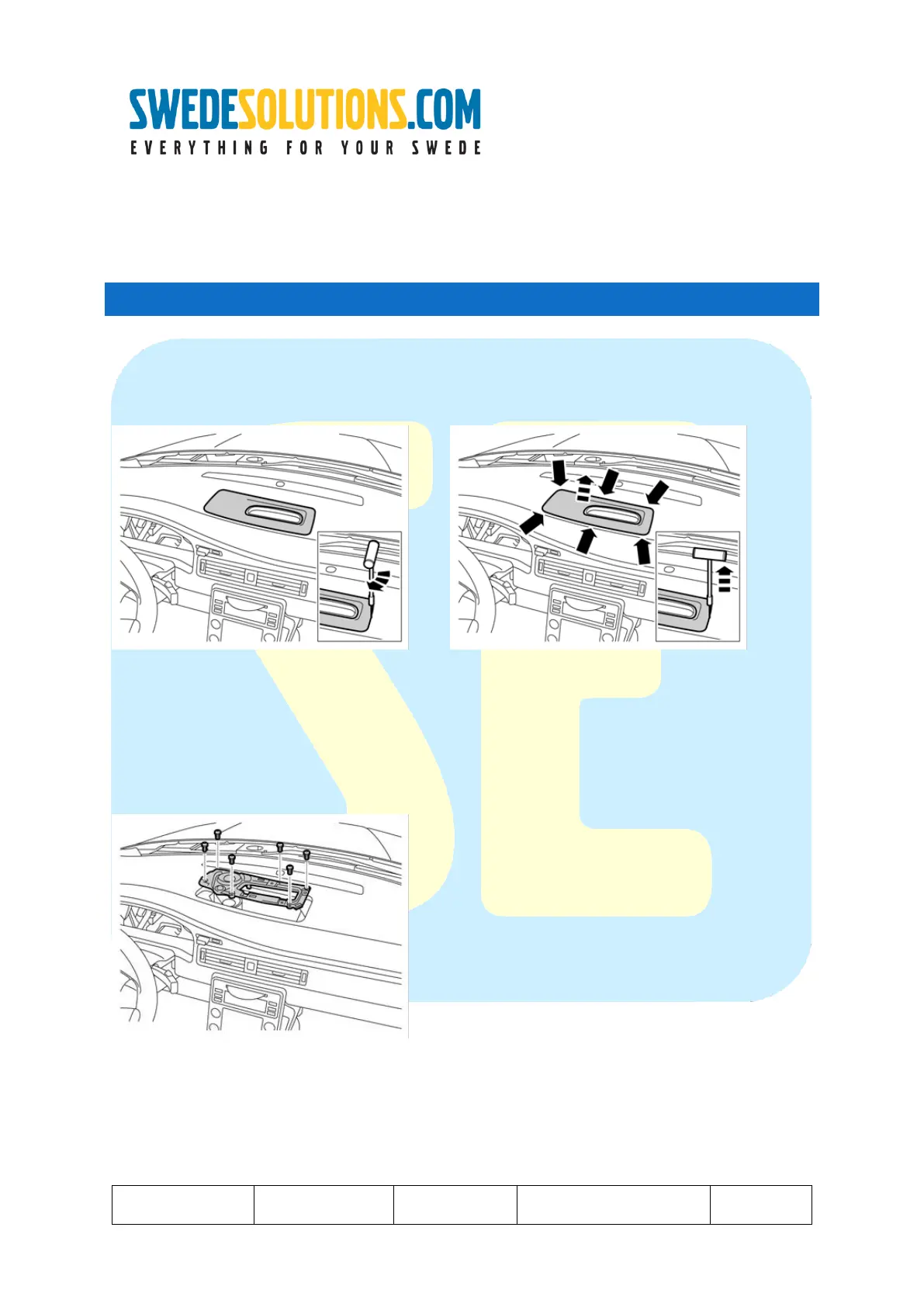
Step 1 : Remove the cover.
1 -> Insert the tool with the bottom part in parallel with the side to be lifted out.
2 -> Once inserted properly, turn the tool so that the angled part points to the center of the panel.
3 -> Carefully but firmly pull up until you feel the panel come loose. Repeat at all sides and corners.
(be careful not to touch the windscreen when pulling! Keep one hand above the tool to avoid hitting the wind-
screen!)
Step 2 : remove the bracket holding the HLDF (and optionally the center speaker)
1 -> remove the 6 torx (size 20) screws.
2 -> pull out the panel holding the screen
3 -> remove connectors from screen (and optionally from the center speaker).



 To Next Page