ENGLISH VERSION
4
TheprogramwillimmediatelysearchforthePowerlinedevices,whichareconnectedwiththepowerlineadapterofyourcomputer
viathepowergrid.Thefounddeviceswillappearinthewindowunder“DeviceName”.Hereyoucanseethepassword(Default
settingempty),thequalityoftheconnection,theeffectivedataspeed(“Rate(Mbps)”)andtheMACaddressoftheadapter.
Whenyouwanttousethesecuritypossibilitiesyouhavetoenterthepasswordoftheadapter.Thispassword(“PWR:xxxx-xxxx-
xxxx-xxxx”)isuniqueforeveryadapterandislocatedonthestickerunderneaththeadapterundertheMACaddress(“MAC:
xx:xx:xx:xx:xx:xx”).Weadviseyoutowritethesedetailsonapieceofpaperbeforeyoustarttheinstallation,thiswayyoucan
easilyfindthedetails.
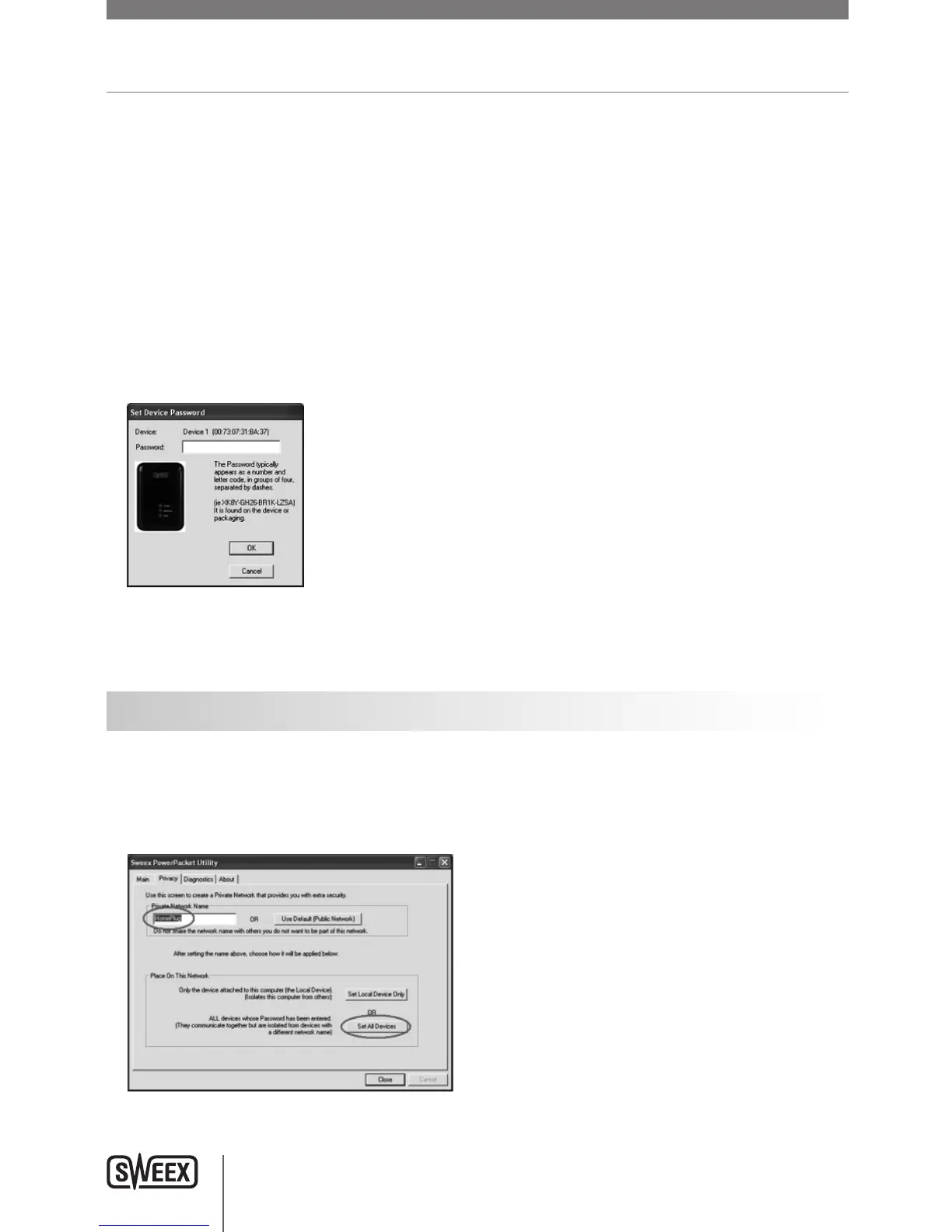
Selectthedeviceyouwanttoconfigureandclick“EnterPassword”.Thefollowingscreenappears:
Enterthepasswordthatisontheadapter.PayattentionthattheMACaddressoftheadapteristhesameastheMACaddressin
theprogram,sothattherightpasswordisentered!
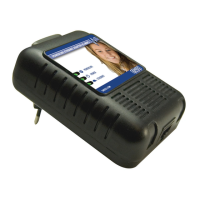
Security
ItisnotnecessarytoconfigurethesecurityfortheSweexPowerlineEthernetAdapter200Mbpstoworkproperly.Ifsomeonehas
accesstoyourplugsockets,thatperson(whenyoudidnotsetupsecurity)couldaccessinternetviathatplugsocket.Thisisnot
practicalandwillhardlyeveroccur,becausethePowerlineislimitedtoyourownhouse.Powerlinedoesgooverallgroupswithin
yourhouse.
00087270_LC202_manual_A6_part1.indd 4 09-06-09 21:01


 To Next Page