EasyManua.ls Logo

SWEEX LC085 - User Manual

SWEEX LC085
4 pages
Print Icon
To Next Page IconTo Next Page
Loading...
English version
4
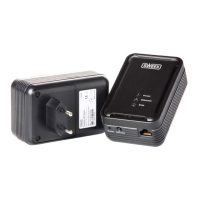
LC085 Sweex Powerline Ethernet Adapter 85 Mbps
Introduction
In order to fully enjoy the Sweex Powerline Ethernet Adapter 85 Mbps, it is important to observe a number of things:
Do not expose the Sweex Powerline Ethernet Adapter 85 Mbps to extreme temperatures. Do not place the product in direct sunlight or in the
direct vicinity of heating elements.
Do not use the Sweex Powerline Ethernet Adapter 85 Mbps in extremely dusty or moist surroundings.
Protect the product against powerful shocks or jolts - they may damage the internal electronics.
Never attempt to open the product yourself - it will cause the warranty to lapse.
Note!
Do not connect the Sweex Powerline Ethernet Adapter 85 Mbps to a UPS or a wall outlet with over-voltage protection and/or filter. This can
negatively affect the quality of the signal.
Installation of hardware
Take the following precautionary measures prior to installing the hardware:
Ensure there is at least 1 free wall outlet available per adapter.
Insert the adapter in the wall outlet. In the event of shortage of space near the wall outlet, the plug of the Sweex Powerline Ethernet Adapter
85 Mbps can be changed.
Press and hold the button under the ribbed section and slide the cover in the direction of the arrow. This will reveal a connection onto which a
power cable can be connected. This cable is not included.
Insert the second and, if applicable, third (etc.) adapter in another wall outlet.
Connect the adaptor with the network and/or the computer by means of the network cables. There are 3 connection options:
Question and Answer IconNeed help?

Do you have a question about the SWEEX LC085 and is the answer not in the manual?

Summary

Introduction to Sweex Powerline Ethernet Adapter

General Safety Precautions

Key safety measures for using the adapter, covering temperature, environment, and physical handling.

Power Connection Advisory

Warning against connecting to UPS or surge-protected outlets to ensure signal integrity.

Hardware Installation and Setup

Pre-installation Requirements

Ensure available wall outlets and proper adapter insertion; plug orientation is adjustable.

Network Configuration Options

Describes connecting multiple adapters and linking to network devices via cables.

Software Installation and Utility

Driverless Operation and Utility

The adapter functions without drivers; the utility enhances functionality and security.

Manual Installation Procedure

Instructions for manually starting the software installation from the CD-ROM if autorun fails.

Accessing the Power Adapter Utility

Guide on how to launch the 'PowerPacket Utility' for configuring the adapter via the Start menu.

Adapter Configuration and Security

Utility Device Information

Utility displays device name, connection quality, speed, and MAC addresses for configuration.

Setting Device Passwords

Step-by-step guide on entering the unique password for each adapter to enable security features.

Network Security Overview

Optional network security prevents unauthorized internet access through the wall outlet.

Enabling Network Protection

How to enable network protection by setting a unique network name, which also acts as a password.

LED Indicators and Warranty

LED Status Meanings

Explains the meaning of Powerline, Power, and Ethernet LEDs for monitoring adapter status.

Warranty Terms

Details the three-year warranty, excluding software/batteries, with claims processed via the dealer.
Summary

Introduction to Sweex Powerline Ethernet Adapter

General Safety Precautions

Key safety measures for using the adapter, covering temperature, environment, and physical handling.

Power Connection Advisory

Warning against connecting to UPS or surge-protected outlets to ensure signal integrity.

Hardware Installation and Setup

Pre-installation Requirements

Ensure available wall outlets and proper adapter insertion; plug orientation is adjustable.

Network Configuration Options

Describes connecting multiple adapters and linking to network devices via cables.

Software Installation and Utility

Driverless Operation and Utility

The adapter functions without drivers; the utility enhances functionality and security.

Manual Installation Procedure

Instructions for manually starting the software installation from the CD-ROM if autorun fails.

Accessing the Power Adapter Utility

Guide on how to launch the 'PowerPacket Utility' for configuring the adapter via the Start menu.

Adapter Configuration and Security

Utility Device Information

Utility displays device name, connection quality, speed, and MAC addresses for configuration.

Setting Device Passwords

Step-by-step guide on entering the unique password for each adapter to enable security features.

Network Security Overview

Optional network security prevents unauthorized internet access through the wall outlet.

Enabling Network Protection

How to enable network protection by setting a unique network name, which also acts as a password.

LED Indicators and Warranty

LED Status Meanings

Explains the meaning of Powerline, Power, and Ethernet LEDs for monitoring adapter status.

Warranty Terms

Details the three-year warranty, excluding software/batteries, with claims processed via the dealer.

SWEEX LC085 Specifications

General IconGeneral
BrandSWEEX
ModelLC085
CategoryAdapter
LanguageEnglish

Related product manuals