EasyManua.ls Logo

SWEEX LC203 - User Manual

SWEEX LC203
8 pages
Print Icon
To Next Page IconTo Next Page
Loading...
ENGLISH VERSION
2
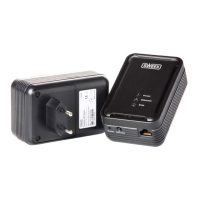
Sweex Powerline 200 Adapter
Introduction
• DonotexposetheSweexPowerlineEthernetAdapter200Mbpstoextremetemperatures.Donotplacetheproductindirect
sunlightorclosetoheatingelements.
• DonotusetheSweexPowerlineEthernetAdapter200Mbpsinextremelydustyormoistenvironments.
• Preventhardshocksorimpactsoftheproduct,asthiscancausedamagetotheinternalelectronics.
• Nevertrytoopentheproductyourself,thisvoidsthewarranty.
Important!
DonotconnecttheSweexPowerlineEthernetAdapter200MbpstoaUPSorasocketwithsurgeprotectionand/orfilter.Thiscan
negativelyinfluencethequalityofthesignal.Usageinsecuredplugsocketsorextensionleadsisalsonotrecommended.
Hardware Installation
Priortoinstallingthehardware,followtheseprecautionaryinstructions:
• Ensurethatthereisatleast1freeplugsocketavailableforeveryadapter.
• Placethesecondandpossiblythird(etc.)adapterinadifferentplugsocket.
• Connecttheadapterwiththenetworkand/orthecomputerbymeansofthenetworkcables.Thereare3connectionpossibilities:
1:Fromrouter/switchtoPC(seeimageunderneath)
00087270_LC202_manual_A6_part1.indd 2 09-06-09 21:01
Question and Answer IconNeed help?

Do you have a question about the SWEEX LC203 and is the answer not in the manual?

Summary

Product Introduction and Safety

Safety and Warnings

Important warnings about operating conditions, physical handling, power sources, and unauthorized opening.

Hardware Installation Guide

Installation Preparations and Connections

Instructions on socket availability, placement, and network cable connections for setup.

Connection Scenarios

Illustrates three primary connection possibilities for the adapters.

Software Installation

Software Installation Procedure

Step-by-step guide for installing the Sweex Powerline utility software on Windows.

Power Packet Utility

Accessing and Using the Utility

Instructions on how to launch and the initial view of the PowerPacket Utility software.

Device Configuration and Password Entry

Details on finding the unique password and entering it to configure devices.

Network Security Configuration

Network Privacy and Security Setup

Explains how to set up a private network using a unique name for enhanced security.

Securing with the Security and reset buttons

Detailed step-by-step scenarios for securing the network using the adapter's security button.

Factory Reset

Factory Reset Procedure

Instructions on how to use the reset button to restore default settings and unsecure the adapter.

LED Status Indicators

Understanding LED Indicators

Explanation of the function and status of the Data, Power, and Ethernet LEDs.

Product Warranty Information

Product Registration Benefits

Details the advantages of registering the Sweex product, including extended warranty and updates.

Detailed Warranty Conditions

Outlines the 2-year standard EU warranty and the 10-year extended manufacturer's warranty.

Warranty Exclusions and Voiding Conditions

Lists items and actions that are excluded from warranty coverage or will void the warranty.
Summary

Product Introduction and Safety

Safety and Warnings

Important warnings about operating conditions, physical handling, power sources, and unauthorized opening.

Hardware Installation Guide

Installation Preparations and Connections

Instructions on socket availability, placement, and network cable connections for setup.

Connection Scenarios

Illustrates three primary connection possibilities for the adapters.

Software Installation

Software Installation Procedure

Step-by-step guide for installing the Sweex Powerline utility software on Windows.

Power Packet Utility

Accessing and Using the Utility

Instructions on how to launch and the initial view of the PowerPacket Utility software.

Device Configuration and Password Entry

Details on finding the unique password and entering it to configure devices.

Network Security Configuration

Network Privacy and Security Setup

Explains how to set up a private network using a unique name for enhanced security.

Securing with the Security and reset buttons

Detailed step-by-step scenarios for securing the network using the adapter's security button.

Factory Reset

Factory Reset Procedure

Instructions on how to use the reset button to restore default settings and unsecure the adapter.

LED Status Indicators

Understanding LED Indicators

Explanation of the function and status of the Data, Power, and Ethernet LEDs.

Product Warranty Information

Product Registration Benefits

Details the advantages of registering the Sweex product, including extended warranty and updates.

Detailed Warranty Conditions

Outlines the 2-year standard EU warranty and the 10-year extended manufacturer's warranty.

Warranty Exclusions and Voiding Conditions

Lists items and actions that are excluded from warranty coverage or will void the warranty.

SWEEX LC203 Specifications

General IconGeneral
BrandSWEEX
ModelLC203
CategoryAdapter
LanguageEnglish

Related product manuals