ENGLISH VERSION
3
2:FromPCtoPC
3:Fromrouter/switchtorouter/switch
• CheckiftheLEDsarelitasindicatedinthetopic“LEDindications”.
Software installation Windows 2000, XP and Vista
NodriversareneededfortheSweexPowerlineEthernetAdapter.Theutilitythatwillbeinstalledensuresextrafunctionalityand
security.Ifyoudonotneedthisyoudonothavetoinstallthesoftware.WithoutsoftwareyoucanimmediatelyusetheSweex
PowerlineEthernetAdapter.
Beforeyoustarttheinstallationwerecommendyoutoensurethatyouroperatingsystemisup-to-date.Thisiseasilycheckedbyselecting
the“Extra”menuinInternetExplorerandthentheoption“WindowsUpdate”.
PlacetheSweexCD-ROMintheCD-ROMplayer.Theautorunmenuwillstartautomatically.
Inthismenuchoosetheoption“DriversWindows2000,XPandVista”
Whenthisautorunmenudoesnotappearyoucanstartthesoftwaremanually.Todothisopen“MyComputer”andgotoX:\
software\(XistheletteroftheCD-ROMdrive).Hereisthefile‘LC202_software’.Executethisfile.Windowswillinstallthe
softwareautomatically.
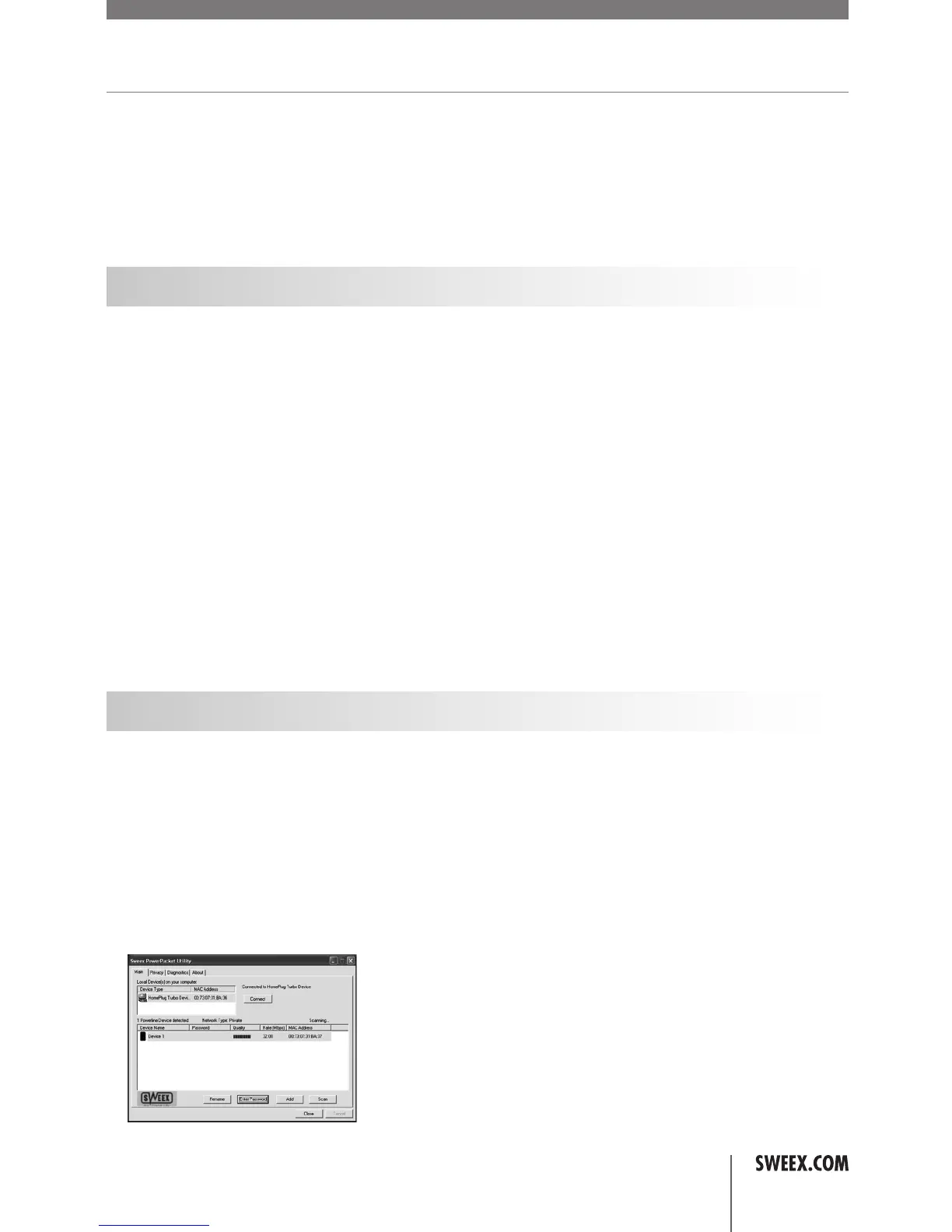
Software Power Adapter Utility
ConfiguringtheSweexPowerlineEthernetAdapter200Mbpsisdonewiththe‘PowerPacketUtility’.Thesecanbefoundas
follows:
GotoSTART->“AllPrograms”->“PowerPacket5.0”->“PowerPacket5.0”
orwhentheclassicviewisbeingused:
GotoSTART->“Programs”->“PowerPacket5.0”->“PowerPacket5.0”
Thefollowingscreenappears:
00087270_LC202_manual_A6_part1.indd 3 09-06-09 21:01


 To Next Page