EQUIPMENT DETAILS
110
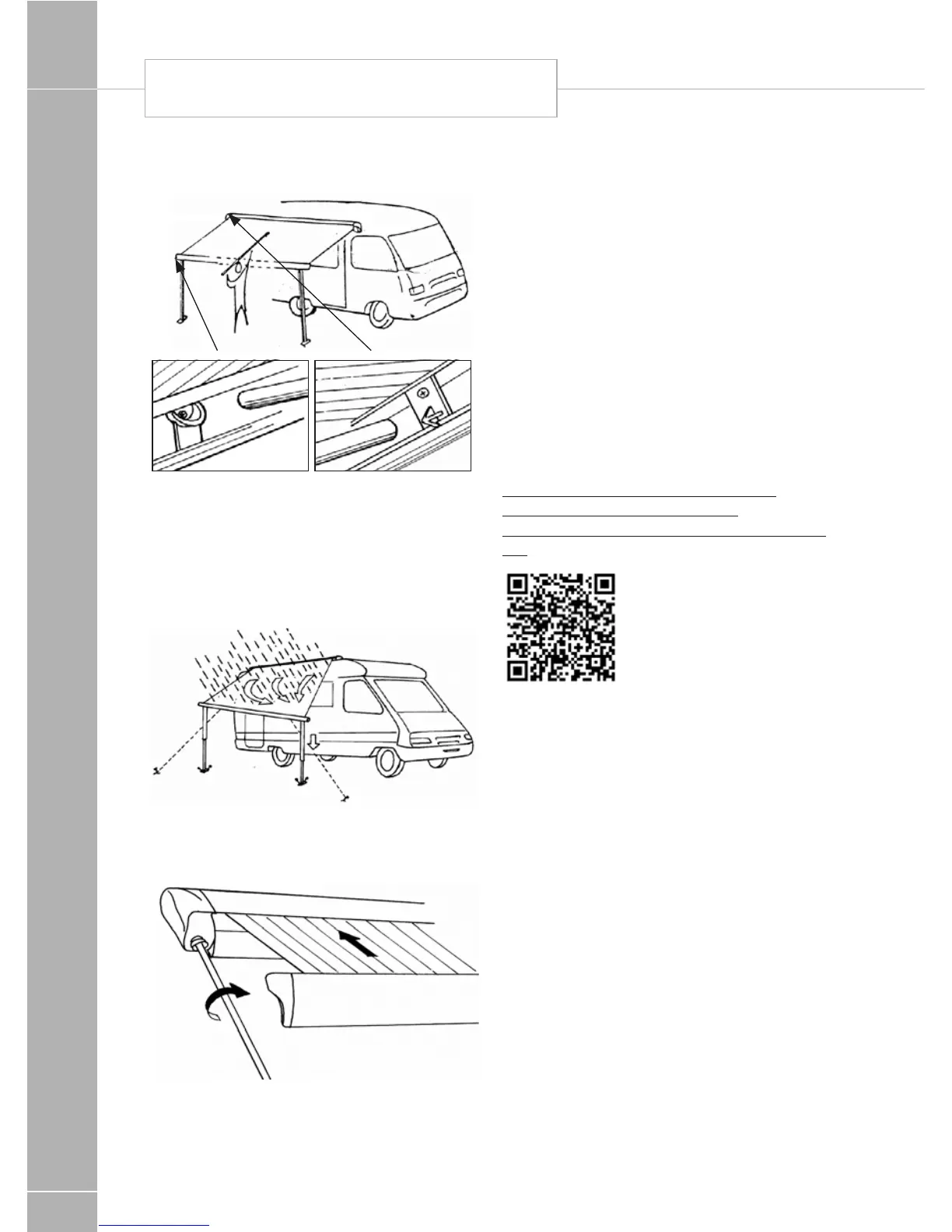
8. Install the tension rafter (for 3.75 m awning).
Fig. 8
9. When raining, lower one side of the awning
in such a way that the water can run down
the fabric. Prevent the fabric from flying up
by a sudden wind blow by using the hold
down kit (optional).
Fig. 9
10. The front profile locks automatically
when rolling up
Fig. 10
Status 570 Digital antenna system
Travelling
Do not travel:
• with the antenna raised
• with the antenna set for vertical signals
To reduce the possibility of damage when
travelling, point the antenna backwards.
The RED SPOT on the bottom of the mast
indicates the front of the Antenna.
Your motorhome is fitted with a Status 570 TV
aerial. Please read the user instructions for the
TV aerial, which are available from the following
location:
http://www.visionplus.co.uk/assets/
pdfs/2016/570%20RETAIL%20
Instructions%20A3%20Lilac%2018-08-15.
pdf
If you are unable to view the documents on
line, please contact the supplier, your dealer or
Swift for an electronic or paper copy.
AWNING / STATUS TV AERIAL






 To Next Page