63
ELECTRICAL SYSTEMS
63
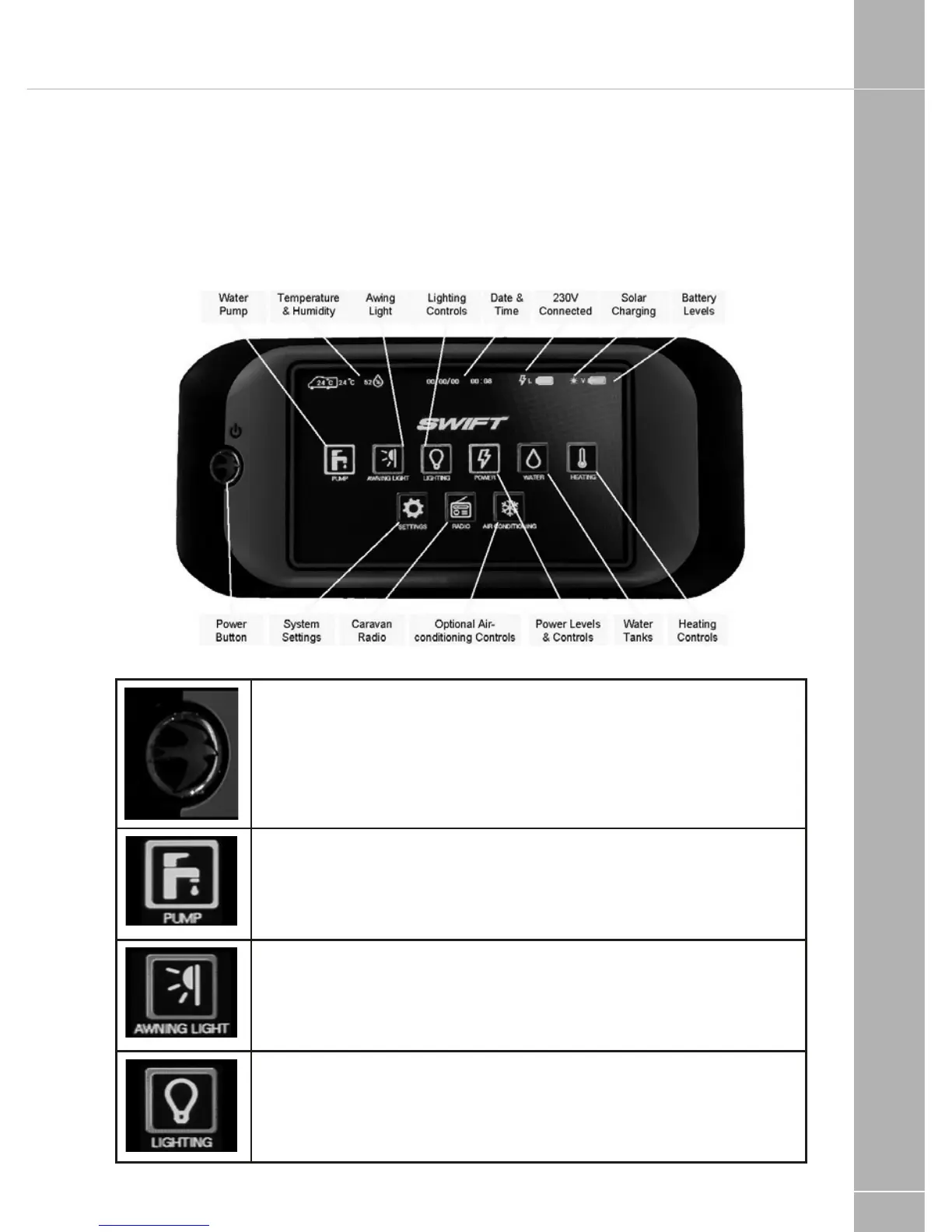
2.5 Control Panel - Component Layout
(see image below)
Your control panel will have an appearance as
below, but depending on your specification of
the vehicle the control panel features will vary.
Not all features are present in all vehicles.
2.6 Control Panel - Key Features
'Swift' Power Button. Press the ‘Swift’ power button to turn the leisure
power on, the panel will beep twice and show the Swift start-up logo. The
control panel screen will illuminate when the power is on, but the screen
will go to sleep after a pre-determined time. Pressing the power button or
touching the screen while the screen is asleep will wake the screen without
turning the power on or off. To turn the power off press and hold the power
button to turn the power off, the panel will beep once.
Pump Button. Press the pump button to turn the water pump on. Press
the button again to turn the pump off. The button border will illuminate
when the pump is on. To view the water tank levels and other controls
press the water button.
Awning Light Button. Press the awning light button to turn the awning
light on or off. The border of the button will illuminate when the awning light
is on. Note the awning light may also be controlled by the motorhome
locking system.
Lighting Button. Press the lighting button to show the lighting control
screen. Here you can turn on / off or adjust the dimmable lighting levels.
Press the home button to return to the main screen.
Fig 2






 To Next Page