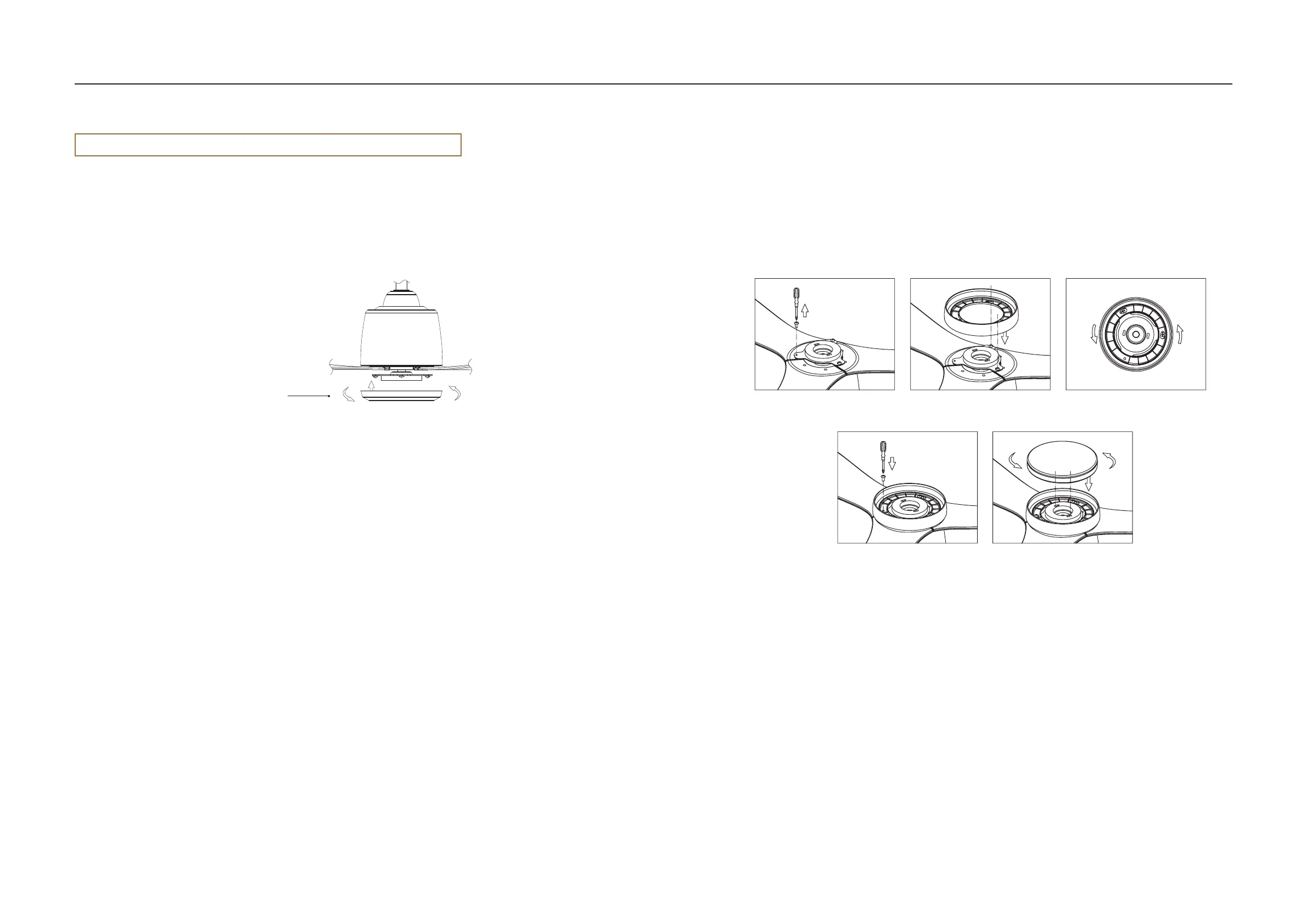
- Gently connect the bottom cover and rotate clockwise.
- Before switching on the fan, ensure that all the blades are securely fastened!
10. Connecting the bottom cover 11. Installing the light fitting (if selected)
- Remove one screw completely from the light base (Figure 1).
- Partially loosen two screws on the light base.
- Align the keyhole slots on the light cover with the two partially loosened screws (Figure 2).
- Rotate counterclockwise to lock the light cover in place (Figure 3).
- Insert the third screw into place and tighten all three screws (Figure 4).
- Rotate the light fitting counterclockwise to lock in place (Figure 5).
1 2
54
3
Bottom Cover
Installation instructions
Attention! If you install a light fitting – there is no need to attach the bottom cover.
11
SWING DIAMOND
Fan Installation Instructions | Version 1.23
10


 To Next Page