12
Function / select buttons, see
Ä
‘Function / select buttons [12]’ on page 12.
13 Transport buttons:
back, forward, stop, play, record
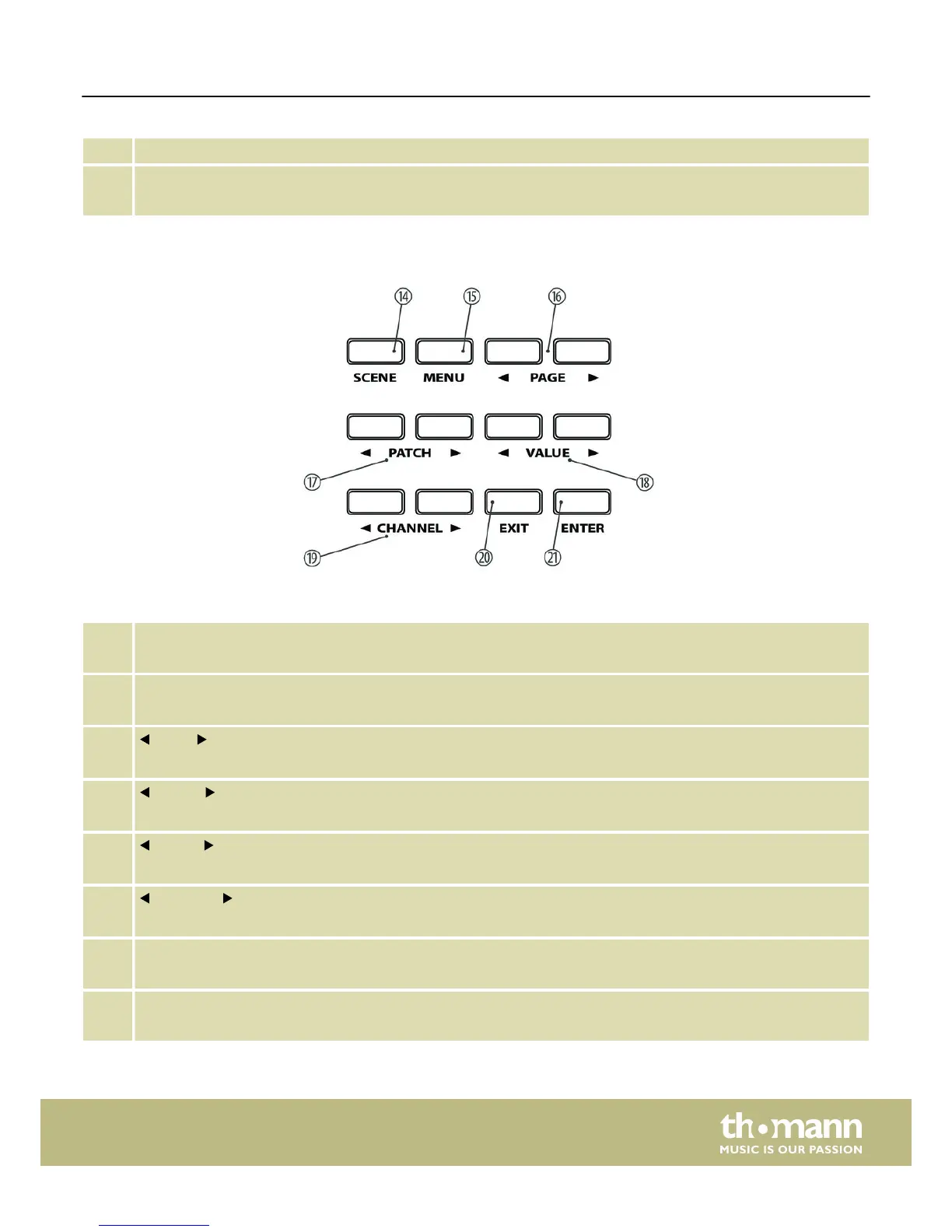
14 [SCENE]
Button to activate the Scene mode.
15 [MENU]
Button to activate the Edit mode.
16
[PAGE]
Buttons to navigate between the parameters and functions available (all modes).
17
[PATCH]
Buttons to send programme change commands.
18
[VALUE]
Buttons to adjust / select values / options in Edit and Scene mode.
19
[CHANNEL]
Buttons to switch between the available channels.
20 [EXIT]
Button to exit the open menu or menu function.
21 [ENTER]
Button to confirm parameter changes.
Function / select buttons [5]
Connections and operating elements
ControlKey 49, ControlKey 61, ControlKey 88
11


 To Next Page