Need help?
Do you have a question about the Swissvoice G50 and is the answer not in the manual?
Identifies and locates external features, ports, buttons, and cameras of the G50 phone.
Steps for inserting SIM/memory cards and installing the battery.
Covers making calls, accessing call logs, managing contacts, and message handling.
Instructions for switching between Android and Simple modes and exporting/importing data.
Managing the notification bar and setting ringer modes for calls and alerts.
Guides on connecting to Wi-Fi networks and using Bluetooth for device pairing.
Instructions for using the camera and basic multimedia functions.
Details on accessing and managing installed applications on the device.
Configuration options for network connections and audio output.
Customizing screen display properties and securing the device.
Setting device language, input methods, and accessibility features.
Guidance on resolving common issues and understanding network service support.
Important safety guidelines for using the phone, including handling and environmental considerations.
Information on radiation exposure, battery care, and responsible disposal.
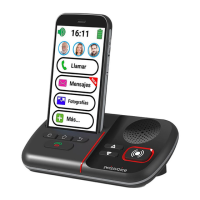
The Swissvoice G50 is a smartphone designed with ease of use in mind, particularly for seniors, offering two distinct operating modes: "Simple Smartphone" and "Light Android." This dual-mode functionality allows users to choose an interface that best suits their comfort and technical proficiency. The device emphasizes accessibility through features like text-to-speech support, a dedicated SOS button, and an easy-charging desktop base.
The G50's core functionality revolves around communication, safety, and simplified access to common smartphone features.
The device supports standard call functions, allowing users to make and receive calls. The "Simple Smartphone" mode features three one-touch speed dial buttons on the home screen for quick access to important contacts. Users can also dial numbers directly or select contacts from a simplified phonebook. The phonebook allows for adding new contacts with names, numbers, and even photos for visual recognition. Editing existing contacts is also straightforward.
For messaging, the G50 consolidates all message types (SMS, WhatsApp, missed calls) into a single "Messages" center. This simplifies message management, with new messages highlighted for easy identification. Users can compose new text messages, input recipient numbers directly, or select from their phonebook. The device also supports multimedia messages (MMS) by allowing attachments to text messages.
The G50 includes a "Call Log" to view recent and full call history, enabling users to easily redial numbers or access more options for call records. For those who prefer video communication, the device integrates Google Duo, allowing for video calls to contacts.
A prominent safety feature is the dedicated SOS button (17). When pressed and held for three seconds, the G50 automatically dials pre-set assistance numbers and activates hands-free mode. Simultaneously, an SMS containing geolocation information is sent to the assistance call recipient and up to five other designated contacts. This feature is crucial for emergencies, providing both direct communication and location sharing. Users are advised to ensure the SOS number is set up correctly in the phonebook and that the network service is active for this function to work reliably.
The G50 offers two distinct modes:
The device includes a camera for taking photos and recording videos. Users can switch between normal and selfie modes and access flash settings. The "Pictures" center allows for viewing and organizing photos and videos. The "Gallery" app provides tools for editing and sharing images.
A built-in flashlight can be activated or deactivated using a sliding switch (10) on the side of the phone.
The G50 supports Wi-Fi and Bluetooth connectivity. Users can easily enable these features from the notification bar or through the "Settings" menu. Wi-Fi allows for internet access, while Bluetooth enables pairing with other devices like headsets.
The "Settings" menu provides comprehensive options for personalizing the phone. Users can adjust language, sound settings (ringer melody, volume for calls, notifications, multimedia), and display settings. The "Advanced Settings" menu offers further customization, including initial setup, personal info management, SOS and support settings, Android settings, medication reminders, and display & sound settings.
To begin using the G50, users need to insert a SIM card (and optionally a microSD memory card for expanded storage). The device supports two Micro SIM cards and a microSD card up to 64 GB. After inserting the cards and battery, the phone is powered on by a long press of the ON/OFF button (1). A setup wizard then guides the user through language selection and initial configurations.
In Simple Smartphone mode, calls can be initiated directly from the three speed dial buttons, by entering a number via the "Call" menu, or by selecting a contact from the phonebook. To end a call, the red hang-up button is pressed. When receiving a call, a pop-up window appears, and users can press the green "ANSWER" button to accept or "DECLINE" to reject. During a call, the volume can be adjusted using the volume up/down keys (2, 3).
A helpful feature for users with visual impairments is "Talking Dialing Digits." As numeric buttons are pressed, the G50 announces the corresponding number, except when in silent mode. This feature can be disabled in the "Advanced Settings" menu.
To send a message, users navigate to the "Messages" center, select "Write a new message," and input the recipient's number or select from contacts. Messages can be composed using the keyboard or by selecting a pre-defined simple message.
The notification bar at the top of the screen displays information about the phone and installed apps. Dragging down the notification bar reveals pending notifications and quick-access shortcuts to various phone settings, such as Wi-Fi and Bluetooth.
Users can switch between "Simple Smartphone" and "Light Android" modes. From Android mode, this is done by clicking "Select Home app" and choosing "Simple Smartphone." From Simple Smartphone mode, users go to "Tools" > "Exit System" > "Select Home app" and choose "Android."
The flashlight can be easily turned on or off using the dedicated sliding switch (10) on the left side of the phone.
In idle mode, users can press the dedicated button to select between Sound, Silent, or Vibrate ringer modes.
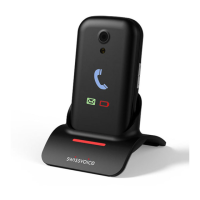
The G50 comes with an easy-charging desktop base. Users simply place the phone on the base as depicted in the manual. Alternatively, the phone can be charged using the provided USB cable plugged directly into the USB connector (12). It is crucial to use only the battery, charger, and accessories approved by the manufacturer to avoid damage and invalidate the warranty.
To ensure optimal battery life and safety, users are advised to:
The manual provides a basic troubleshooting guide for common issues:
The device is marked with a symbol indicating that it should be collected separately from household waste for recycling, aligning with European Union regulations for electronic appliance disposal. This encourages users to contribute to environmental protection.
 General
| Body SAR (EU) | 0.67 W/kg |
|---|---|
| Head SAR (EU) | 0.224 W/kg |
| Extremities SAR (EU) | 2.226 W/kg |
| Processor family | - |
| Processor frequency | - GHz |
| Hearing aid compatibility | Yes |
| Screen shape | Flat |
| Display diagonal | 5 \ |
| Display resolution | 1280 x 720 pixels |
| Form factor | Bar |
| Product color | Black |
| Multimedia Messaging Service (MMS) | Multimedia Messaging Service (MMS) is a standard way to send messages that include multimedia content to and from a mobile phone over a cellular network |
| RAM capacity | 1 GB |
| Compatible memory cards | MicroSD (TransFlash) |
| Internal storage capacity | 16 GB |
| Rear camera type | Single camera |
| Front camera type | No |
| Rear camera resolution (numeric) | 5 MP |
| Front camera resolution (numeric) | 0 MP |
| Talk time (3G) | 8 h |
| Battery voltage | 4.35 V |
| Battery capacity | 2700 mAh |
| Standby time (3G) | 300 h |
| 4G standard | LTE |
| SIM card type | MicroSIM |
| Wi-Fi standards | 802.11b, 802.11g, Wi-Fi 4 (802.11n) |
| Bluetooth version | 4.2 |
| 4G bands supported | 850, 900, 1800, 1900 MHz |
| SIM card capability | Dual SIM |
| Mobile network generation | 4G |
| Subscription type | No subscription |
| USB connector type | Micro-USB B |
| Headphone connectivity | 3.5 mm |
| Platform | Android |
| Operating system installed | Android 10 Go edition |
 Weight and Dimensions
| Depth | 10.5 mm |
|---|---|
| Width | 73 mm |
| Height | 143 mm |
| Weight | - g |

 To Next Page