EasyManua.ls Logo

Syba SY-ENC50119 - User Manual

Syba SY-ENC50119
2 pages
Print Icon
To Next Page IconTo Next Page
Loading...
Superior USB3.0 eight-bay hard disk enclosure, tool-free mobile tray design,
plug-and-play, suitable for 2.5/3.5 Inch SATA HDD /SSD hard disk. Internal twin
cooling fan, single disk independent power switch , intelligent segmentation.
Easy to achieve sea volume expansion and external storage backup, and carefully
escort your important data.
Product material : Alloy + engineering plastic
Product size : 256x151x313mm
Interface port: USB3. 0
Drive bays: 8 SATA III Interface Drive Bays
Compatible disk : 2.5 "/ 3.5 " SATA HDD or SSD
Installation method: Tool-free extraction, driver-free
Chipset: ASM1074+ASM1153E main control chip
Power supply: 200W internal power supply
Transmission rate: USB3.0 5Gbps / SATA III 6Gbps bandwidth
Support UASP acceleration ,TRIM command
Supported systems: Windows / Mac OS / Linux
Package Contents
Hard disk enclosure
USB 3. 0 Data cable
Power cable
Screw x 20
Instruction manual
Please read this manual carefully before using the product, and keep it in a safe place
TM
8 Bay USB 3.0 Hard Drive Enclosure
SY-ENC50119 Manual
Product Description
Product Parameters
Appearance Description
Question and Answer IconNeed help?

Do you have a question about the Syba SY-ENC50119 and is the answer not in the manual?

Summary

Product Overview and Specifications

Product Description

Details the superior USB3.0 eight-bay hard disk enclosure's features like tool-free design, plug-and-play, and cooling.

Product Parameters

Lists key technical specifications such as material, size, interface, drive bays, chipset, and supported systems.

Device Components and Labels

Product Labels Description

Explains the function and location of each component, including power switches, mobile tray, cooling fan, and interface ports.

Hard Disk Installation Guide

3.5 Inch Drive Installation

Step-by-step guide for installing 3.5-inch hard drives into the mobile tray using tool-less design.

2.5 Inch Drive Installation

Instructions for installing 2.5-inch hard drives, including securing them with screws to the mobile tray.

Frequently Asked Questions

Troubleshooting Common Issues

Addresses slow speeds, new disk recognition, XP capacity limits, and safe drive ejection procedures.

Overview

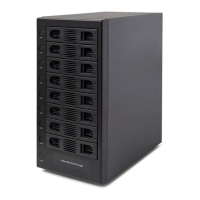
The SY-ENC50119 is an 8-bay USB 3.0 Hard Drive Enclosure designed for expanding storage and backing up data. This device is crafted from alloy and engineering plastic, measuring 256x151x313mm. It features a tool-free mobile tray design, making it plug-and-play for both 2.5-inch and 3.5-inch SATA HDD/SSD hard disks.

Function Description:

The enclosure provides eight SATA III interface drive bays, allowing for significant storage expansion. Each hard drive bay has its own independent power switch, enabling individual drives to be powered down separately. This feature is particularly useful for managing multiple drives and conserving power. The main power switch controls the entire unit, turning it on when pressed down and off when pressed again.
Important Technical Specifications:

  • Material: Alloy + engineering plastic
  • Dimensions: 256x151x313mm
  • Interface Port: USB3.0
  • Drive Bays: 8 SATA III Interface Drive Bays
  • Compatible Disks: 2.5" / 3.5" SATA HDD or SSD
  • Installation Method: Tool-free extraction, driver-free
  • Chipset: ASM1074+ASM1153E main control chip
  • Power Supply: 200W internal power supply
  • Transmission Rate: USB3.0 5Gbps / SATA III 6Gbps bandwidth
  • Supported Systems: Windows / Mac OS / Linux
  • Features: Support UASP acceleration, TRIM command

Usage Features:

  • Tool-Free Mobile Tray Design: The mobile trays are designed for easy hard disk installation and removal. For 3.5-inch drives, users simply press a middle sliding button to release the tray, remove fixed fasteners on both sides, place the hard disk, align screw holes, and re-fasten the fasteners. For 2.5-inch drives, one fixed fastener is removed, the drive is placed on the tray, and secured with provided screws through bottom screw holes. Once the hard disk is installed, the tray slides back into the bay and snaps into place.
  • Independent Power Switches: Each bay has its own power switch, allowing for flexible management of individual drives.
  • Hard Disk Power Indicator: The enclosure provides visual feedback on hard disk status:
    • Solid Blue: Power On
    • Flashing Green: Drive Activity
    • Solid Green: Drive Sleep Mode
  • USB 3.0 Interface: The enclosure connects to a PC via a USB 3.0 port using the provided USB3.0 cable. If the PC's USB interface is USB2.0, the transmission speed will be downgraded accordingly.
  • Intelligent Segmentation: The device supports intelligent segmentation, although specific details of this feature are not elaborated upon in the manual.
  • UASP Acceleration and TRIM Command Support: These features enhance data transfer speeds and optimize SSD performance.

Maintenance Features:

  • Cooling System: The enclosure is equipped with two 8 cm silent cooling fans that automatically activate when there is disk activity and turn off when the disk goes to sleep. This helps maintain optimal operating temperatures for the hard drives.
  • Fan Speed Control: The cooling system offers two fan speed modes: Low and High. Users are advised to set the fan speed to high when the ambient temperature exceeds 78°F (26°C) to ensure adequate cooling.
  • Power Supply Fan: The internal 200W power supply includes a standard industrial 1U small power supply fan designed for heat dissipation. Users are reminded not to block the fan vents to ensure proper airflow.

Important Considerations:

  • New Hard Disk Installation: For new hard disks, users must initialize and format the partition in "Computer Management" - "Disk Management" before the mobile hard disk can be used normally.
  • Windows XP Limitations: Windows XP systems cannot identify hard drives larger than 2TB. For capacities exceeding 2TB, it is recommended to convert the disk to a GPT disk partition, which is supported by Windows Vista (64bit) or above. Windows XP will not support disk partitions exceeding 2TB.
  • Safe Ejection: To safely remove an active hard drive without data corruption, users should use the "Safely Remove Hardware and Eject Media" icon in the system tray or turn off the enclosure.
  • Transmission Speed: While the product supports USB 3.0 standard transmission speeds (5Gbps), actual read/write speeds can vary. Connecting to a USB 2.0/1.1 host port will reduce speed. Simultaneous reading/writing from multiple hard disks can also result in relatively slower transmission speeds due to intelligent assignment.

Syba SY-ENC50119 Specifications

General IconGeneral
BrandSyba
ModelSY-ENC50119
CategoryEnclosure
LanguageEnglish

Related product manuals