SET
MODE
6
E
1 . Operating features of the instrument
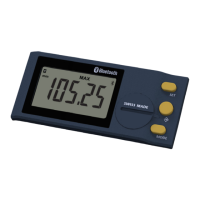
- The instrument has two operating modes: First level functions (direct access) and Second level functions. In
addition to the conguration functions, available access to the MIN, MAX and DELTA (TIR) mode, or display of
tolerances (see chaps. 3 and 4)
- The «favourite» key gives direct access to the function used most often (see chap. 9)
- Sets a Preset value, reset the MIN/MAX mode, veries a selection, and controls switching off the instrument.
By default, SIS mode enables automatic switch-off with no loss of origin (see chap. 11).
- With the «Left and Right» buttons, the user may change the extent of the analogue scale as well as enter the
values of the nominal dimension and tolerance limits. (see chap. 6.2)
- Personalising the functions
It is possible to activate or de-activate certain functions of the instrument via RS232 (see chap. 13)
- Data transmission parameters
4800Bds, 7 bits, even parity, 2 stop bits
2. Start
Press a button. (For a
Bluetooth
®
connection, see chap 9.)



 To Next Page
 Loading...