OPTmONAL SETTmNGS (Continued}
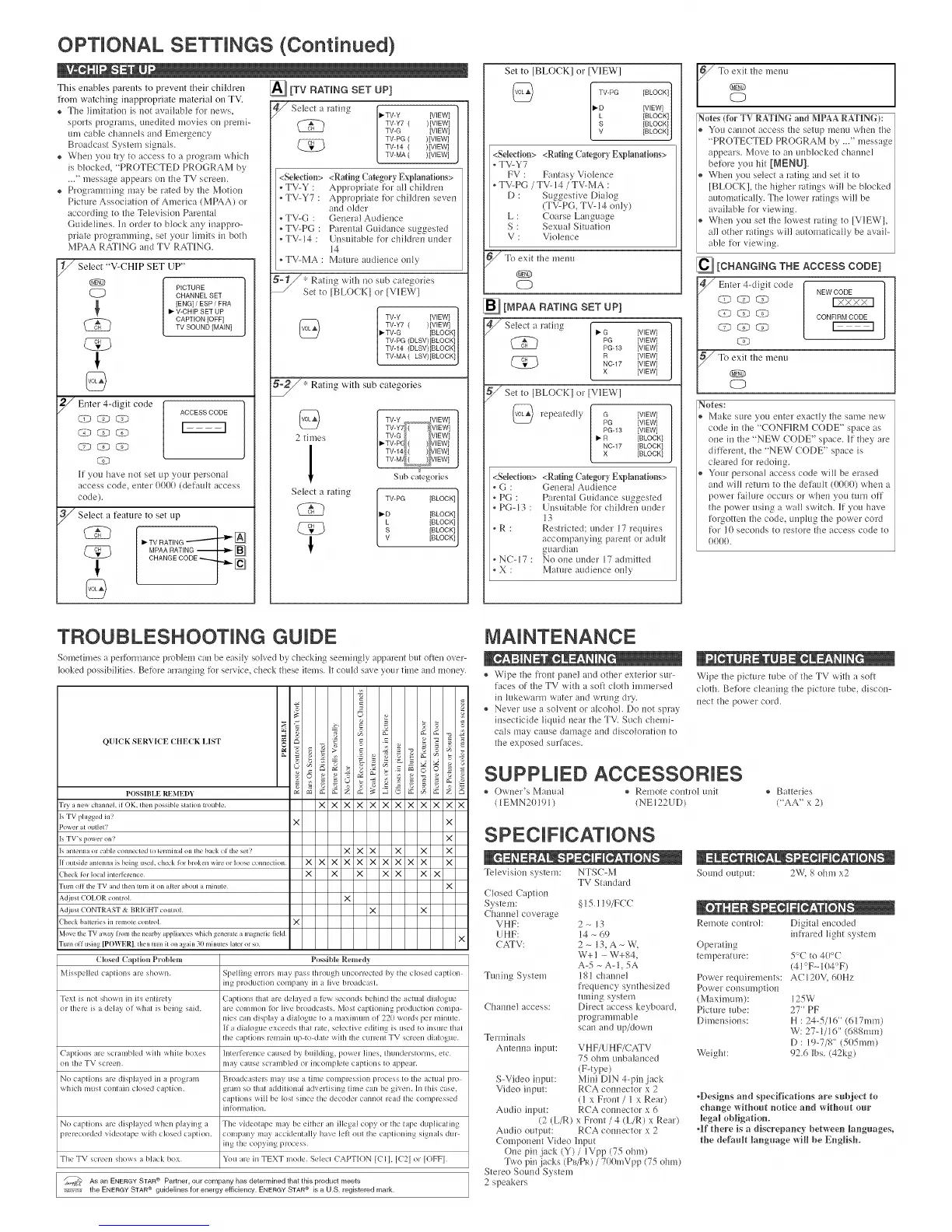
This enables parents to prevent their children
from watching inappropriate material on TV.
® The l{mitation is l_otavailable fl.)rnews,
sports programs, tmedited movies on premi-
um cable chalmels md Emergency
Broadcast System signals.
® When you try to access to a program which
is blocked, "PROTECTED PROGRAM by
•_" message appears on tile TV screen.
® Progr;mmfing may be rated by tile Motion
Picture Association ot America (MPAA) ol
accordiug to tile Televis{ou Parental
GuideNiles. hi order to block ally iuappro-
prfate progr lmmilig, se{your limits iu both
MPAA RAT]INGand TV RAT]ING.
i
///Select "V-CHIP SET UP"
®
PICTURE
_} CHANNEL SET
[ENG] / ESP / FRAV-CHIP SET UP
CAPTION [OFF]
TV SOUND ]MAIN[
_ Enter 4-digit code
ACCESS CODE
LTb CD _LT2_
O7_GP C)
C9
If you have _ot set up your personal
access code, euter 0001/(def udt access
code)•
_ Select a feature to set
up
CHAN ECO .
@
_[TV RATING SET UP]
///Select I_TV-Y [VIEW]
i'atiug
a
TV-Y7 ( )]VIEW[
TV-G ]VIEW]
TV-PG ( )]VIEW]
TV-14 ( )]VIEW]
TV-MA ( )]VIEW]
<Selection> <Rating Category Explanations>
, TV-Y : Appropriate tor all childre_*
, TV-Y7 : Appropriate tbr children seven
and older
• TV-G : Genera! Audieuce
• TV-PG : Parental Guidance suggested
• TVq4 : U_suitable for children under
14
• TV-MA : Mature aud{ence nifty
_"; Rati_*gwith no sub categories
Set to [BLOCKI or [V]IEW]
TV-Y [VIEWI
TV-Y7 ( )[VIEW]
• TV-G [BLOCK]
TV-PG (DLSV)[BLOCK]
TV-14 (DLSV)[BLOCK]
TV-MA ( LSV)[BLOCK l
* Rating with sub categories
TV-Y ,,_, VIEW]
TV-Y7 ( / VIEW]
2 times TV-G VIEW]
_TV-PE ( ) qlEW]
TV-14 ( ) VIEW]
TV-M/ ( ) glEWl
Sub categories
Select a rating
i
TV-PG [BLOCK]
I_D [BLOCK]
L [BLOCK]
S [BLOCK}
V [BLOCK1
Set to [BLOCK] or [VIEW]
I_D [VIEW]
[BLOCK]
[BLOCKI/
[BLOCKIJ
<Sdedion> <RatingCategory Explanations>
, TV-Y7
FV : Fautasy Violence
• TV-PG / TV- 14/ TV-MA :
D : Suggestive Dialog
(TV-PG, TV- 14only)
L : Coarse Lm*gutge
S : Sexual Situation
V : Violence
_Tc exit tile lrteml
®
CD
_ [MPAA RATING SET UP]
_ Select _-G [VIEW}
ratiug
a
PG [VIEW l
PG-13 [VIEW l
a [VIEW]NC-17 [VIEW]
X [VlEWI
_Set to [BLOCK1 or [V]IEW]
repeatedly G
PG
PG-13
NC-17
X
[VIEW]
[WEW]
[VIEW]
[BLOCK]
[BLOCK]
[BLOCK]
<Sdedinu> <RatingCategory Explanations>
• G : Gee*era]Aud{ellce
• PG : Parental Gu{dance suggested
, PG-13 : U_suitable tbr childreu under
13
, R : Restricted; under 17requh'es
accompauying parent or adult
guardian
,NC-17: No oneuuder 17admitted
, X : Mature audieuce only
To_t the menu
Notes (for TV RATING and MPAARATING):
Voll caln_ot access tile setup menu whel_ the
"PROTECTED PROGRAM by ..." message
appears. Move to an unblocked channel
beibre you hit [MENU].
Whell you select a rating and set it to
[BLOCK], the higher ratings will be blocked
automatically. The Mwer rati_*gswill be
available fbr viewitlg.
When you set tile lowest rating to [V1EWl,
all other ratings wHI automatically be avliF
able tbr viewing.
_ [CHANGING THE ACCESS CODE]
Enter 4-digit code NEWCODE
C4-_ E-s_ _ CONFIRM CODE
_<_ F-----q
Notes:
Make sure you enter exacdy the su'qe ilew
code i_*the "CONF]IRMCODE" space as
one i_*the "NEW CODE" space. ]ifthey are
dfft)reut, the "NEW CODE" space is
cleared Mr redoiug.
Your personal access code will be erased
and will return to the default (00(/(/) whell a
power failure occm's or wheu you tm'n off
tile power using a wall switch. It you have
%rgotte_*tile code, tu*ph_gthe power cord
%r 10 secouds to restore tile access code to
0000.
TROUBLESHOOTING GUIDE
Somethnes t perfbrmauce problem cau be easHysohed by' checking seemiugb appareut but oRen over-
looked possibilities• Be%re uTaI}gh}g%r service, check these items•litcould save your time midmou%,.
QUICK SERVICE CHE(K LIST
,o
I'OSSHIIJe;REME1)Y _5 b2 ;_ _ _ _q _ b2
Tr}anewchannehiIOK, thenpossibleslationl_ouble X X X X X X X X X X X X
Is TV phlgged in?
x x
Power al outlel?
Is TV's power on? X
[samennaorcahleconnectedtoterminalonlhebackot'fl_esel? X X X X X X
[Ioulsideanlennaisbeingused. check lor broken wire or hx>se connecfion X X X X X X X X X X X
Check lot h/cll imerlerence X X X X X X X
Turn oll fl_e TV and th_'n turn il on alt_q Ihoul a minute" X
Adiust COI.OR control X
Adiust CONTRAST & BRIGHT control X X
Check balleries in remole control X
Move the TV av_a) lmnl file neaih) _ppli races M_ich generate a m ignetic fieM X
Turn oil ushlg P()V_ ER . then {ulll il /Ill igain 30 minutes lalel or so
(losed Captiou_ l)_oblem Possible Remed)
MissD:lle(l (apliOllS ale shot_41. Spellhlg t>rlors ilia) piss [hrotlgh tlRcorlccted by gin closed caption
II1_ prodtlcliOll (Olllp311y ill I live broadcaM•
Text is no[ sho\_n ill ils ellthe[} C tplions thai arc delayed a IL-,a se( ollds behhld tile acltlal dialogue
or lhele is a (lelay ol \_lial b, beilig said. al(_ (Olii111Oll Ix)iT live bl:oad( asts• Mosl t'aptioRifig pl'Odtl(liOll t'oRlpa
IlJeS Call (llspla} t dialoj2tle 1o I lllaXl!llllRI Ol 220 \_()t'd'_ per ITIlIItlIU•
lie dialogue exceeds thai Fain selective editing is used 1oiRstlre thai
[he (aplio[Is l'elllaiR tl D [0 dale \_illi [l_e ( tlrlelU TV sclee[I dialogtle.
CaptiOllS are SClalllble(l \_ilh \_llJle boxes ]lltetfctellc_ (aused by btliklhlg, po_er liRes lhtlnderstorlRs, elc.
on lhe TV _( reeli. IR_ly (arise SClalRbled OF ill( ORlplele ( aplJoIIS IO appear•
NO capliolls are displayed ill a pl'ogtalR S!oadoagwis lilly USe a tilne COlllpleSSiOR process tO the acltltl pro
_*liich IRtlSl COlltaill dosed CapliOIl• glare SO lhal addJliotlal advelliSillg tillle Call [)t? given. ]li tliis case,
captions _ilI be Iosl _illce file decoder ( {lllllOl read lhe compressed
ill [()rill31 loll•
NO capliORS are disphtyed t_lieli plating t Tile videotape inty be either aR illegal copy or lhe [ape dtlplicathig
)rerecorded videolape \_Jlh ( losed ( apliOIl• COlllpally may a( cldeRtally ]la'v'(? lel_ Otll IlK? CaDlJOlliRg signals (ltll
ing lhe copyillg process.
TheTV screeRshoes i bltck box. Youare iHTEXTmode.Seled CAITION[CII, [C21or [OFFI.
_ As an ENERGY STAR ® Partner, our company has determined that this product meets
_,,_-,_ the ENERGY STAR guidelines for energy efficiency. ENERGY STAR_ is a U.S. registered mark.
® Wipe the fi'ont panel and other exterior sur-
faces of tile TV with a soft cloth immersed
in hlkewarm water and wrmig dry.
® Never' use a solveut or llcohol. Do not spray
insecticide liquid uear the TV. Such chemi-
cals may cause damage and discoloration to
the exposed surfaces.
Wipe the picture tube of the TV with a soft
cloth. Befbre deauiug the picture tube, discon-
ned the power cord.
SUPPLIED ACCESSORIES
® Owl_er's ]VlarKlal ® Relrlo[e col_trol uuJt
( lEMN20!? 1) (NE 122UD]I
® Batteries
(%A" x 2)
SPECIFICATIONS
Televis{o_*system: NTSC-M
Closed Caption
System:
Chain*el coverage
VHF:
UHF:
(ATV:
Tuuing System
(ha_nle] lccess:
TV Standard
§ !5.119/FCC
2_13
14 - 69
2- 13, A- W,
W+I - W+84,
A-5-A-1,5A
18! chanuel
freque_cy sy_thesized
tul*{llg system
Direct access keyboard,
programmable
scau md up/down
Termiuals
Antelma input: VHF/U HF/CATV
75 ohm unbalanced
(F-type)
S-Video {nput: Mi_*iD]IN4-pin jack
Video input: RCA colmector x 2
(1 x Front/ 1 x Rear)
Audio iuput: RCA colmector x 6
(2 (L/R) x Front / 4 (k/R) x Rear')
Audio output: RCA colmector x 2
( ompo_*emVideo h/put
()he piu .jack (Y) / lVpp (75 ohm)
Two piu jacks (Pb/PR)/ 70(/mVpp (75 ohm)
Stereo Sound System
2 speakers
Souud output: 2W, S ohm x2
Remote coutrol: Digital encoded
iufl'ared light system
Operating
temperature: 5°C to 4(/°C
(41°F_ 1(/4°F)
Power requirements: AC12t)V_6(/Hz
Power consul_/ptioll
(Maximum): 125W
Pictm'e tube: 27" PF
Dimeusions: H : 24-5/!6" (617ram)
W: 27-1/16" (688into)
D : 19-7/8" (5(/5mm)
Weight: 92.6 Ibs. (42kg)
4)esigns and specifications are subjed to
change without notice and witho_t om°
legal obligatkmo
qf fl_ere is a discrepancy between ]iang_ages,
fl_e defa_flt language will be English°



 To Next Page
 Loading...