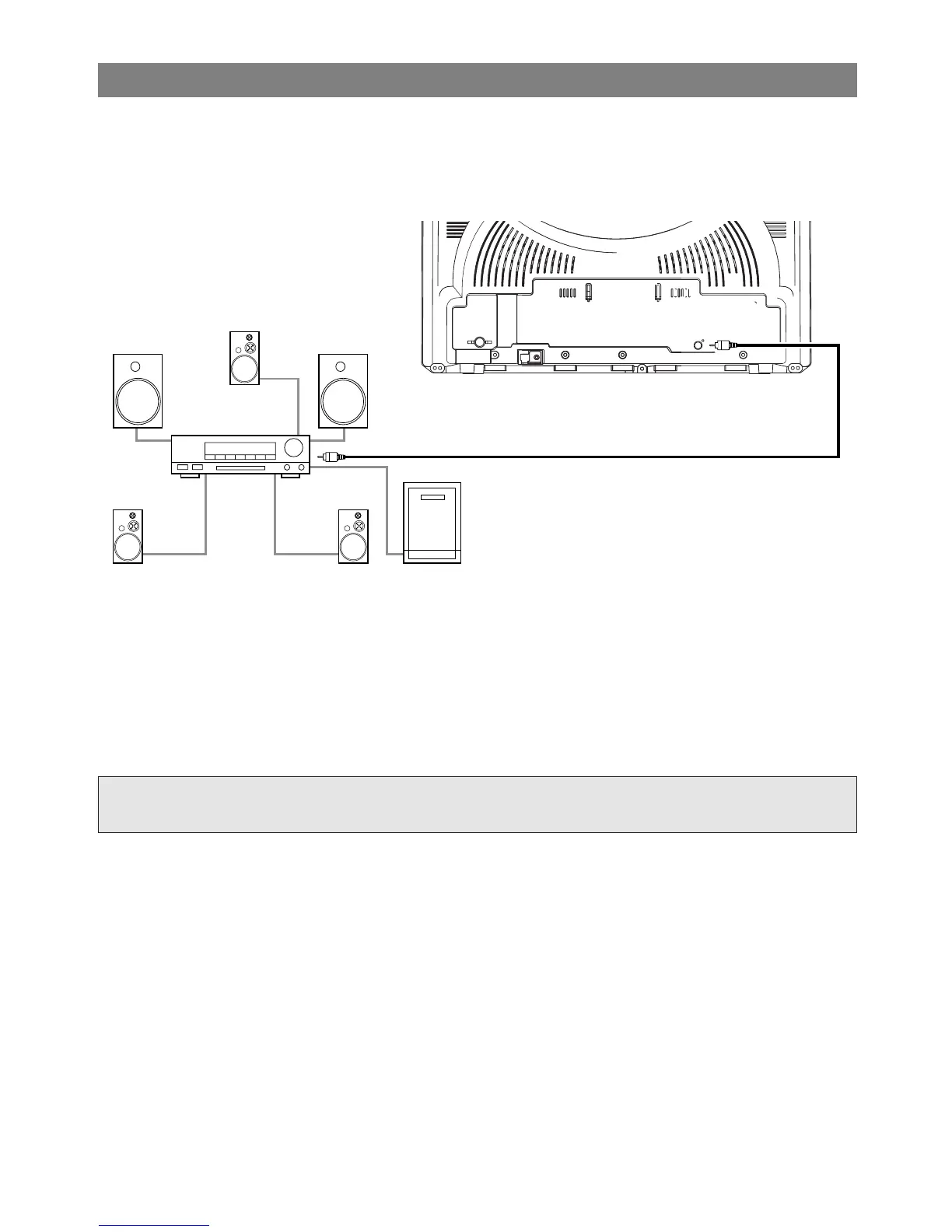
[Fig. 7]
CONNECTING TO A DOLBY DIGITAL DECODER (for DVD)
If using this TV/VCR/DVD to play a DVD disc in a 5.1 channel Dolby Digital surround format, the
TV/VCR/DVD outputs a DOLBY DIGITAL Data stream from its COAXIAL digital audio out jack. By hook-
ing the player up to a Dolby Digital decoder, you can enjoy a more convincing, realistic ambience with pow-
erful and high-quality surround sound as enjoyed in movie theaters.
Use audio coaxial digital cables available at retail for the audio connections.
NOTES:
•
Be sure to turn off the power to all components in the system before connecting another component.
•
Refer to the Owner's Manuals for the components to be connected to the TV/VCR/DVD.
•
If connected to a Dolby Digital decoder, set DOLBY DIGITAL to ON for audio output in the setup mode.
(See page 45 to set DOLBY DIGITAL to ON.)
•
Unless connected to a Dolby Digital decoder, set DOLBY DIGITAL to OFF for audio output in the setup
mode. Playing a TV/VCR/DVD using incorrect settings may generate noise distortion, and may also dam-
age the speakers.
Manufactured under license from Dolby Laboratories. “Dolby” and the double-D symbol are
trademarks of Dolby Laboratories.


 To Next Page