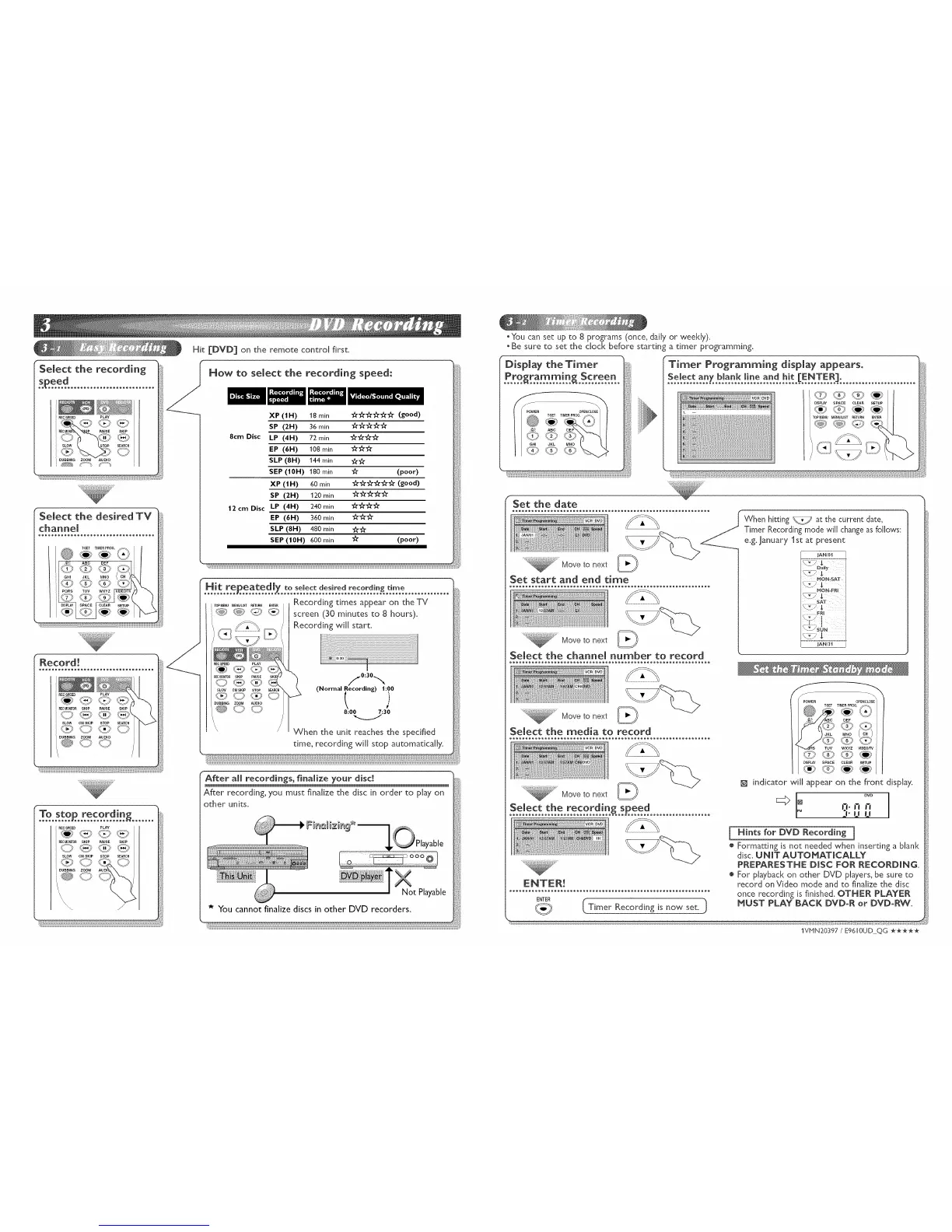
Select the recording
PLAY
R SKIP
SLOW STOP SEARCH
DUBBING ZOOM AUDIO
Select the desired TV
PLAY
SKIP PAUSE SKIP
@Oq©O
k DUBBING ZOOM AUDIO
@00
\
r
To sto recordin
..........P..............._.......
PLAY
<O <';_
PAUSE SKIP
@<@
STOP SEARCH
/
Hit [DVD] on the remote control first.
HOW to select the recording speed:
8cm Disc
12 cm Disc
XP (1 H) 18 min "A"_"_"A"'A"_" (good)
SP (2H) 36 min €_'€_'_€_'€_"
LP (4H) 72 min €_'€_"€_€_"
EP (6H) 108 min 3_"3_"'_"
SLP (8H) 144 min _-
SEP (10H) 180 min 1_" (poor)
XP (tH) 60 min __ (good)
SP (2H) 120 min _'_
LP (4H) 240 min _'_
EP (6H) 360 rain _
SLP (8H) 480 min _
SEP (|0H) 600 rain _" (poor)
Hit re eared[ to select desired recording time
..........P..........X................!............!......................
ToP_,Nu_E,_'_T_ETU_,E,TE_ Recording times appear on the TV
_i_ Recording will start.
PLAY
SKIP PAUSE
SLOW CM SKIP STOP
_90 C© O
DUBBING ZOOM AUDIO
1
/.o:3o..,.,
(Normal Recording) 1:00
8:00 7:30
When the unit reaches the specified
time, recording will stop automatically.
After all recordings, finalize your disc!
After recording, you must finalize the disc in order to play on
other units.
* You cannot finalize discs in other DVD recorders.
oYou can set up to 8 programs (once, daily or weekly).
oBe sure to set the clock before starting a timer programming.
)lay the Timer
Select any blank line and hit [ENTER].
@
f
Set the date
@
Move to next /_
Set start a_d e_d ti_e
_" Move to next
Select the cha_e[ _rnber to record
When hitting _ at the current date,
Timer Recording mode will change asfollows:
e.g. January 1st at present
JAN/01
JAN/31
ii:ii :[JJ }JJ i{ Moveto next _)
Select the media to record
Move to next _)
@
/
POWER 0PEN/CLOSE
$SET TIMER PEOG.
DEF
JKL MNO
WXYZ VIDEO/TV
DISPLAY SPACE CLEAR SETUP
indicator will appear on the front display.
I DVD° ,]:n n
LIU
ee®®®_e®®®®_eo®_®_®o®®_®®®o_o®_®®o_o®_®®o_®®®®ee®®®®eee®®®®®®e
ENTER
( Timer Rec°rdJng is n°w set. i)
j Hints for DVD Recording j
® Formatting is not needed when [nserqng a blank
disc. UNIT AUTOMATICALLY
PREPARESTHE DiSC FOR RECORDING.
® For playback on other DVD players, be sure to
record on Video mode and to finalize the disc
once recording is finished. OTHER PLAYER
_UST PLAY BACK DVD-R or DVD-RW.
1VPIN20397 / E9610UD QG *****


 To Next Page