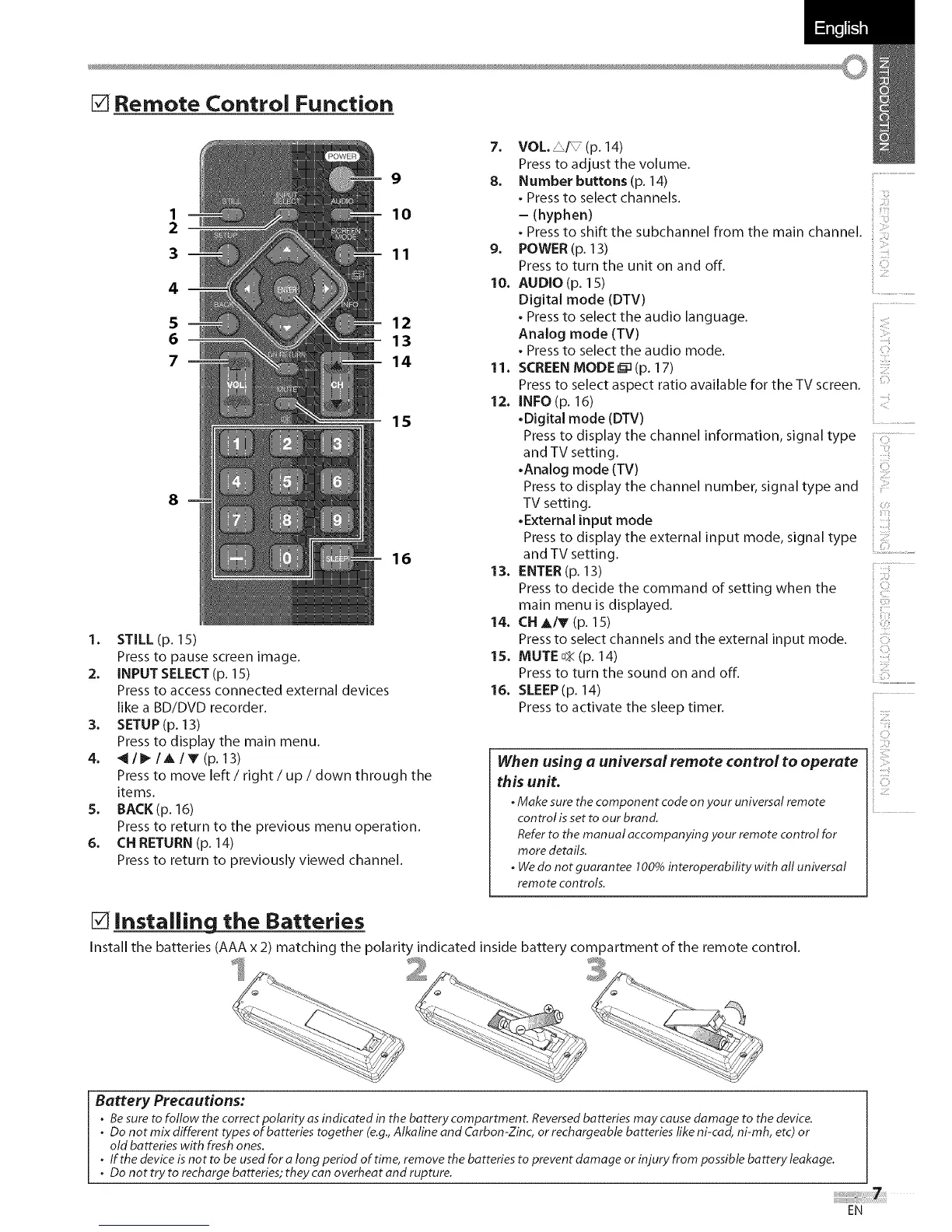
[] Remote Control Function
1
2
3
4
5
6
7
8
9
10
11
12
13
14
15
16
1. STILL(p. 15)
Press to pause screen image.
2. INPUT SELECT (p. 15)
Press to access connected external devices
like a BD/DVD recorder.
3. SETUP(p. 13)
Press to display the main menu.
4. _II_IAIV(p. 13)
Press to move left / right / up / down through the
items.
5. BACK(p. 16)
Press to return to the previous menu operation.
6. CN RETURN (p. 14)
Press to return to previously viewed channel.
7_
8.
9_
10.
11.
12.
13.
14.
15.
16.
VOLe _I_ (p. 14)
Press to adjust the volume.
Number buttons (p. 14) ................................................
. Press to select channels. ::
i iii
- (hyphen)
Press to shift the subchannel from the main channel.
POWER (p. 13)
Press to turn the unit on and off.
AUDIO (p. 15)
Digital mode (DTV) ....
. Press to select the audio language.
Analog mode (TV)
. Press to select the audio mode.
SCREEN MODE _ (p. 17)
Press to select aspect ratio available for the TV screen.
INFO (p. 16)
•Digital mode (DTV)
Press to display the channel information, signal type :::: ........
and TV setting.
•Analog mode (TV}
Press to display the channel number, signal type and
TV setting.
•External input mode
Press to display the external input mode, signal type
and TV setting.
ENTER (p. 13)
Press to decide the command of setting when the
main menu is displayed.
CN A/_ (p. 15)
Press to select channels and the external input mode.
MUTE ¢_ (p. 14)
Press to turn the sound on and off.
SLEEP (p. 14)
Press to activate the sleep timer.
When using a universal remote control to operate
this unit.
• Make sure thecomponent code onyour universal remote
control isset to our brand.
Referto the manual accompanying your remote control for
more details.
• Wedo not guarantee 100% interoperability with all universal
remote controls.
ii)!
', ()
[!i
'!! ................
, :] ........
C]
il
ii ......
i! IIZI','
[] Installing the Batteries
Install the batteries (AAA x 2) matching the polarity indicated inside battery compartment of the remote control.
Battery Precautions:
• Besure tofollow the correct polarity as indicated in the battery compartment. Reversedbatteries may cause damage to the device.
• Do not mix different types of batteries together (e.g.,Alkaline and Carbon-Zinc, or rechargeable batteries like ni-cad, ni-mh, etc) or
old batteries with fresh ones.
. If the device isnot to be usedfor a long period of time, remove the batteries to prevent damage or injury from possible battery leakage.
. Do not try to recharge batteries; they can overheat and rupture.
EN





 To Next Page