Beforeyou connect,,,
Besureyour antenna or other device isconnectedproperly before plugging in the ACpower cord.
[] Antenna Connection
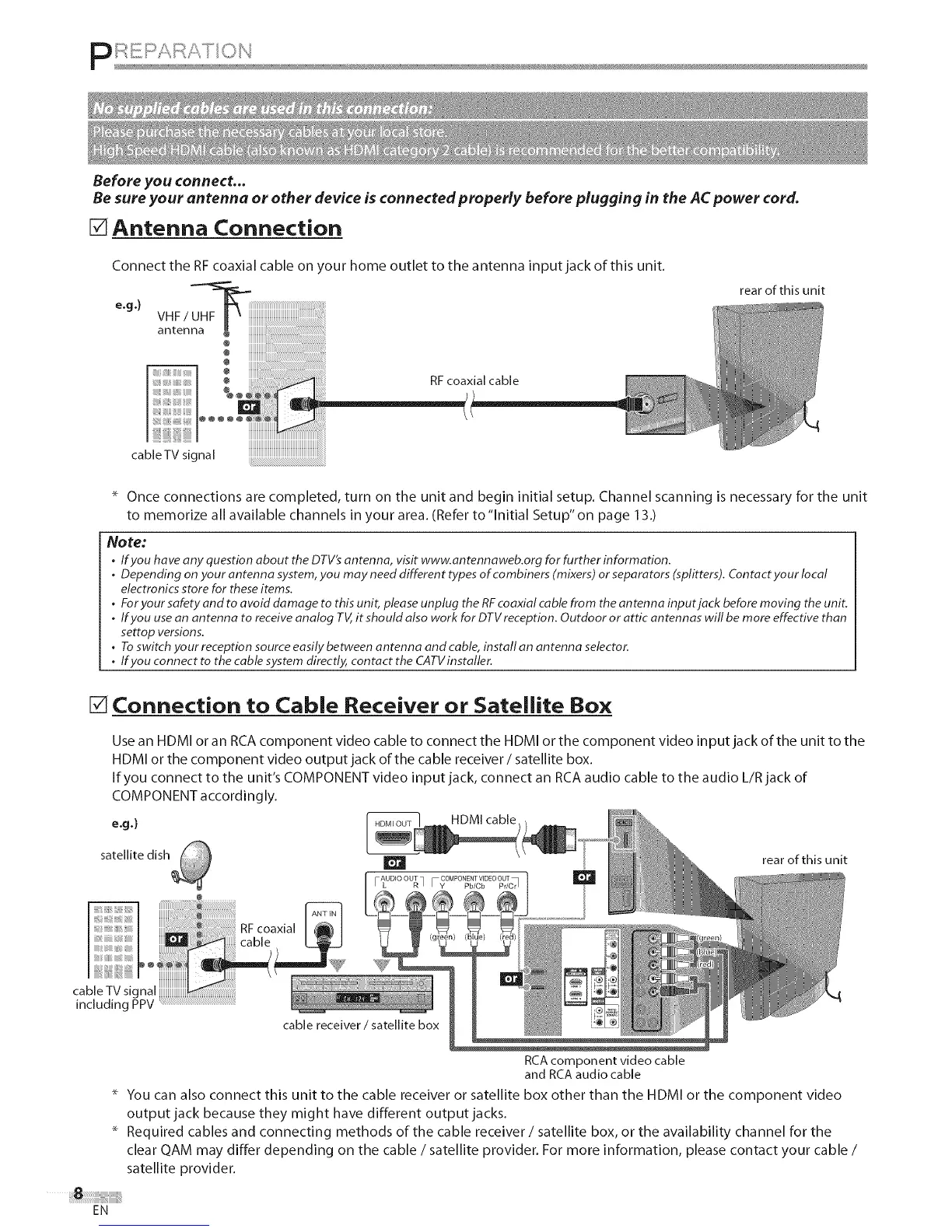
Connect the RF coaxial cable on your home outlet to the antenna input jack of this unit.
e.g.) VHF/_'_
antenna g
@
rear of this unit
RF coaxial cable
cableTV signal
* Once connections are completed, turn on the unit and begin initial setup. Channel scanning is necessary for the unit
to memorize all available channels in your area. (Refer to"lnitial Setup" on page 13.)
Note:
• If you have any question about the DTV's antenna, visit www.antennaweb.org for further information.
• Depending on your antenna system, you may need different types of combiners (mixers) or separators (splitters). Contact your local
electronics store for these items.
• For your safety and to avoid damage to this unit, please unplug the RF coaxial cable from the antenna input jack before moving the unit.
• If you use an antenna to receive analog TV, it should also work for DTV reception. Outdoor or attic antennas will be more effective than
settop versions.
. Toswitch your reception source easily between antenna and cable, install an antenna selector.
. Ifyou connect to the cable system directly, contact the CATVinstaller.
[] Connection to Cable Receiver or Satellite Box
Use an HDMI or an RCA component video cable to connect the HDMI or the component video input jack of the unit to the
HDMI or the component video output jack of the cable receiver/satellite box.
If you connect to the unit's COMPONENT video input jack, connect an RCA audio cable to the audio L/R jack of
COMPONENT accordingly.
e.g.) HDMI cable
satellite dish
rear of this unit
including PPV
cable receiver / satellite box
RCAcomponent video cable
and RCAaudio cable
* You can also connect this unit to the cable receiver or satellite box other than the HDMI or the component video
output jack because they might have different output jacks.
* Required cables and connecting methods of the cable receiver / satellite box, or the availability channel for the
clear QAM may differ depending on the cable / satellite provider. For more information, please contact your cable /
satellite provider.
EN



 To Next Page