10
Control Panel
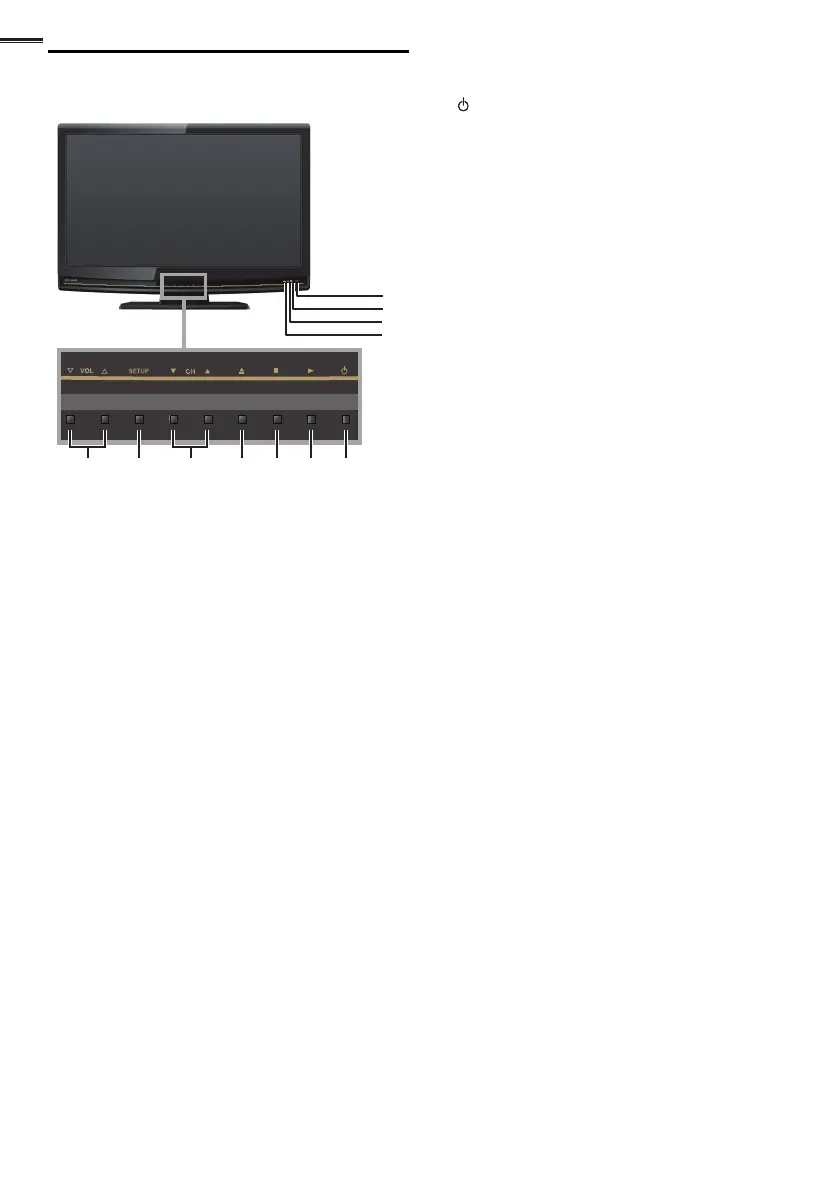
75 16 4 3 2
8
9
11
10
1 (power)
➠
p. 13
Press to turn the unit on and go into standby mode.
To completely turn off the unit, you must unplug the AC
power cord.
2 B (play)
➠
p. 29
3 C (stop)
➠
p. 29
4 A (eject)
➠
p. 29
5 CH ▲/▼
➠
p. 14
Press to select channels or move up (▲) / down (▼)
through the main menu items.
6 SETUP
➠
p. 17
7 VOL
▲/▼
➠
p. 15
Press to adjust the volume or move right (▲) / left (▼)
through the main menu items.
8 Infrared sensor window
Receives infrared rays transmitted from the remote
control.
9 POWER ON indicator
Lights up green when power is on.
10 STAND BY indicator
Lights up red when the unit goes into standby mode.
11 DVD indicator
Lights up orange when a disc is inserted.















 To Next Page