11
INTRODUCTION
PREPARATION WATCHING TV
USING FUNCTIONS OPERATING DVD
CONNECTING DEVICES
INFORMATION USEFUL TIPS
English
Terminals
DVI
ANALOG
AUDIO
13
14
*
22
18
19
20
21
16
15
17
12
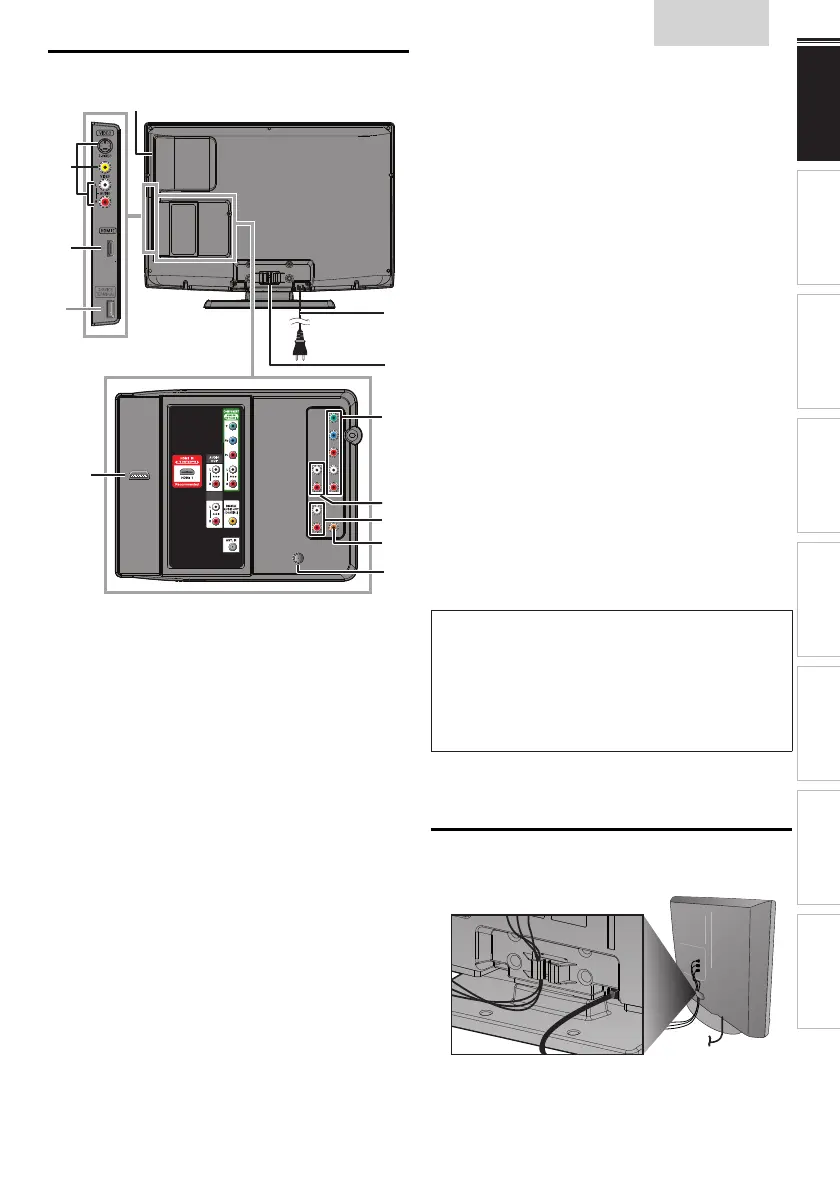
Side Panel
12 Disc loading slot
➠
p. 29
13 S-Video / Composite Video / Audio (L/R) Input jacks
for VIDEO
➠
p. 34, 35
14 HDMI 2 Input jack
➠
p. 12, 34
Rear Panel
15 AC power cord
➠
p. 12
16 Cable management
➠
p. 11
17 Component Video and Audio (L/R) Input jacks
➠
p. 12, 34
18 Analog Audio (L/R) Output jacks
➠
p. 35
19 Analog Audio (L/R) Input jacks for HDMI 1
➠
p. 34, 35
Audio cable connection from a DVI device.
When you connect your PC that has a DVI terminal,
use a stereo mini plug conversion cable as well.
(For HDMI 1 Input jack only)
20 Digital Audio Output jack
➠
p. 35
21 Antenna Input jack
➠
p. 12
22 HDMI 1 Input jack
➠
p. 12, 34, 35
HDMI connection for HDMI or DVI device.
When you connect your PC that has a DVI terminal,
you can enjoy this unit as a PC monitor.
Note for service terminal
*
service terminal (service use only)
• Use this terminal only when a software update is necessary.
• User should not connect any devices to the service terminal such
as digital camera, keyboard, mouse, etc. (because these will not
work).
• The software update is, in most cases, handled by an authorized
service person or in some circumstances the user may be asked
to do the software update themselves.
Cable Management
Keep the cables through this holder to avoid tangling them.















 To Next Page