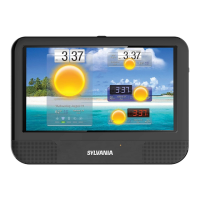
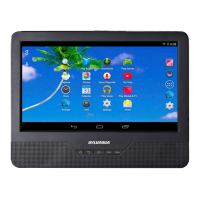
This document serves as the user's manual for the SYLVANIA SLTDVD1024-B device, which is a DVD player with an integrated tablet.
Function Description:
The SYLVANIA SLTDVD1024-B is a versatile entertainment device that combines the functionality of a DVD player with a tablet. It supports playback of various disc formats including DVD, VCD, CD, and MP3. However, it is important to note that this unit is NOT compatible with Blu-ray discs. In its tablet mode, the device offers touch control functions and supports wireless connectivity. It runs on Android™ 10 (Go edition), providing access to a wide range of applications, games, music, movies, TV shows, books, and magazines through Google Play. The device also features a front camera for capturing images and a built-in stand on its back plate for convenient viewing.
Important Technical Specifications:
- Display: 10.1-inch panel with a resolution of 1024x600.
- Processor: Quad-core MTK8167, Arm Cortex-A35 @ 1.3GHz.
- Operating System: Android™ 10 (Go edition).
- Memory: Built-in internal memory of 16GB.
- Wireless Connectivity: Wi-Fi: 802.11b/g/n.
- Battery: Built-in rechargeable Lithium-ion battery.
- Audio: Built-in two speakers.
- Camera: 0.3 MP front camera.
- Ports: Micro USB jack (for power supply input and PC connection), Micro SD slot (for external storage), Earphone jack (for external earphones).
- Disc Compatibility: DVD, VCD, CD, MP3. (Not compatible with Blu-ray discs).
Usage Features:
- Power On/Off: To turn on the device, press and hold the power button for 2-3 seconds until the screen lights up. To turn off, press and hold the power button for 2-3 seconds, then select "Power off" from the options (Power off, Restart, Screenshot).
- Charging: Connect the Micro USB cable to the device and the USB power adapter (wall charger) to a power outlet. A full charge takes approximately 5 hours.
- Disc Loading: Press the OPEN (▼) button to open the unit and place the disc on the loading tray.
- Volume Adjustment: Use the Volume +/- buttons to adjust the sound level.
- Navigation:
- The main page displays app icons. Swipe up to access the app page with all pre-installed apps.
- Function buttons at the bottom of the interface:
- Walmart Apps icon: To enter Walmart Apps.
- Back arrow: To go back to the last step or quit the current app.
- Circle icon: To go to the main page at once.
- Square icon: To show the recent app list.
- File Transfer: Connect the device to a PC using the Micro USB cable. On the device, go to Setting -> Connected devices -> USB -> Use USB for FileTransfer to transfer files between the PC and tablet.
- External Storage: Insert a micro SD card into the Micro SD slot.
- Earphone Connection: Connect external earphones to the earphone jack.
- Mirror Cast Connection: The device supports Mirror Cast Connection (details on page 12).
- Text Input: The device supports text input (details on page 13).
- Camera Function: The device has a camera function (details on page 10).
- Wi-Fi Connection: The device supports Wi-Fi connection (details on page 11).
Maintenance Features:
- Battery Care:
- Charge the battery every 3 months if the device is not used for a long time to maintain good condition.
- Avoid overcharging; do not leave the device on the charger for very long after it's fully charged.
- If the device shows no charging indication after being stored for a long time, keep it connected to power for 5-10 minutes.
- Cleaning: Unplug the system before cleaning. Use only a wet cloth; do not use liquid detergent or aerosol.
- Environmental Protection:
- Do not use or leave the device in direct sunlight or hot environments (e.g., a vehicle) to prevent overheating damage.
- Keep the device away from fire or water.
- Protect the device from moisture and extreme temperatures.
- Do not expose the device to temperatures above 40 °C / 104 °F.
- Physical Protection:
- Protect the device from physical impact or damage; avoid dropping it.
- Do not disassemble, puncture, or crush the device.
- Charger Use: Only use the factory-supplied charger. Using an unapproved charger or cable may cause battery failure, explosion, or device damage.
- Software Updates: Do not cut off power abruptly during software updates or downloads to prevent data loss and system errors.
- Troubleshooting: If the system malfunctions and cannot be turned off, use a thin object (like a paper clip) to press the Reset button to restart the device.
- Data Backup: Back up important data in a timely manner for data safety.
- Disc Handling: Do not use irregularly shaped discs (e.g., heart or star-shaped) as they may cause the unit to malfunction.
- Earphone Volume: Adjust earphone volume to an appropriate level to avoid hearing damage from high volume.
Safety Precautions:
- Read the instruction manual carefully and follow all safe operation requirements.
- Avoid installing near heat sources like radiators, heat registers, stoves, or other heat-producing apparatus.
- Unplug the unit during lightning storms or when unused for long periods.
- Refer all servicing to qualified service personnel. Do not attempt to repair the device yourself due to the danger of high voltage and electric shock.
- The device complies with FCC Rules Part 15, meaning it may not cause harmful interference and must accept any interference received.
- Changes or modifications not expressly approved by the responsible party could void the user's authority to operate the equipment.
- The device has been evaluated to meet general RF exposure requirements and can be used in portable exposure conditions without restriction.

 Need help?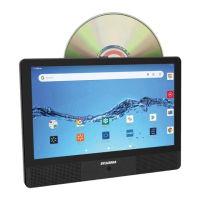

 To Next Page
 General