EasyManua.ls Logo

Sylvania SP333-DG - User Manual

Sylvania SP333-DG
2 pages
Print Icon
To Next Page IconTo Next Page
Loading...
BLUETOOTH SPEAKER
INSTRUCTION MANUAL
PLEASE READ BEFORE OPERATING THIS EQUIPMENT
MODEL NO.:
SP333-DG
3
1
Table of Contents
Your Bluetooth light up speaker …………………..…………………….…..4
"FCC RF Radiation Exposure Statement Caution: This Transmitter must be
installed to provide a separation distance of at least 20 cm from all persons."
Features
Includes
Charging instructions …..…………..……………………………………....…. 4
Charging the battery for first time
Recharging the internal battery
Battery Note and Care
Orientation …………………………………..……………………………..…. 6
Features & Controls
Bluetooth operation ………………………………….………………………. 7
Getting connected
Playing music from an external Bluetooth device
Auxiliary operation ………..……………………………….………………….7
Treble and Bass……………………………………………………………….8
Specifications …………..………………………………………………..……8
Trouble Shooting ……………………………………..………….……
………9
4
2
Your Bluetooth Light up Speaker
Features
Supports Bluetooth v2.1+EDR
Supports profile A2DP
Supports automatic device pairing
Wireless range: 30 feet
Pairing button
Play/pause button
Skip forward/back button
On/off switch
Treble/Bass/Volume control
Bluetooth/AUX indicator
Charge indicator
3.5mm AUX IN jack for player etc
Internal rechargeable battery
DC input for battery recharging
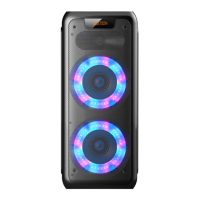
Light up LED speaker
Includes
USB Cable
User
manual
Charging instructions
This unit operates on a internal Li-ion battery that can be recharged either using the USB port on
your computer or from a USB power adaptor (not included) with a rated output of DC 5V/500mA and
up.
Charging the battery for first time
1.) Charge the internal Li-ion battery a minimum of 3 hours prior to first use.
Plug the unit into the USB port on your computer or into a USB power adaptor
(not included) using the included USB cable.
2.) The CHARGER indicator will light red while charging
and light green when the unit is fully
charged. Unplug the USB cable from the power source once the battery is fully charged.
5

Questions and Answers

  • C
    Courtney JacksonAug 3, 2025
    Why is there no sound when playing audio via Bluetooth on my Sylvania Speakers?
    • K
      Kaylee NorrisAug 3, 2025
      There could be several reasons for this: * Your Bluetooth device may not be paired correctly. Try pairing your Bluetooth device again, referring to the “Pairing a Bluetooth Device for the First Time” section. * The unit might be out of range. Relocate the unit within the Bluetooth operating range (30 feet). * The volume on your Bluetooth device or the main unit might be too low. Increase the volume on both your Bluetooth device and the main unit.
  • C
    cody40Aug 11, 2025
    What to do if my Sylvania SP333-DG are not charging?
    • V
      Victoria DiazAug 11, 2025
      If your Sylvania Speakers are not charging, it could be due to a few reasons: * The USB power adapter might not be properly connected to the wall outlet, or the USB cable isn't connected to the mini USB jack on the unit. Ensure the USB power adapter is plugged into a functioning wall outlet and the USB cable is securely connected to the mini USB jack. * The wall outlet itself might not be working. Test the outlet by plugging in another device to confirm it's functioning. * The computer USB port may not be working. Make sure your computer is powered on and try using a different USB port.
  • B
    Brooke CollinsAug 17, 2025
    Why is there no sound coming from my Sylvania SP333-DG Speakers?
    • A
      Andrea LutzAug 18, 2025
      If you are experiencing no sound from your Sylvania Speakers, it could be due to the following reasons: * The unit battery may be exhausted. Try recharging the unit battery. * The volume might be set too low. Press the volume+ button to increase the sound level.
  • A
    Amy Shah MDAug 27, 2025
    What to do if there is no sound in AUX mode on Sylvania Speakers?
    • P
      Pamela ThompsonAug 27, 2025
      If you're not getting any sound in AUX mode on your Sylvania Speakers, here's what you can check: * Ensure the volume isn't set to the minimum. Adjust the volume knob. * The external device might not be properly connected. Try cleaning the contact pins and reconnecting the device.

Summary

Safety Instructions and Precautions

Electrical and Operational Safety

Comprehensive safety measures for electrical operation, device protection, and environmental considerations.

Specific Usage and Maintenance Safety

Detailed safety instructions for product usage, maintenance, and environmental factors.

Your Bluetooth Light up Speaker

Product Features Overview

Highlights the key functionalities and capabilities of the Bluetooth speaker.

Charging Instructions

Guidance on how to properly charge the Bluetooth speaker.

Device Orientation and Controls

Component Identification

Diagram and labels identifying the various buttons, ports, and indicators on the speaker.

Bluetooth and Auxiliary Operation

Bluetooth Connectivity

Steps for connecting external Bluetooth devices to the speaker.

Audio Playback via Bluetooth

Instructions for playing music from a connected Bluetooth device.

Auxiliary Audio Input

Guidance for connecting external audio sources via the auxiliary input.

Technical Specifications and Troubleshooting

Product Specifications

Detailed technical data including power requirements, dimensions, and connectivity standards.

Troubleshooting Common Issues

Solutions for common problems like no charging, no sound, and Bluetooth connectivity issues.

Sylvania SP333-DG Specifications

General IconGeneral
BrandSylvania
ModelSP333-DG
CategorySpeakers
LanguageEnglish

Related product manuals