DEAR CUSTOMER
In order to achieve the best performance of your product, please
read this instruction manual carefully before using, and keep it
for future reference.
NOTE
This unit may be submitted to changes in specifications,
characteristics and/or operation without prior notice to the user,
in order to continue improving and developing its technology.
Packing list
Upon opening the package, please check for the following items:
1 x Speaker
1 x USB charging cable
1 x Instruction manual
1 x Microphone
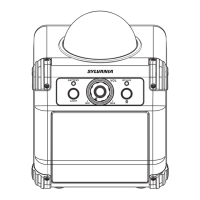
Product overview
2 3 5 6 7 8 9
4
Specification
Input: DC 5V
Drivers: 8”Full Range
FM: 87.5~108.0 MHz
Battery Capacity: 1500mAh
Transmission Distance: 10m
Dimension: (WxHxD): 230x365x205mm
SYLVANIA is a registered trademark of
OSRAM Sylvania Inc. used under licese.
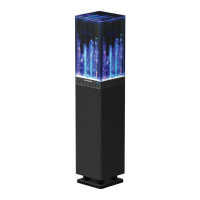
LIGHT UP BLUETOOTH SPEAKER
WITH AUX/USB/TF CARD
FM/MICROPHONE
Model No: SP740-C
User Manual
1.Power/VOLUME -&+
3.DC interface (5V)
2.Charging Indicator
RED=Charging
Light off= Fully Charged
8.TF/USB input
4.MODE/LED ON(Long press to turn
on/off light; Lightly press to enter
into selection for Bluetooth,FM
Radio,AUX Input,USB/TF Card)
6.Play/Pause/REC
5.Previous track&TWS (Wirless
Bluetooth Connection: under
bluetooth mode,
press TWS button for around 3
seconds to pairing another TWS
speaker;
Under FM mode, lightly press
Play/Pause&TWS to enter into
saved automatically.)
9.AUX input
10.MIC input
This product is warranted to be free from defects in material
and workmanship for a period of ninety (90) days from the date
of original purchase. During this period, your exclusive remedy
is repair or replacement of this product or component found to
be defective, at our option; however, you are responsible for all
costs associated with returning the product to us. If the product
or component is no longer available, we will replace with a
similar one of equal or greater value. Prior to a replacement
being sent, the product must be rendered inoperable or
returned to us.
This warranty does not cover glass, filters, wear from normal
use, use not in conformity with the printed directions., or
damage to the product resulting from accident, alteration,
abuse, or misuse. This warranty extends only to the original
consumer purchaser or gift recipient. Keep the original sales
receipt, as proof of purchase is required to make a warranty
claim. This warranty is void if the product is used for other than
single-family household use or subjected to any voltage and
waveform other than as on the specified rating on the label
(e.g., 120V~60Hz).
90 day Warranty
FCC Statement
NOTE: This equipment has been tested and found to comply with
the limits for a Class B digital device, pursuant to part 15 of the
FCC Rules. These limits are designed to provide reasonable
protection against harmful interference in a residential installation.
This equipment generates uses and can radiate radio frequency
energy and, if not installed and used in accordance with the
instructions, may cause harmful interference to radio
communications. However, there is no guarantee that interference
will not occur in a particular installation. If this equipment does
cause harmful interference to radio or television reception, which
can be determined by turning the equipment off and on, the user
is encouraged to try to correct the interference by one or more of
the following measures:
- Reorient or relocate the receiving antenna.
- Increase the separation between the equipment and receiver.
-Connect the equipment into an outlet on a circuit different from
that to which the receiver is connected.
-Consult the dealer or an experienced radio/TV technician for help
Changes or modifications not expressly approved by the party
responsible for compliance could void the user's authority to
operate the equipment.
This device complies with Part 15 of the FCC Rules. Operation is
subject to the following two conditions:
(1) this device may not cause harmful interference, and
(2) this device must accept any interference received, including
interference that maycause undesired operation.
We exclude all claims for special, incidental, and consequential
damages caused by breach of express or implied warranty. All
liability is limited to the amount of the purchase price. Every
implied warranty, including any statutory warranty or condition
of merchantability or fitness for a particular purpose, is
disclaimed except to the extent prohibited by law, in which
case such warranty or condition is limited to the duration of this
written warranty. This warranty gives you specific legal rights.
You may have other legal rights that vary depending on where
you live. Some states or provinces do not allow limitations on
implied warranties or special, incidental, or consequential
damages, so the foregoing limitations may not apply to you.
For faster service, locate the model, type, and serial numbers
on your appliance.
For service assistance and product information,
please call: 1-800-968-9853.
Curtis International Ltd.
7045 BECKETT DRIVE, UNIT 15, MISSISSAUGA, ON,
L5S 2A3 www.curtisint.com
POWER SOURCE
1.Please charge the unit at least 4 hours before first time using.
2. Twist the dial clockwise/anticlockwise to switch on/off the
unit.
CHARGE THE BATTERY
When the battery is charging, the CHARGE STATUS lights
shows on the LED display is red. After the battery has fully
charged, the light turns off.
1. Connect the USB charge cable to the DC5V interface of the
speaker firmly.
2. When the battery is fully charged, please disconnect the USB
charge cable from the speaker.
3.The speaker works normally when charging.
POWER/VOLUME
Twist the dial clockwise/anticlockwise to increase/discrease the
mus volume.
PREVIOUS/NEXT BUTTON
Under playing status, press PREVIOUS/NEXT button to get
back to a previous or next song.
PAUSE/PLAY BUTTON
To stop playing the current track, please press PAUSE/PLAY
button on the control panel. Press it once again to continue
playing.
MODE/LED ON
Long press to turn on/off light.
Lightly press to enter into playing mode selection(Bluetooth,FM
Radio,AUX Input, USB/TF Card).
AUX IN JACK
1.Connect an audio cable to the AUX IN JACK of the speaker
and to the audio output socket on the external audio devices
such as MP3 player, discman,etc,then select AUX by pressing
the MODE/LED ON button on the control panel .
2.Play from an external audio device.
TWS: (True Wireless Speaker)
It needs two speakers to make a TWS. When you had two
speakers, you can make a TWS as below steps:
1. Don't connect to this speaker with Bluetooth devices.
2. Turn on both speakers and press the mode button to
change to Bluetooth mode.
-
4. Turn the Bluetooth devices to search the Bluetooth name
“Syl SP740" and tap to connect it. It will have a tone coming
out from this speaker after connected successfully.
5. Now you can play the music form your Bluetooth devices.
MIC IN JACK
Plug in microphone directly for playing.
USB/TF JACK
Insert USB/TF card directly for playing.
FM FUNCTION
Lightly press MODE/LED ON button to switch to FM mode.
Press PLAY/PAUSE
Short press PLAY/PAUSE button on control panel for automat-
ic searching and saving the radio stations, by pressing
PREVIOUS or NEXT you can select a previous or next radio
station.
Bluetooth:
Short press MODE/LED ON button on control panel to select
Bluetooth mode.
Simultaneously turn on the Bluetooth setting on your phone,
tablet or any other bluetooth enabled audio device and select
"Syl SP740"(no need to match code), the unit and device will
then connected via Bluetooth. Press the "NEXT SONG"
and "PREVIOUS SONG" button on the control panel to select
the song, press " PLAY/PAUSE" button to control the playing
status.
Playing recording function
1. After the portable speaker is turned on, insert the TF Card
or U disk to the TF slot or USB port, press the Mode button to
the Bluetooth mode, connect it with your Bluetooth device and
paly the music, long press the REC button around 3 seconds,
you will here a prompt voice “ding” means the TF card/USB is
starting recording, long press the play/pause button for 3
seonds again and you will here prompt voice”ding ding”, that
means stop recording.
2. If you want to play this recording sound, press the Mode
button to the USB or TF card mode, press the next button to
find out this song and play it.
Note:
a) When your TF card and U disk insert to the speaker at
same time , it will record to your U disk when recording.
b) The recording only works in Bluetooth mode, can not record
in FM, Aux mode and can't record Microphone's sound.
c) It's better to turn the Bleutooth devices volume to maximum
during recording.
d) It will be stopped recording when pressing the mode button
during recording.
SPECIFICATIONS
Power Output: 10W
Frequency Response
for main speaker: 55Hz-20KHz
Power Supply: DC 5V
/
/
CHARGING LED
DC 5V IN
MODE/LED ON
TWS
REC
AUX IN
MIC IN
7.Next track
automatic scan and all the
scanned radio stations will be
3.Press and hold the TWS button for both speakers, the
display shows 't on' that means pairing mode, wait for a few
minutes that will be connected together. And it will have a tone
coming out during connected together.

 Need help?

 To Next Page
 General