STANDBY
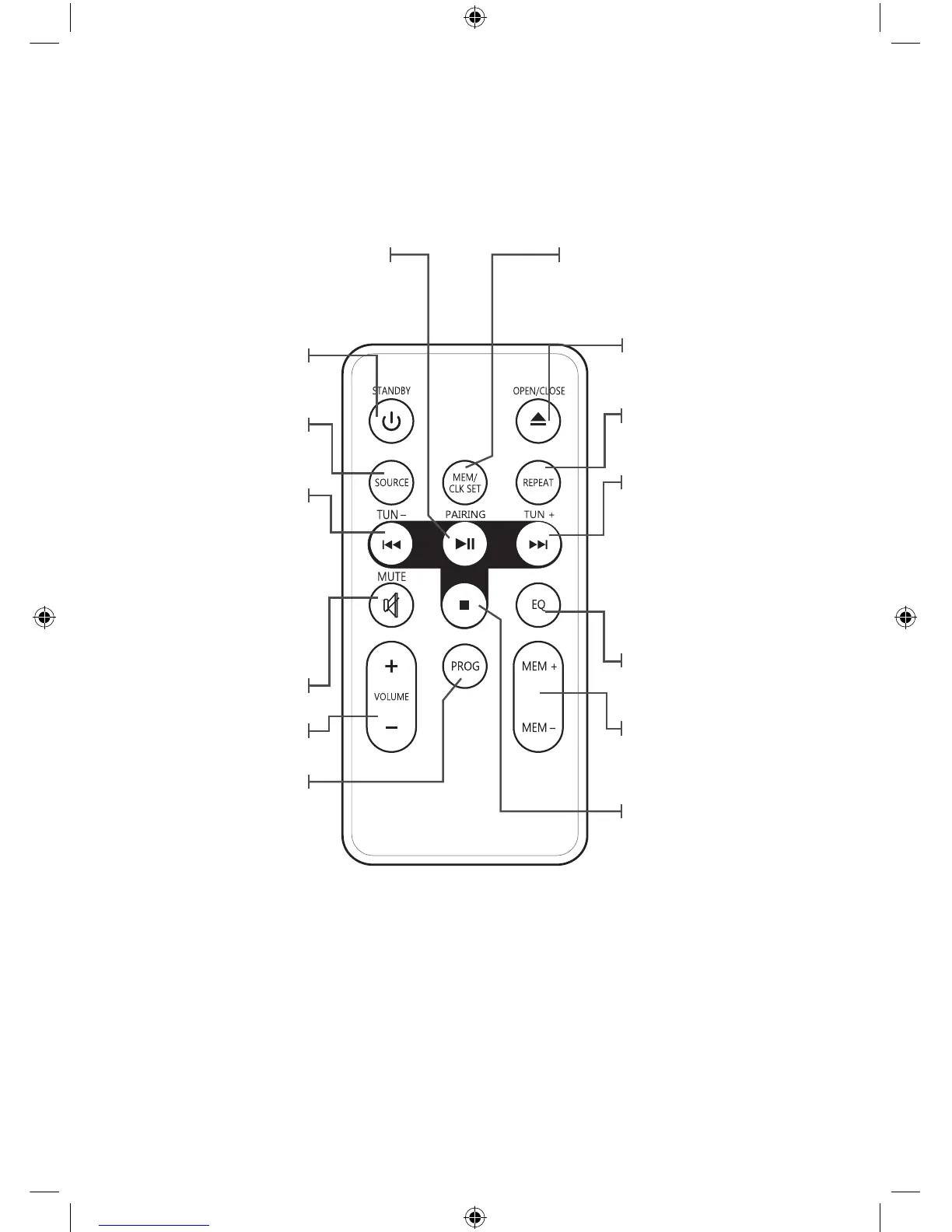
Pres to power the music
system o or on.
MUTE
Press to mute the volume.
VOLUME
Press to adjust the volume.
SOURCE
Press to switch to CD, LINE
IN, Radio or Bluetooth
modes.
SKIP/SEARCH/TUNE-
Press to skip between tracks
on loaded CD or Bluetooth.
Press and hold to search
through an individual track.
Press to tune the FM radio.
Press to adjust the time
when setting the clock.
OPEN/CLOSE
Press to open or close
the CD door
.
REPEAT
Press to repeat the
current track or an
entire album/playlist.
SKIP/SEARCH/TUNE+
Press to skip between tracks
on loaded CD or Bluetooth.
Press and hold to search
through an individual track.
Press to tune the FM radio.
Press to adjust the time
when setting the clock.
EQ
Press to switch the preset
EQ to Pop, Jazz, Classic,
Rock or Normal.
MEM(+/-)
Press the cycle through saved
radio stations.
MEN/CLK SET
Press to set the clock or
save a radio station.
PROGRAM
Press to program a loaded
disc to play tracks in a
specied order.
STOP
Press to stop a CD
during play.
PAIRING/PLAY/PAUSE
Press to play or pause a
loaded CD.
Press & hold to begin
pairing a Bluetooth device.
5


 To Next Page