Need help?
Do you have a question about the Sylvania SRCD2732BT and is the answer not in the manual?
General safety warnings, electrical shock, fire hazards, and laser safety precautions.
Instructions for unpacking the unit and a list of included package contents.
Detailed description of the unit's buttons, ports, and remote control functions.
Guidance on connecting the speaker units and the power supply.
Instructions for using and replacing the remote control battery.
Turning the unit on/off, source selection, volume control, and antenna adjustment.
Manual and auto tuning, storing, and recalling FM presets.
Loading, playing, pausing, stopping, and skipping CD tracks.
Random play, high-speed search, and repeat playback modes for CDs.
Pairing Bluetooth devices and connecting external players via AUX input.
Adjusting EQ sound effects, setting the sleep timer, and clock setup.
Guidelines for cleaning the CD disc, lens, and the unit casing.
Details on power, frequency range, Bluetooth version, and output power.
Details on the 90-day warranty, coverage, and claim process.
Information regarding FCC rules, compliance, and interference.
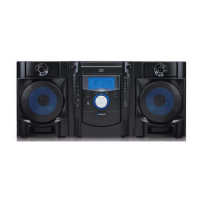
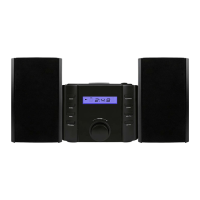
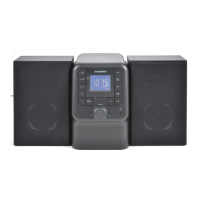
The SYLVANIA Bluetooth CD FM PLL Radio Micro System, model SRCD2732BT-BLACK, is a versatile audio device designed for home use, offering multiple playback options and user-friendly controls. This micro system combines a CD player, FM radio, Bluetooth connectivity, and an AUX-in port, providing a comprehensive audio experience.
The core function of this device is to play audio from various sources. It features a top-loading CD disc compartment, allowing users to play their favorite compact discs. The integrated FM PLL radio provides access to local radio stations, with options for both automatic and manual scanning. Bluetooth functionality enables wireless streaming of audio from compatible devices such as smartphones and tablets. Additionally, an AUX-in port allows for a wired connection to external audio players, expanding its versatility. The system delivers sound through two external speakers, ensuring a stereo audio output.
The micro system is designed for ease of use, with clearly labeled controls on both the main unit and the included remote control.
To power on the unit, users press the STANDBY button. Pressing it again will turn the unit off. The SOURCE button allows users to switch between different modes: CD, FM, Bluetooth (BT), and AUX IN. Volume control is managed either by turning the VOLUME knob on the main unit or by using the VOL- / VOL+ buttons on the remote control.
To play a CD, the user opens the CD door, places a disc with the graphic side facing up, and then closes the door. The unit automatically reads the disc and begins playing the first track. Playback can be paused or resumed using the PLAY/PAUSE button, and stopped with the STOP button. Users can skip to the next or previous tracks using the NEXT and PREVIOUS buttons. The CD player also offers advanced playback modes. Pressing the MODE button during CD playback enables "Random Play," which shuffles the tracks. Pressing MODE again will resume normal playback. For "Repeat Playing," pressing the MODE button once will repeat the current track ("REPEAT"), and pressing it again will repeat all tracks on the disc ("REPEAT ALL"). High-speed music search is available by pressing and holding the PREVIOUS or NEXT buttons during playback, allowing users to quickly navigate through a track.
In FM mode, the unit offers several ways to find and store stations. The "Auto Scan" feature, activated by pressing and holding the SCAN button, automatically searches for and stores available FM stations. For "Manual Scan," users can repeatedly press the TUNE- or TUNE+ buttons to fine-tune to a specific frequency, or press and hold them to automatically search for the next available station. Up to 20 FM stations can be stored as presets. To store a station, tune to the desired frequency, then press and hold the PROG/MEMORY button. The display will show "P01" (or the next available preset number). Use the TUNE- or TUNE+ buttons to select the desired preset number, then press and hold PROG/MEMORY again to save. Stored presets can be recalled by pressing the PROG/MEMORY button repeatedly. For optimal FM reception, the wire antenna located at the rear of the unit should be extended and adjusted.
To connect a Bluetooth device, the user presses the SOURCE button repeatedly until "bt" appears on the display, indicating the unit is searching. If no device has been previously paired or the last paired device is not found, the display and Bluetooth indicator will flash. Users then enable Bluetooth on their external device and search for "Sylvania SRCD2732BT." A pass code "0000" may be required for connection. Once successfully paired, the unit will display "bt." Music can then be streamed wirelessly from the paired device. Playback controls (PLAY/PAUSE, PREVIOUS, NEXT) function similarly to CD mode.
The AUX IN port allows for a wired connection to external audio players. Users connect a 3.5mm audio cable (not included) from their external player's line out to the AUX IN jack on the front of the unit. After selecting AUX mode via the SOURCE button (display shows "AUX"), audio from the external player will be output through the micro system's speakers.
The EQ button allows users to select different sound effect modes to enhance their listening experience. Available modes include FLAT, POPS, CLASSIC, JAZZ, and ROCK.
The sleep function allows users to set a timer for the unit to automatically turn off. When the unit is on, pressing the SLEEP button repeatedly cycles through sleep durations: 120, 90, 60, 45, 30, 15 minutes, or "sleep off." The sleep icon will appear on the display. The unit will power off when the timer reaches zero. To cancel the sleep function, either turn off the unit with the STANDBY button or repeatedly press the SLEEP button until "sleep off" is selected.
To set the clock, the unit must be in Standby mode. Press and hold the TIME SET button to enter the setup menu. Use the TUNE- or TUNE+ buttons to adjust the hour, then press TIME SET to confirm and move to minute adjustment. Repeat the process for minutes, then press TIME SET to save. Note that FM station real-time information may override the time setting. The time can be temporarily displayed in any mode by pressing the TIME SET button.
Proper maintenance ensures the longevity and optimal performance of the micro system.
The left and right speakers connect to dedicated "SPEAKER" terminals on the unit's rear panel. It is crucial to ensure that the speaker wires are inserted with correct polarity (L for left, R for right) for proper stereo sound.
The remote control comes with a pre-installed CR2025 battery, protected by an insulation sheet that must be pulled out before first use. To replace the battery, slide out the battery case, remove the old CR2025 battery, insert a new one with the correct polarity, and slide the case back in.
If a CD skips or fails to play, it may need cleaning. Discs should be wiped in straight lines from the center to the outer edge using a soft, lint-free dry cloth. Abrasive cleaners or detergents should not be used.
A dirty CD lens can cause playback issues. Dust can be removed with a blower/brush. For fingerprints, a dry cotton swab should be used, wiping from the middle towards the outer edge of the lens.
Before cleaning, the unit should be disconnected from the AC power source to prevent electric shock. Dust and stains on the casing can be wiped with a soft cloth lightly moistened with a mild soap and water solution. Benzene, thinner, or similar chemicals should be avoided as they can damage the casing.
CDs should be handled carefully by their edges, avoiding contact with the shiny, unprinted surface. Discs should not be exposed to direct sunlight, high humidity, high temperatures, or dust. Writing or sticking anything on either side of the disc should be avoided, as sharp instruments or ink can damage the surface.
 General
| Brand | Sylvania |
|---|---|
| Model | SRCD2732BT |
| Category | Stereo System |
| Bluetooth | Yes |
| CD Playback | Yes |
| Disc Compatibility | CD, CD-R, CD-RW |
| FM Radio | Yes |
| AUX Input | Yes |
| USB Port | Yes |
| Remote Control | Yes |
| Type | CD Player |
| Tuner | FM |
| Power Source | AC Power |

 To Next Page