
 To Next Page
K
Kelly SmithJul 29, 2025
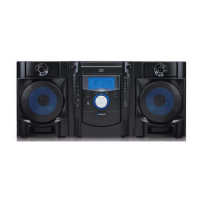
How to fix a Sylvania SRCD822 that won't turn on?
- CchapmannathanielJul 29, 2025
If your Sylvania Stereo System doesn't power on, make sure the unit is properly connected to the AC power supply.

How to fix a Sylvania SRCD822 that won't turn on?
If your Sylvania Stereo System doesn't power on, make sure the unit is properly connected to the AC power supply.
Why is there no sound coming from my Sylvania SRCD822 Stereo System?
If no sound is coming from the speakers of your Sylvania Stereo System, first, check that the volume isn't turned down completely. If it is, adjust the volume to a suitable level. Also, verify that the input selector matches the source you're trying to play. If not, re-select the correct input source.
How to improve radio signal on Sylvania SRCD822 Stereo System?
If your Sylvania Stereo System isn't picking up radio stations or the signal seems weak, ensure that you've correctly tuned in the station. Also, a nearby TV set can interfere with the signal. Try turning off any nearby TVs.
Why does my Sylvania SRCD822 Stereo System skip on certain CDs?
If a specific CD sounds noisy, or playback stops or skips on your Sylvania Stereo System, the CD might be scratched, damaged, or warped, in which case it should be replaced. Alternatively, the disc may be very dirty, so try cleaning it.
What to do if Sylvania Stereo System CD player stops playing?
If your Sylvania Stereo System's CD player stops immediately after starting, pauses, or stops during playback, make sure the CD is inserted correctly with the printed side facing up. Also, the CD might be dusty, dirty, or have condensation on it; try cleaning and drying the CD.
Why can't I insert a cassette into my Sylvania SRCD822 Stereo System?
If the cassette cannot be inserted into your Sylvania Stereo System, ensure that the cassette tape is being inserted correctly and not in reverse.
How to resolve distorted sound from tape on Sylvania Stereo System?
If the sound from your Sylvania Stereo System is distorted or faint when playing a tape, the tape heads might be dirty. Clean the tape heads to resolve this issue.
Product design and compliance with radiation control regulations for laser products.
Warnings about electric shock, radiation exposure, and proper servicing.
Alerts on electric shock risks, handling plugs, and laser beam exposure.
Technical specifications for amplifier, tuner, and CD player sections.
Troubleshooting for power, sound, and general unit problems.
Troubleshooting for cassette insertion, sound quality, and tape head issues.
Troubleshooting for radio reception and sound distortion.
Troubleshooting for CD playback, no sound, and disc-related problems.
 General
| Brand | Sylvania |
|---|---|
| Model | SRCD822 |
| Category | Stereo System |
| Language | English |