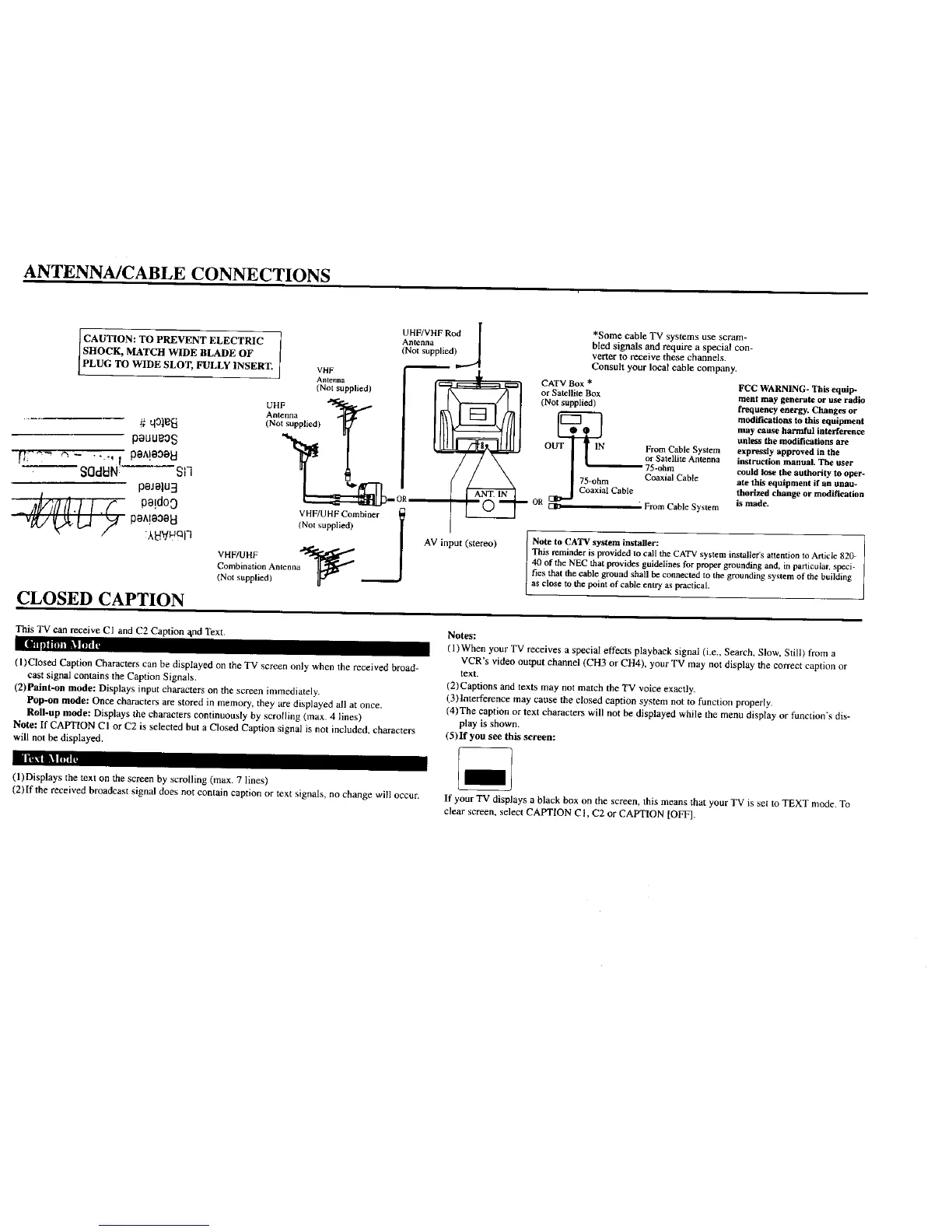
ANTENNA/CABLE CONNECTIONS
CAUTION: TO PREVENT ELECTRIC
SHOCK, MATCH WIDE BLADE OF
PLUG TO WIDE SLOT, FULLY INSERT.
# qOl_
pauu_o$
[[ ..... _ .... ,. pe^leOeEl
"SOdBN ! -- -S11
peJelu3
_ I.f ,,!do0
:XSV_qln
CLOSED CAPTION
l
UHF/VHF R_d [ *Some cable TV systems use scram-
Antenna )_ bled signals atad require a special con-
(Not supplied verter to receive these channels.
_ . Consult your local cable company.
AVHtcFnna
= _ 1_ CATV BOx _ FC c WARNING- This e.ll]D-
(No,,uppbed) I k-'---'_----7_--I or Satellite Box ment may generate or useradio
Ante.°a _ It_ I _ I _ I _ mo_,_.o_tothisequipmenl
_Nots.ppli_d) IF,/ IIl_l_------_/llll I *e I maycauseharmfulinterference
OUT IN From Cable System expressly approved in the
or Satellite Antenna instruction manual. The user
75-ohm could lose the authority to oper-
"1 _ / / \ 175-ohm Coaxial Cable ate this equipment if an unau-
_::::_[[::=::_--OR--.------_..._ _") _ OR _ From Cable System is made.
VHF/UHF Combiner l I 1.-.--.-._...-_
(Nol supplied) 1 AV input (stereo) [ Note to CA'I'Vsystem installer: --
- This reminder is provided to call the CATV system installer's attention to Article 820
VHF/UHF 40 of the NEC that provides guidelines for proper grounding and, in particular, speci-
(NotsuppliedlC°mbinati°nAntenna_ ._ _n2t_o_i _LdeS t_Pe_itiesthat the cable ground shall be connected to the grounding system of the building
This TV can receive CI and C2 Caption and Text.
i_ _'-i'illl'lm LI t1'_,
(l)Closed Caption Characters can be displayed on the TV screen only when the received broad-
cast signal contains the Caption Signals.
(2)Paint-on mode: Displays input characters on the screen immediately.
Pop-on mode: Once characters are stored in memory, they are displayed all at once.
Roll-up mode: Displays the characters continuously by scrolling (max. 4 lines)
Note: If CAPTION CI or C2 is selected but a Closed Caption signal is not included, characters
will not be displayed.
Notes:
(l)When your TV receives a special effects playback signal (i.e., Search, Slow. Still) from a
VCR's video output channel (CH3 or CH4), your TV may not display the correct caption or
text.
(2)Captions and texts may not match the TV voice exactly.
(3)Interference may cause the closed caption system not to function properly.
(4)The caption or text characters will not be displayed while the menu display or function's dis-
play is shown.
(5)If you see this screen:
I i'lll i_il'i_ ,,
(l)Displays the text on the screen by scrolling (max. 7 lines)
(2)If the received broadcast signal does not contain caption or text signals, no change will occur. If your TV displays a black box on the screen, this means that your TV is set to TEXT mode. To
clear screen, select CAPTION C1, C2 or CAPTION [OFF].




 To Next Page