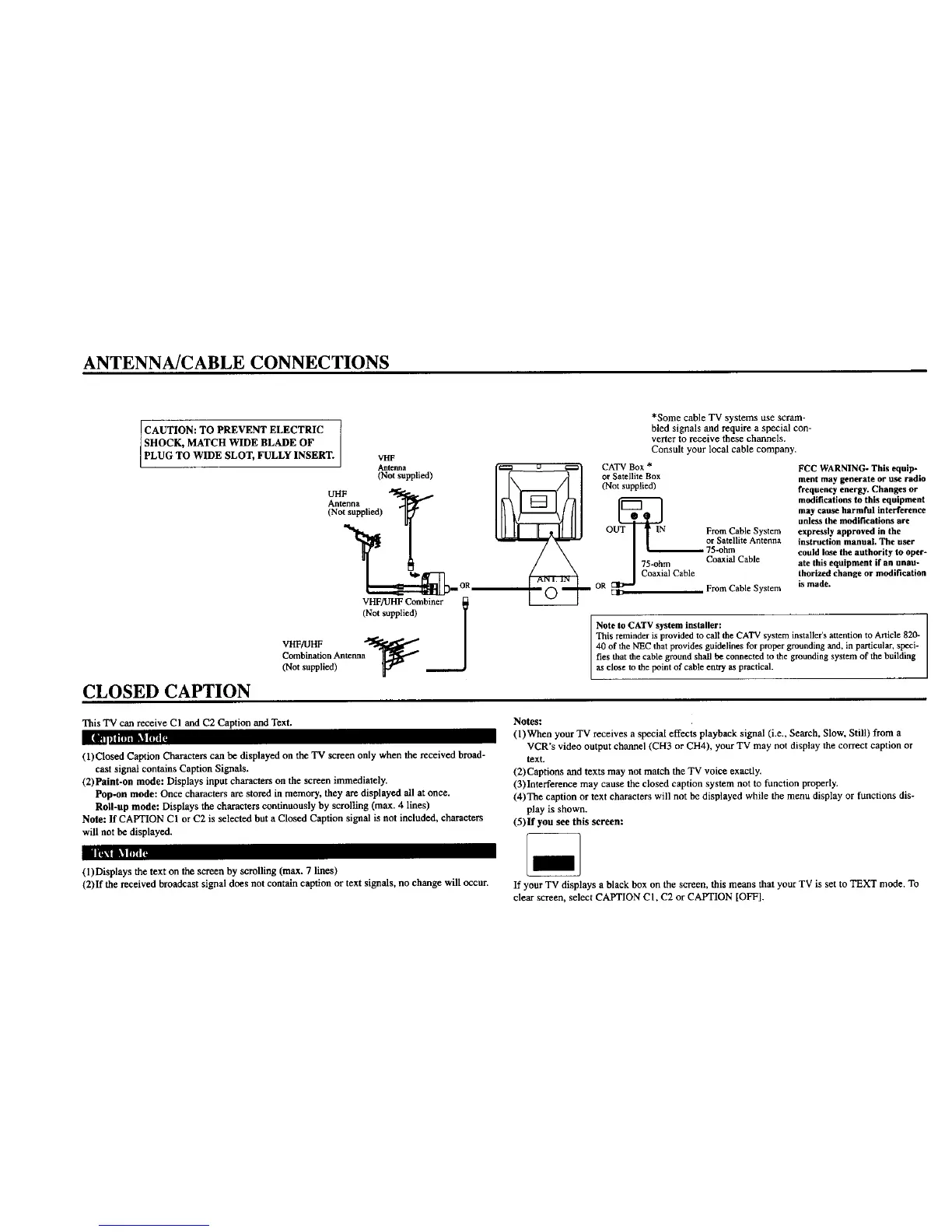
ANTENNA/CABLE CONNECTIONS
CAUTION: TO PREVENT ELECTRIC
SHOCK, MATCH WIDE BLADE OF
PLUG TO WIDE SLOT, FULLY INSERT.
CLOSED CAPTION
*Some cable TV systems use scram-
bled signals and require a special con-
vener to receive these channels.
Consult your local cable company.
VHF
Antenna €=_ u _ CATV Box * FCC WARNING- This equip-
(Not supplied) _ _/ or Satellite. Box ment may generate or use radio
_ _ I I"r-=-( I I (Not_uppl,ed) ,,eqno°cyenergy.Chang,_o,
Antenna modifications to this equipment
(Not supplied) _ I _-_ _ ]/_ [ _ umnayc¢ atuleS_hare mfi_clliintesrfaeerenee
OUT 1N From Cable System expressly approved in the
75-ohm Coaxial Cable ate this equipment if an unau-
Coaxial Cable thortzed change or modification
,,. OR OR From Cable System is made.
VHFAII-IF Combiner _
(Not supplied) l
Note to CATV system installer:
This reminder is provided to call the CATV system installer's attention to Article 820-
/ I gr°ueding
Combination Antenna ties that the cable ground shall be connected to the grounding system of the building
(No.opp.od, ____J °
This TV can receive CI and C2 Caption and Text.
(1)Closed Caption Characters can be displayed on the TV screen only when the received broad-
cast signal contains Caption Signals,
(2)Paint-on mode: Displays input characters on the screen immediately.
Pop-on mode: Once characters are stored in memory, they are displayed all at once.
Roll-up mode: Displays the characters continuously by scrolling (max. 4 lines)
Note: If CAPTION CI or C2 is selected but a Closed Caption signal is not included, characters
will not be displayed.
Notes:
(l)When your TV receives a special effects playback signal (i.e., Search, Slow, Still) from a
VCR's video output channel (CH3 or CH4), your TV may not display the correct caption or
text.
(2)Captions and texts may not match the TV voice exactly.
(3)Interference may cause the closed caption system not to function properly.
(4)The caption or text characters will not be displayed while the menu display or functions dis-
play is shown.
(5)If you see this screen:
I IIII tl [l_t
(1)Displays the text on the screen by scrolling (max. 7 lines)
(2)If the received broadcast signal does not contain caption or text signals, no change will occur. If your TV displays a black box on the screen, this means that your TV is set to TEXT mode. To
clear screen, select CAPTION CI, C2 or CAPTION [OFF].




 To Next Page