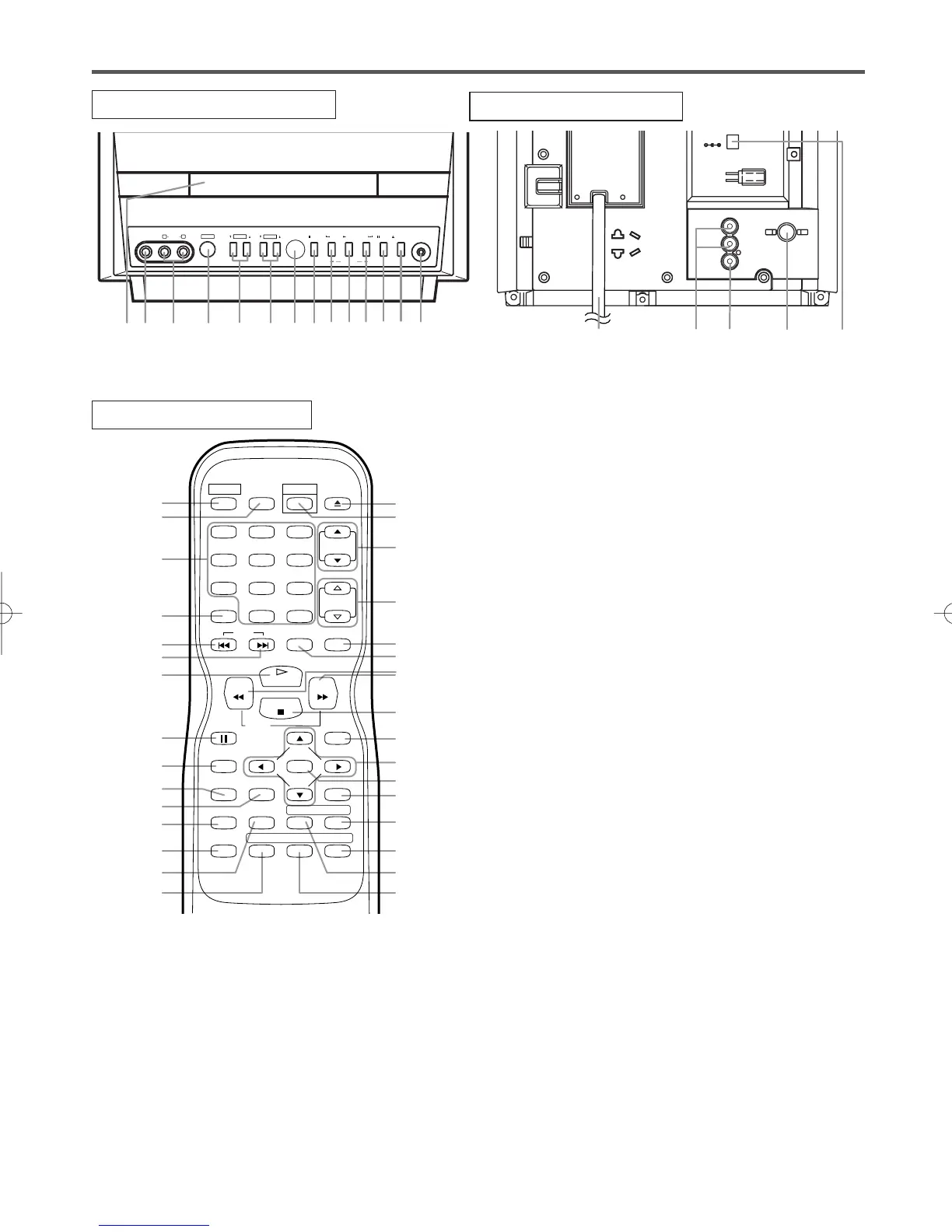
TV/DVD REAR VIEW
[Fig. 3]
–
8
–
EN
0C28
–
8
–
6.CHANNEL K/L (CH.K/L) Buttons [page 14]
Press to select memorized channel.
Press to change to TV mode when DVD mode.
7.Remote Sensor Window
8.STOP Button [page 19]
Stops operation of the disc.
9.SKIP H Button [page 21]
Plays back from the beginning of the current
chapter or track.
SEARCH (REV) E Button (Front Panel)
[page 20]
During playback or in the pause mode, press and
hold button down
for a few seconds to change
reverse playback speed.
10. PLAY Button [page 19]
Starts playback of the disc contents.
Press to change to DVD mode when TV mode.
11. SKIP G Button [page 21]
Plays back from the beginning of the next chapter
or track.
SEARCH (FWD) D Button (Front Panel)
[page 20]
During playback or in the pause mode, press and
hold button down
for a few seconds to change for-
ward playback speed.
12. PAUSE Button [page 20]
Pauses the current disc operation.
13. OPEN/CLOSE Button [page 19]
Press to insert discs into or remove them from the
tray.
14. HEADPHONE Jack
To connect headphone (not supplied) for personal
listening.
OPERATING CONTROLS AND FUNCTIONS
TV/DVD FRONT PANEL
REMOTE CONTROL
[Fig. 2]
[Fig. 1]
1.Disc loading tray
2.VIDEO input Jack [page 11]
Connect to the video output jack of a video
camera or VCR.
3.AUDIO L/R input Jacks [page 11]
Connect to the audio output jacks of a video
camera or VCR.
4.POWER Button [page 14]
Press to turn the power on and off.
5.VOLUME K/L (VOL. m/n) Buttons
Press to control the volume level for the DVD and TV.









 To Next Page