5
(5V500mA)
2 3 654
1
1
2
3
4
5
6
7
Pair
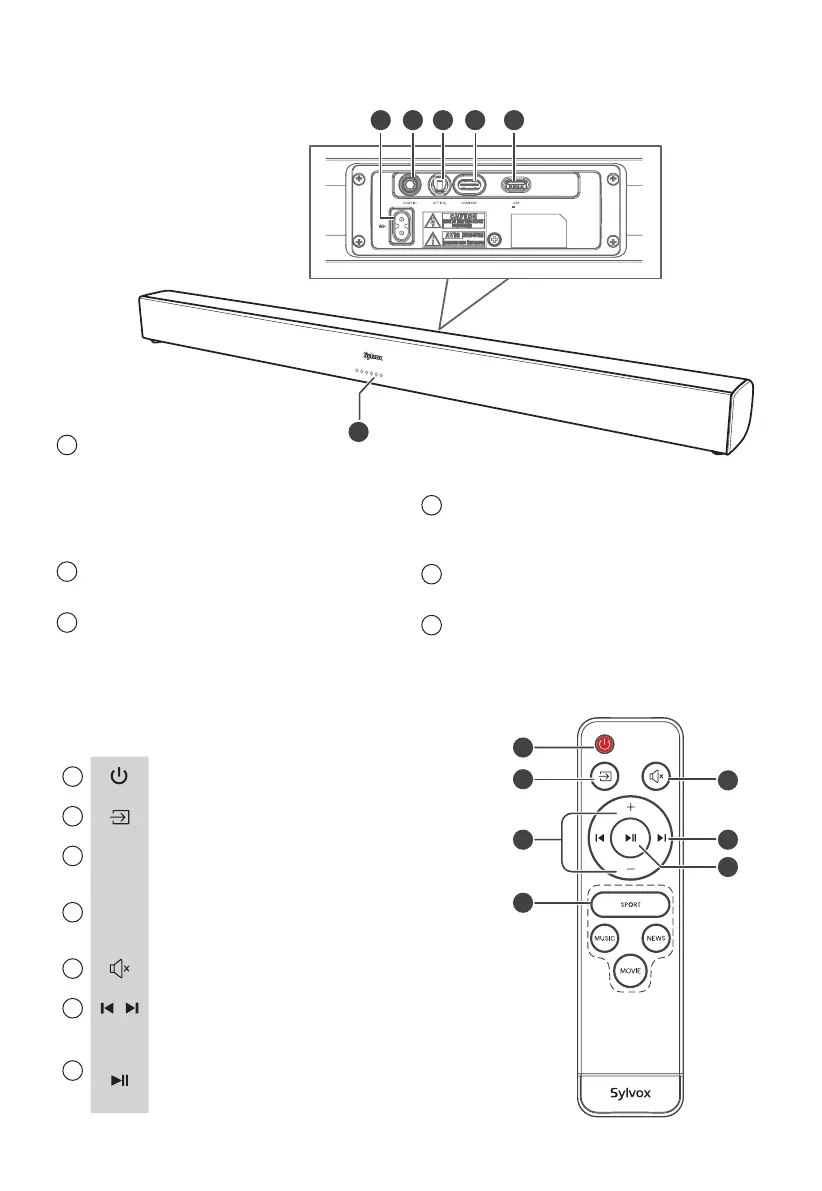
4. Identifying the Parts
4.1 Main Unit
1
LED Indicators
• Red indicator : STANDBY mode
• Yellow indicator : COAXIAL mode
• Blue indicator : Bluetooth mode
• Orange indicator : OPTICAL mode
• White indicator : HDMI ARC mode
• Green indicator : USB mode
2
AC~ Socket
Connect power cord.
3
COAXIAL Socket
Use to connect to the COAXIAL OUT socket
on an external device.
4
OPTICAL Socket
Use to connect to the OPTICAL OUT socket
on an external device.
5
HDMI ARC Socket
Connect to a TV via HDMI cable.
6
USB Socket
Insert the USB device to play music.
4.2 Remote Control
1
Switch the unit between ON and STANDBY mode.
2
Select the play function.
3
+
/
-
Increase/decrease the volume level.
4
SPORT
MUSIC
NEWS
MOVIE
Select Equalizer (EQ) Eect.
5
Mute or resume the sound.
6
/ Skip to previous/next track in Bluetooth/USB mode.
7
Pair
Play/pause/resume playback in Bluetooth/USB mode.
Press and hold to activate the pairing function in
Bluetooth mode or disconnect the existing paired
Bluetooth device.


 To Next Page